

Integrating Documentation Tools
|
April 29, 2026
|

Compare 4 User Manual Writing Software Tools for Your Needs
Key Highlights
- User manual writing software streamlines the documentation process, enhancing clarity and accessibility for customers.
- Digital guides reduce product misunderstandings and returns, and they contribute to environmental sustainability by minimising paper use.
- Effective documentation lightens the load for customer support and boosts user satisfaction, with 73% of customers finding guides more helpful than videos or sales reps.
- Thorough documentation is essential for legal compliance, helping businesses manage risks and avoid liabilities.
- Key features to consider when selecting user manual writing software include ease of use, collaboration capabilities, template availability, multimedia support, version control, export options, and customer support.
- MadCap Flare offers robust features and advanced multimedia support but may have a steep learning curve for new users.
- Adobe RoboHelp is user-friendly and integrates well with other Adobe products but may lack some advanced features.
- Dr.Explain simplifies documentation with a focus on visual guides, suitable for small to medium businesses.
- HelpNDoc is ideal for startups and small teams needing an easy-to-use tool for quick documentation.
Introduction
You might be wondering why clear and effective user manuals are so important these days. Well, as businesses work hard to boost customer satisfaction and cut down on support costs, having a solid user manual is more critical than ever. That’s where user manual writing software comes into play! It’s a handy solution that helps streamline the creation and management of documentation, making it accessible and engaging for everyone.
But with so many options out there, how do you figure out which software is the right fit for your unique needs? Don’t worry! This article is here to help. We’ll dive into a comparative analysis of four leading user manual writing tools, exploring their features and benefits. By the end, you’ll have a clearer idea of which tool suits your requirements best, guiding you toward an informed choice.
Understanding User Manual Writing Software
You might be wondering why is so important for organizations. Well, if you're looking to create, manage, and publish , these tools are a game changer! They really , helping you whip up clear, concise, and accessible guides that make it easier for customers to use your products or services. Think about it: with features like templates, , version control, and multimedia integration, you can enhance the experience for everyone involved.
Now, let’s dive into some real-world benefits. Companies that have jumped on the digital guide bandwagon often see a big drop in misunderstandings and product returns. Why? Because these guides can include handy that provide quick troubleshooting help. Plus, let’s not forget the environmental perks! and save trees by reducing the need for printed materials. By using writing software for your guides, you can ensure your content is not just accurate but also super accessible.
This accessibility is a win-win! It lightens the load for customer support teams, allowing them to tackle more complex questions and ultimately boosting user satisfaction. In fact, did you know that over 73% of customers find product guides more helpful than videos or sales reps when making purchasing decisions? That really highlights how crucial . Organizations that focus on clear documentation often see a boost in customer engagement and loyalty, too. After all, effective guides show that you care about the customer experience and the quality of your products.
And let’s not overlook the legal side of things. , as industry experts point out. It helps businesses manage risks and steer clear of unnecessary liabilities. So, if you’re still on the fence about investing in user manual writing software, consider all these benefits - it’s definitely worth exploring!

Key Evaluation Criteria for User Manual Writing Tools
When you're on the hunt for user manual writing tools, there are a few key things you might want to keep in mind:
- : You’ll want that is easy to navigate. An intuitive interface means you can whip up and tweak your documentation without needing a degree in rocket science.
- If you’re working with a team, look for user manual writing software that offers to allow you to collaborate in real-time. This is a game-changer for larger projects, making .
- means that pre-designed templates can really speed things up. They help keep your guides consistent, so you don’t have to start from scratch every time.
- : Imagine being able to add images, videos, or even interactive elements to your guides. It makes them way more user-friendly and engaging!
- : This is super important. With user manual writing software, you can utilize version control to track changes and revert to earlier versions if needed, which helps keep everything precise.
- : You’ll want the ability to use user manual writing software to export your manuals in different formats like PDF or HTML. This way, sharing and accessing your documentation is a piece of cake.
- : Reliable customer support can be a lifesaver. It helps you tackle any issues and get the most out of your software.
So, what do you think? Are there any features here that stand out to you? Let’s explore how these tools can make your documentation process smoother!

Comparative Analysis of Leading User Manual Writing Tools
You might be wondering which is right for you. Let’s take a look at four leading options that could make your smoother:
- : This one’s a favorite for its robust features. With and a variety of templates, it’s great for collaboration. Just a heads up, though - it can be a bit complex for newcomers, so be prepared for a learning curve.
- Adobe RoboHelp: If you’re looking for something user-friendly, RoboHelp might be your best bet. It integrates seamlessly with other and offers fantastic export options. However, it might not have all the that some of its competitors boast.
- Dr.Explain: Want to simplify your documentation? Dr.Explain shines when it comes to and offers a straightforward user experience. Just keep in mind that it might not be as feature-rich as some other tools out there.
- HelpNDoc: This tool is all about ease of use and quick setup, making it perfect for small teams. While it covers the essentials, larger organizations might find it lacking in advanced functionalities.
So, which one do you think fits your needs? Each tool has its strengths, and exploring user manual writing software could lead you to the perfect solution for your !
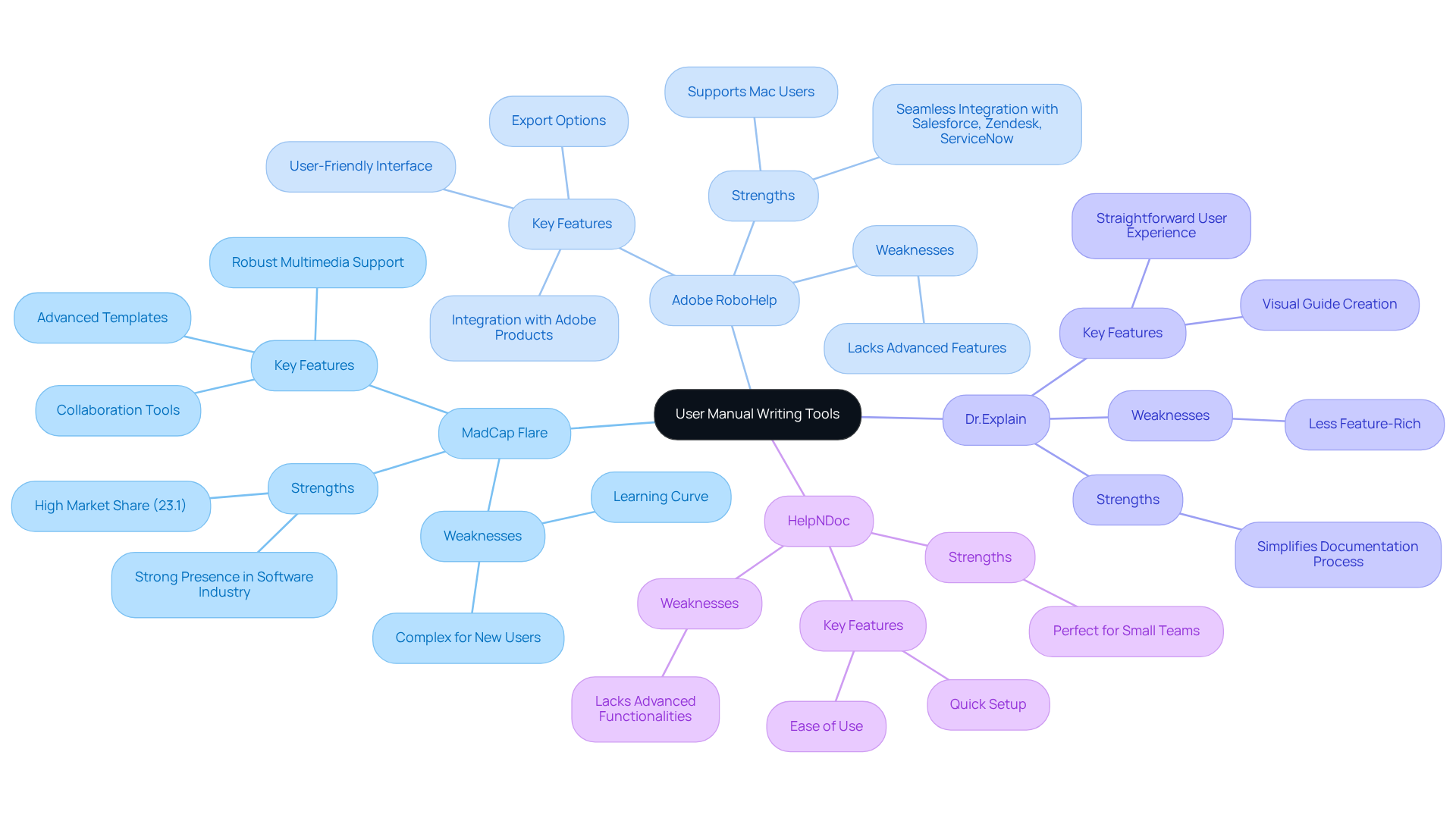
Suitability of Tools for Different User Needs
When you're on the hunt for , it’s super important to think about what your organization really needs. You might be wondering which tool is the best fit for you, right?
- MadCap Flare is a great choice if you’re part of a large team that needs robust reporting features and has the time to invest in training.
- Adobe RoboHelp works wonders for those already using Adobe products. It integrates smoothly and strikes a nice balance between features and usability.
- Dr.Explain is just perfect for small to medium-sized businesses that want a straightforward way to without diving into extensive training.
- HelpNDoc is a fantastic option for startups or small teams looking for a quick and easy way to whip up without the complexity of more advanced tools.
By getting to know the unique strengths of each tool, including [user manual writing software](https://enlyft.com/tech/products/madcap-flare), you can make informed choices that align with your . So, which one do you think fits your needs best?

Conclusion
You might be wondering how user manual writing software can really change the game for your organization. Well, it plays a pivotal role in how you create and manage documentation. By streamlining the process of producing clear and accessible guides, these tools not only enhance customer experience but also boost engagement and loyalty. With features like templates, multimedia support, and collaboration capabilities, they become essential for businesses looking to deliver effective user manuals.
Throughout this article, we’ve highlighted some key advantages of adopting user manual writing software. Think about it: reducing misunderstandings and product returns while ensuring compliance with legal standards is a big deal! Our comparative analysis of four leading tools - MadCap Flare, Adobe RoboHelp, Dr. Explain, and HelpNDoc - showed how each option meets different organizational needs. It’s all about evaluating features like ease of use, collaboration, and version control.
Ultimately, choosing the right user manual writing software isn’t just about functionality; it’s about empowering your team to create high-quality documentation that really resonates with users. As more businesses recognize the value of well-crafted guides, investing in the right tools can significantly enhance customer satisfaction and operational efficiency. So, why not embrace these solutions? It’s a step toward fostering a more informed and engaged user base, making it essential for organizations like yours to explore all the options out there!
Frequently Asked Questions
Why is user manual writing software important for organizations?
User manual writing software is important because it helps organizations create, manage, and publish effective guides and materials, streamlining the documentation process and making it easier for customers to use products or services.
What features do user manual writing software typically offer?
Typical features include templates, collaborative editing, version control, and multimedia integration, which enhance the overall documentation experience.
What are some real-world benefits of using user manual writing software?
Real-world benefits include a reduction in misunderstandings and product returns, as well as the inclusion of instructional videos for quick troubleshooting, which improves customer support and satisfaction.
How does user manual writing software contribute to environmental sustainability?
It contributes to environmental sustainability by reducing the need for printed materials, thereby cutting down on waste and saving trees.
How does effective documentation impact customer support teams?
Effective documentation lightens the load for customer support teams, allowing them to focus on more complex questions and improving user satisfaction.
What do customers prefer when making purchasing decisions?
Over 73% of customers find product guides more helpful than videos or sales representatives when making purchasing decisions, highlighting the importance of well-crafted resources.
How does clear documentation affect customer engagement and loyalty?
Organizations that focus on clear documentation often see increased customer engagement and loyalty, as effective guides demonstrate care for the customer experience and product quality.
Why is thorough documentation important in legal contexts?
Thorough documentation is essential in legal contexts as it helps businesses manage risks and avoid unnecessary liabilities.
👍
What others are liking


5 Steps to outline your ideal documentation structure
5 MINS READ
Where to start the your journey of mapping out your ideal documentation structure, aligning it with the very heartbeat of your organization?
Defining a winning level of detail in your process
3 MINS READ
What is too much detail, and what is too little? This article described in that winning level detail about what detail is enough.


