


Key Highlights:
- ERP systems are integrated software platforms that streamline core business processes across various departments.
- Key components of ERP include integration of data, specialised modules for different business needs, and role-specific user interactions.
- Common documentation challenges in ERP include inconsistent documentation, outdated information, lack of user engagement, and complexity of processes.
- To improve ERP documentation, organisations should adopt standardised templates, version control, review and approval workflows, and user training.
- Technologies such as Document Management Systems (DMS), collaboration tools, automation tools, and analytics can enhance documentation management efficiency.
- Regular maintenance practises include scheduling reviews, assigning document owners, incorporating feedback, and adjusting to business changes.
Introduction
You might be wondering why effective documentation management is such a big deal for organizations using Enterprise Resource Planning (ERP) systems. Well, it’s crucial! Many businesses find themselves tangled in the complexities of documentation, which can really slow things down. But here’s the good news: by adopting some best practices, you can boost efficiency, engage users better, and keep your records accurate and relevant.
Now, let’s talk about the challenges. You know, things like inconsistent formats, outdated info, and not enough user involvement can really throw a wrench in the works. So, how can organizations streamline their documentation processes to get the most out of their ERP systems? This article is here to explore some essential strategies and technologies that can transform your ERP documentation management. Get ready for improved operational performance and happier users!
Understand the Fundamentals of ERP Systems
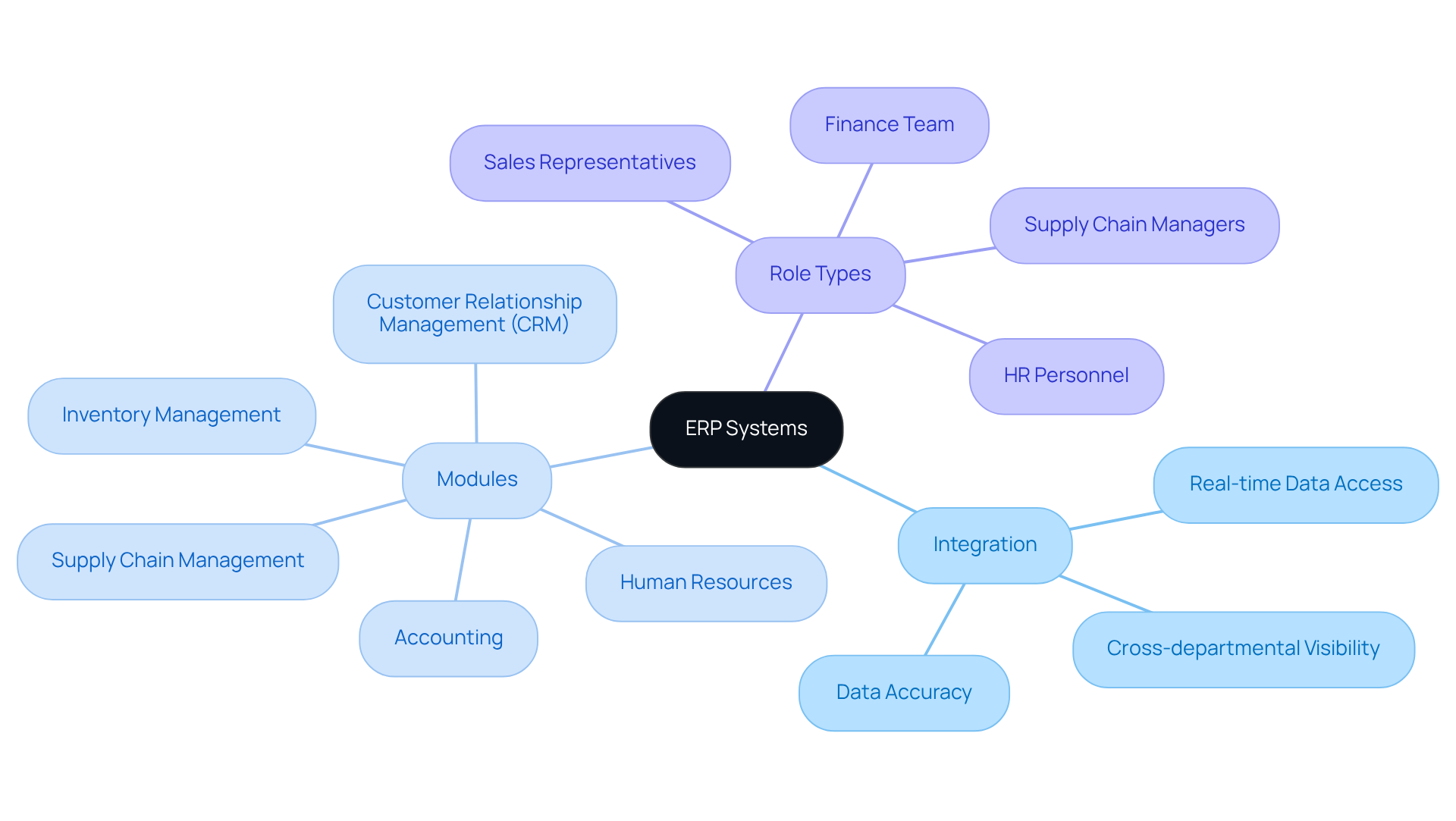
You might be wondering what Enterprise Resource Planning (ERP) systems are all about. Well, they’re integrated software platforms that help manage and streamline core business processes across various departments like finance, human resources, supply chain, and customer relationship management. Understanding the basic components of ERP systems, including their architecture and functionalities, is essential for effective record management and ERP documentation. Let’s break it down a bit:
- Integration: ERP systems pull together data from different business functions, giving you real-time access to information and helping you make better decisions.
- Modules: Most ERP systems come with a bunch of modules designed for specific business needs, such as inventory management, accounting, and project management.
- Role Types: Different folks interact with the ERP system based on their roles, which means they need customized materials that fit their unique workflows.
By getting a grip on these fundamentals, organizations can effectively align their record-keeping practices with the day-to-day realities of their ERP documentation. So, how does your organization handle documentation? It might be time to explore some solutions that fit your needs!
Identify Common Documentation Challenges in ERP
You might be wondering why organizations often struggle with record-keeping in their ERP documentation when managing ERP systems. Well, it turns out these challenges can really throw a wrench in the works, affecting efficiency and user acceptance. Let’s break down some of the key issues, shall we?
-
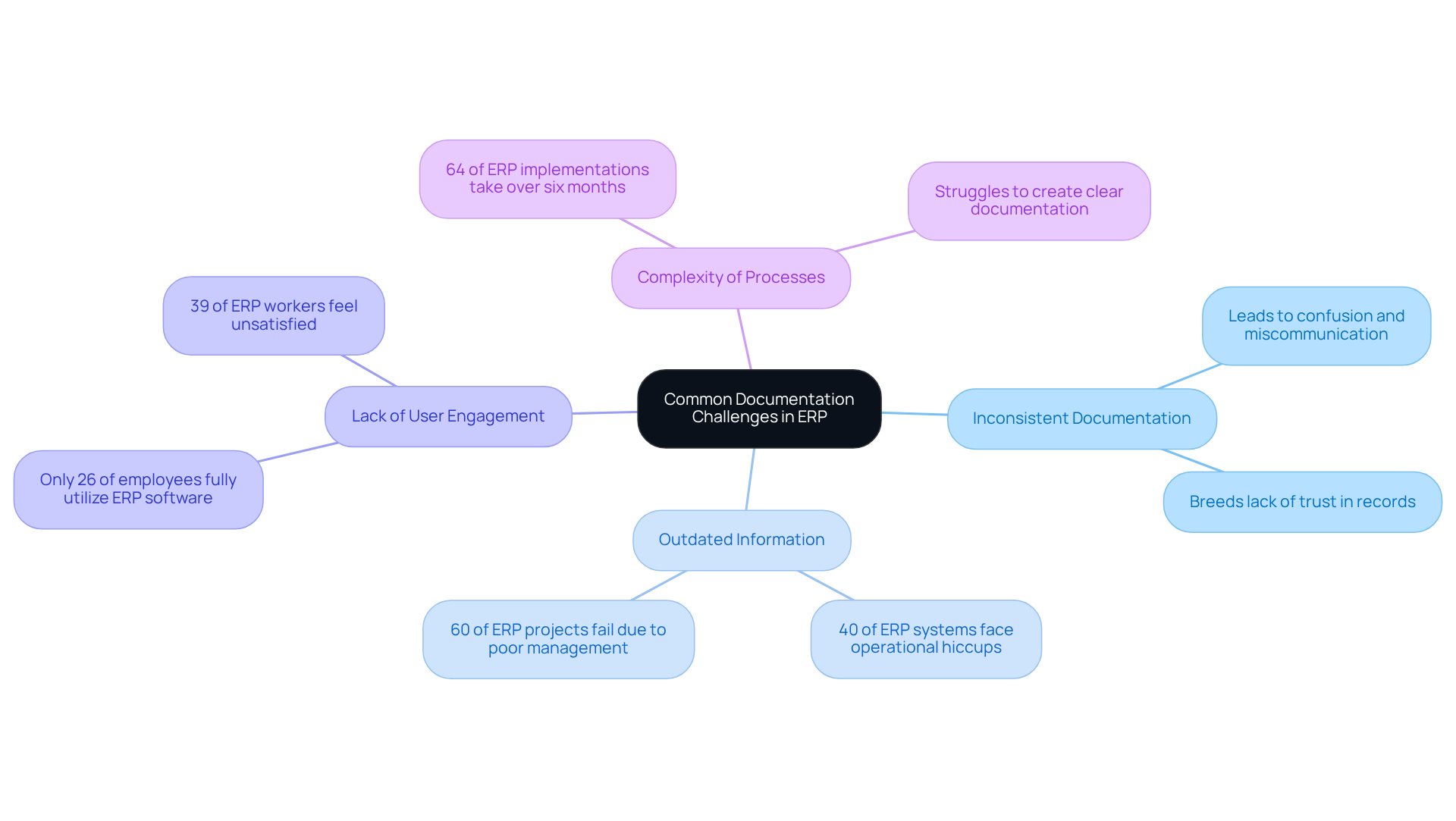
First up, we have inconsistent documentation. When documentation styles and formats vary, it can lead to confusion and miscommunication among users. This inconsistency often breeds a lack of trust in the records, which, let’s be honest, can make people less likely to engage with the ERP documentation. Not ideal, right?
-
Then there’s the problem of outdated information. As ERP systems evolve, records can quickly become stale if they’re not kept up to date. Research shows that a whopping 40% of ERP systems face operational hiccups due to obsolete records. That’s a big deal, especially when you consider that 60% of ERP projects fail because of poor management and implementation issues. Clearly, keeping up with ERP documentation is crucial!
-
Next, let’s talk about lack of user engagement. If the ERP documentation doesn’t take into account the input from end-users, it’s likely to miss the mark. This can lead to underutilization of the ERP system. In fact, studies reveal that only 26% of employees fully use their company’s ERP software, and 39% of ERP workers feel unsatisfied-often due to inadequate training and management. It’s clear we need ERP documentation that resonates with people and addresses their concerns.
-
Lastly, we can’t ignore the complexity of processes. The intricate nature of ERP processes can make it tough to create clear and concise ERP documentation. Many organizations struggle to streamline these workflows, which can create hurdles for users trying to understand and follow the necessary steps. Did you know that 64% of ERP implementations take over six months? That’s a lot of time and effort spent managing these complexities!
By recognizing these challenges, organizations can start to adopt targeted strategies to improve their ERP documentation practices. This, in turn, can lead to better ERP utilization and enhanced operational efficiency. So, what do you think? Ready to tackle these issues head-on?
Establish Structured Documentation Processes
Creating effective documentation for ERP systems can feel like a daunting task, but it doesn’t have to be! You might be wondering how to get started. Well, let’s break it down into some structured processes that can really make a difference:
-
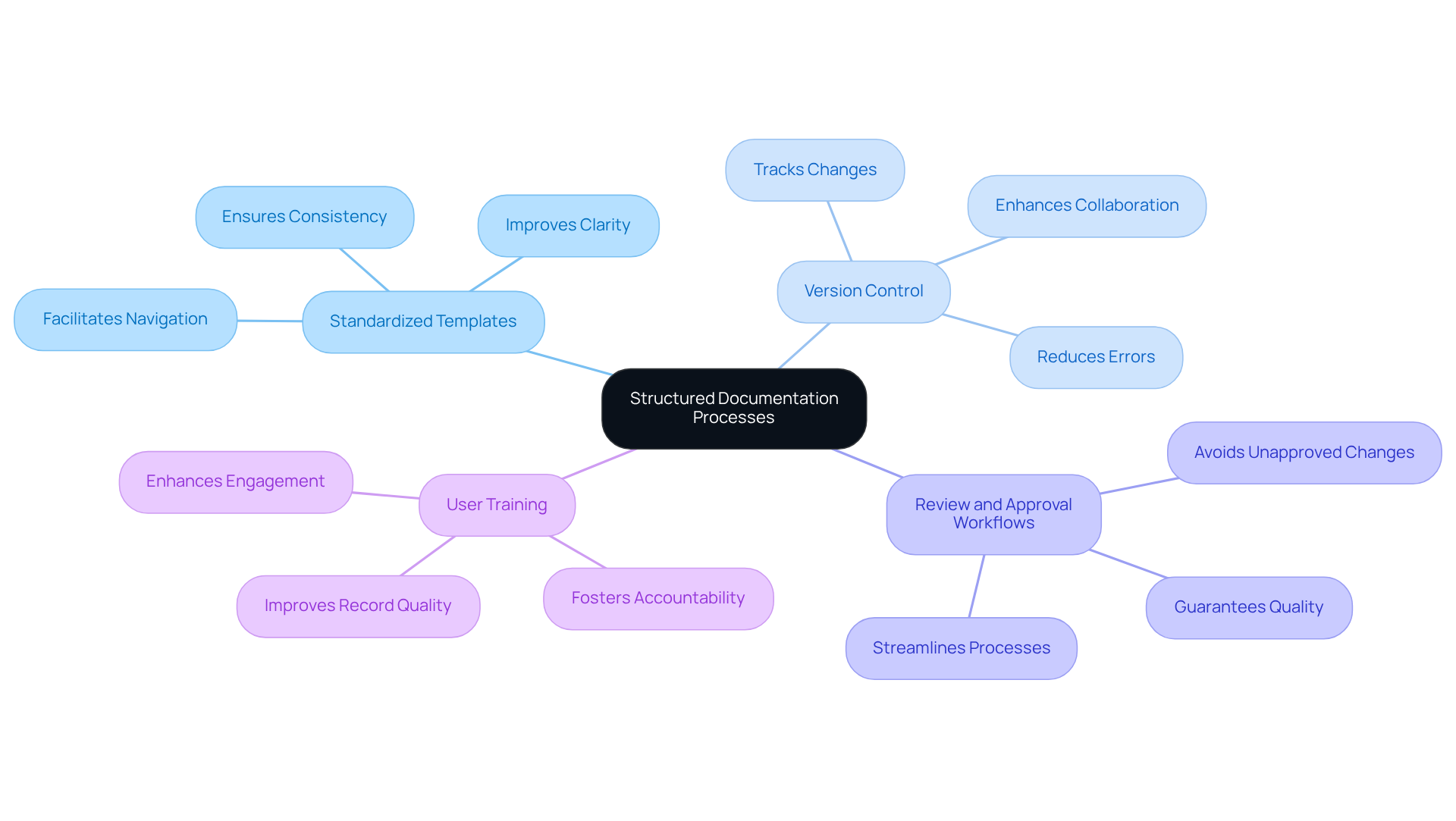
Standardized Templates: Have you ever struggled with inconsistent formats? Developing templates for different types of documentation, like user manuals and process guides, is key. It not only ensures consistency in style but also makes things clearer and easier to navigate. With SowFlow, you can whip up guides effortlessly, tailoring those templates to fit your specific needs.
-
Version Control: Now, let’s talk about version control. It’s super important to have a solid system in place for tracking changes and updates. This way, everyone can access the latest info, which helps cut down on errors from outdated documents. Did you know that 83% of employees face challenges with version control when multiple people are working on the same document? That’s a big deal! SowFlow’s instant record-keeping solution makes updates a breeze, keeping everything relevant in our fast-paced business world.
-
Review and Approval Workflows: You might be thinking, "How do I ensure quality and accuracy?" Establishing clear workflows for reviewing and approving materials is essential. This structured approach helps avoid the mess of unapproved changes and guarantees that all documentation meets the necessary standards before it goes out. In fact, 66% of companies struggle with document approvals and reviews, which shows just how vital organized systems are. With SowFlow, you get tools that streamline the review process, boosting team efficiency.
-
User Training: Finally, let’s not forget about user training. Providing thorough training on how to create and maintain records fosters a culture of accountability and engagement. When employees have the right skills, the overall quality of records improves, making them more useful. SowFlow supports this by offering resources that help teams use records effectively.
By following these organized procedures and leveraging SowFlow’s features, you can significantly enhance the quality and usability of your ERP documentation records. This not only leads to better operational efficiency but can also help cut costs. So, why not give it a try?
Leverage Technology for Efficient Documentation Management
You might be wondering how organizations can really amp up their management of ERP documentation. Well, let’s dive into some tech-savvy ways that can make a big difference!
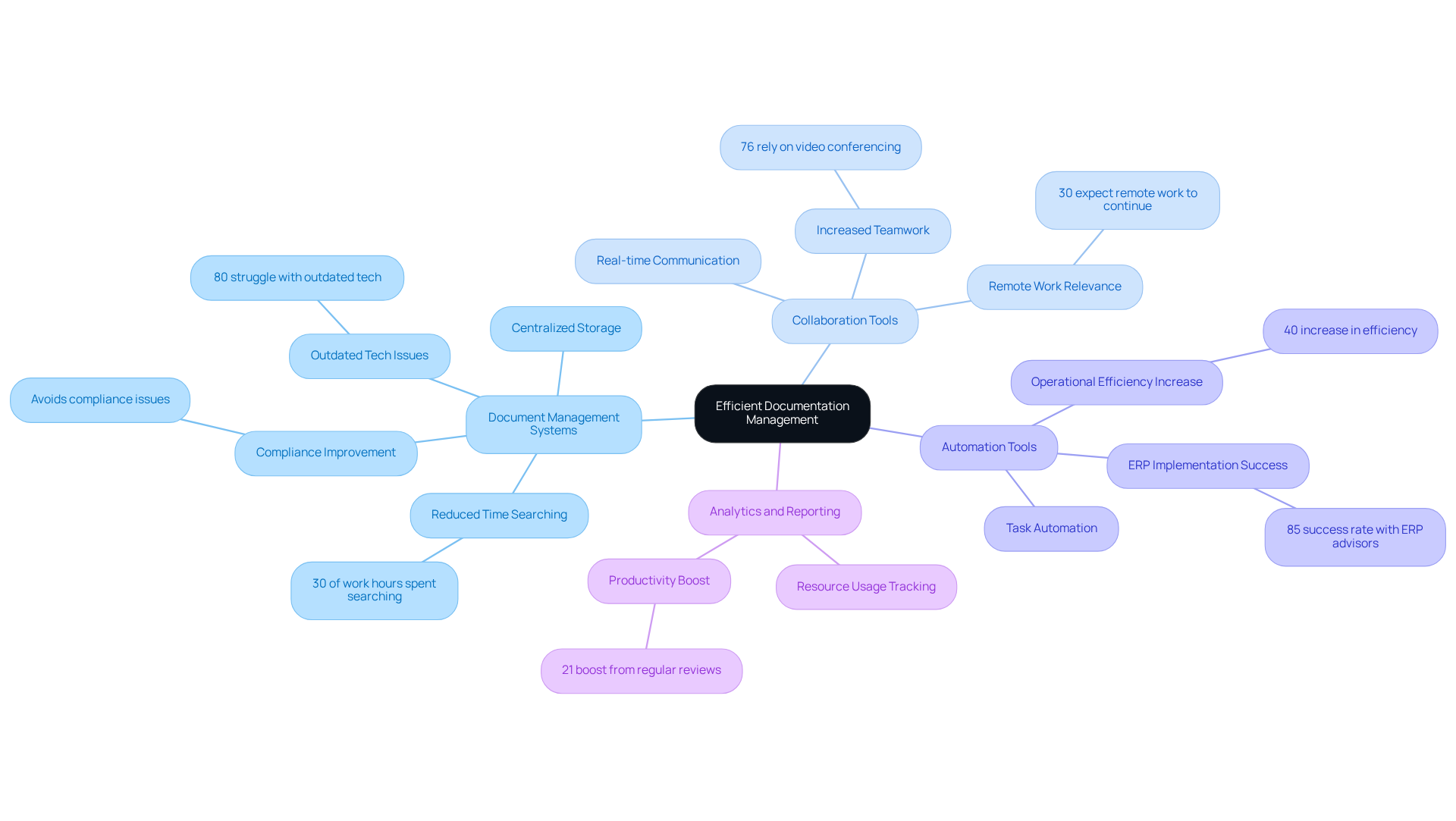
First up, Document Management Systems (DMS). Imagine having all your documentation neatly organized in one place. A DMS does just that! It centralizes storage, making it super easy to access and manage files. This not only cuts down the time employees spend hunting for documents-about 30% of their work hours-but also helps avoid the headaches that come with lost or outdated info, which can lead to compliance issues. Did you know that 80% of organizations struggle because of outdated digital tech? That’s why modern DMS solutions are a must-have.
Now, let’s talk about Collaboration Tools. Platforms like Microsoft Teams and Slack are game-changers for real-time communication and feedback on documents. With 76% of the global workforce relying on video conferencing and collaboration tools, these platforms really boost teamwork. Plus, with 30% of employees expecting remote work to stick around, these tools are more relevant than ever!
Next, we have Automation Tools. These nifty tools take care of repetitive tasks like formatting and distribution, freeing up time for more strategic work. And here’s a fun fact: organizations that automate their document processes see a whopping 40% increase in operational efficiency! Firms that use ERP advisors report an 85% success rate in implementations, highlighting how expert guidance can make a real difference.
Don’t forget about Analytics and Reporting! Using analytics tools to track resource usage can help pinpoint areas for improvement. Organizations that regularly review their record-keeping often find ways to enhance collaboration and cut down on the time spent retrieving documents, leading to a 21% boost in productivity.
By embracing these technologies, organizations can create a more efficient and responsive record management process. This not only improves operational performance but can also lower costs. Just keep in mind that underestimating project staffing can be a pitfall that hinders successful tech implementation. So, what do you think? Ready to explore these solutions for your own documentation challenges?
Maintain and Update Documentation Regularly
To keep your documentation for ERP accurate and useful, you might be wondering what best practices to adopt. Here are some friendly tips:
-
Schedule Regular Reviews: How often do you check your documentation? Establishing a routine for reviewing your records-ideally every few months-can help you spot outdated info and necessary updates. This proactive approach is key in today’s fast-paced business world. With SowFlow, updating and revising your records is a breeze, ensuring they stay current and relevant.
-
Assign Document Owners: Ever thought about who’s in charge of your documentation? Designating individuals responsible for specific areas-like process owners or team leads-can make a big difference. For instance, a project manager might oversee project-related records, while an HR manager could handle onboarding materials. This accountability ensures that records are consistently maintained and updated, boosting quality and reliability. Plus, SowFlow makes it easy for content owners to collaborate, enhancing the overall quality of your materials.
-
Incorporate Feedback from Participants: Have you asked your team for input lately? Actively seeking feedback can help you identify gaps or inaccuracies in your materials. Regular feedback meetings can foster ongoing improvement, ensuring your records meet the needs of those using them. With SowFlow, gathering and applying feedback is simple, making record-keeping less of a chore.
-
Adjust to Modifications: Are you keeping up with changes in your business? Being proactive about refreshing records in response to shifts in activities, software updates, or regulations is crucial. For example, if a new software feature rolls out, you’ll want to update the relevant manuals quickly. With SowFlow, you can streamline your record-keeping processes, enabling instant updates and ensuring everything aligns with current practices.
By embracing these practices and leveraging SowFlow’s capabilities, you can significantly boost the reliability and effectiveness of your ERP documentation. This, in turn, leads to better operational efficiency and user satisfaction. As industry experts often say, regular reviews and designated ownership are essential for maintaining high-quality documentation that supports your organizational goals. So, what are you waiting for? Let’s dive into improving your documentation today!

Conclusion
You might be wondering why effective management of ERP documentation is such a big deal for organizations looking to optimize their business processes and boost operational efficiency. Well, it’s all about understanding the basics of ERP systems and tackling the common challenges that come with documentation. By implementing some best practices, organizations can really streamline their record-keeping efforts. It’s clear that having structured documentation processes, leveraging technology, and keeping everything updated is key to ensuring that documentation stays accurate and relevant.
So, what are some key strategies?
- Establishing standardized templates and version control can really promote consistency and make things more accessible.
- Integrating user feedback and assigning document owners creates a culture of accountability that can significantly improve record quality.
- Tools like Document Management Systems and automation can take documentation management to the next level, leading to increased productivity and lower operational costs.
Ultimately, organizations should take proactive steps to refine their ERP documentation practices. By prioritizing these best practices and tapping into available tech solutions, businesses can not only tackle documentation challenges but also empower their teams to work more effectively. The importance of thorough and well-maintained documentation is huge; it’s the backbone of successful ERP implementation and utilization, driving overall business success. So, why not start exploring these solutions today?
Frequently Asked Questions
What are ERP systems?
Enterprise Resource Planning (ERP) systems are integrated software platforms that help manage and streamline core business processes across various departments such as finance, human resources, supply chain, and customer relationship management.
What are the main components of ERP systems?
The main components of ERP systems include integration of data from different business functions, various modules designed for specific business needs (like inventory management, accounting, and project management), and role types that customize user interaction based on their unique workflows.
Why do organizations struggle with ERP documentation?
Organizations struggle with ERP documentation due to several challenges, including inconsistent documentation styles, outdated information, lack of user engagement, and the complexity of processes.
What issues arise from inconsistent documentation in ERP systems?
Inconsistent documentation can lead to confusion and miscommunication among users, resulting in a lack of trust in the records and decreased engagement with the ERP documentation.
How does outdated information affect ERP systems?
Outdated information can cause operational issues, with research indicating that 40% of ERP systems face problems due to obsolete records. This is significant since poor management and implementation issues contribute to 60% of ERP project failures.
What impact does lack of user engagement have on ERP systems?
A lack of user engagement can lead to underutilization of the ERP system, as only 26% of employees fully use their company's ERP software. Many users feel dissatisfied, often due to inadequate training and management.
Why is the complexity of processes a challenge for ERP documentation?
The intricate nature of ERP processes makes it difficult to create clear and concise documentation, leading to hurdles for users trying to understand and follow necessary steps. In fact, 64% of ERP implementations take over six months to complete.
How can organizations improve their ERP documentation practices?
By recognizing the common challenges in ERP documentation, organizations can adopt targeted strategies to improve practices, which can lead to better ERP utilization and enhanced operational efficiency.
👍
What others are liking


5 Steps to outline your ideal documentation structure
5 MINS READ
Where to start the your journey of mapping out your ideal documentation structure, aligning it with the very heartbeat of your organization?
Defining a winning level of detail in your process
3 MINS READ
What is too much detail, and what is too little? This article described in that winning level detail about what detail is enough.


