


Key Highlights
- SowFlow is an intuitive platform for creating SOP headers quickly, enhancing documentation efficiency.
- Process Street automates workflow management for SOPs, improving compliance and operational efficiency.
- Trello uses a visual board system to organise and track SOP development, fostering team collaboration.
- Asana allows teams to break down SOPs into tasks, enhancing accountability and tracking progress.
- Notion provides a comprehensive workspace for creating, managing, and collaborating on SOP documentation.
- Microsoft Word remains relevant for structured document creation, offering extensive formatting capabilities for SOPs.
- Google Docs enables real-time collaboration for SOP writing, improving input from multiple stakeholders.
- Lucidchart enhances SOP clarity through visual flowcharts, aiding comprehension of complex procedures.
- Smartsheet combines spreadsheet functionality with project management features for effective SOP tracking.
- Monday.com offers customizable workflows for SOP management, streamlining processes and improving visibility.
Introduction
You might be wondering why streamlining operations management is such a big deal for businesses today. Well, it’s all about boosting efficiency and cutting down on those pesky errors. One way to tackle this is by using the right Standard Operating Procedure (SOP) headers. They can really help bring clarity and structure to those complex processes we often face. But with so many options out there, how do you figure out which SOP headers are essential for your unique needs?
In this article, we’ll explore ten vital SOP headers that not only make documentation easier but also help create a culture of collaboration and continuous improvement. So, let’s dive in and see how these headers can transform your operations!
SowFlow: Instant SOP Creation for Streamlined Operations
You might be wondering how to . Well, let me introduce you to SowFlow! It’s an intuitive platform that lets you whip up in no time. With its nifty , you can document workflows right from your browser. How cool is that? Not only does this save you precious time, but it also keeps your records fresh and up-to-date, which is super important in today’s fast-paced business world.
Now, imagine turning those complex workflows into simple, step-by-step guides. That’s exactly what SowFlow does! It boosts your productivity and helps that often comes with managing records. Plus, it gives your team instant access to all their documentation. This makes the use of SOP headers for standardizing procedures, onboarding new folks, and sharing knowledge a breeze. So, if you’re looking to , SowFlow might just be the solution you need. Why not give it a try?

Process Street: Workflow Management for SOPs
You might be wondering how to make your workflow smoother and more efficient. Well, let me introduce you to Process Street! This powerful workflow management platform is a game-changer for within . It lets teams whip up checklists and automate those pesky routine tasks, ensuring that every step in a procedure is done reliably and accurately.
Now, think about it: with features like conditional logic and due dates, compliance becomes a breeze. Organizations can stick to regulatory standards while boosting their . Plus, when you incorporate into your daily routines, it not only aligns your team's efforts but also ensures that tasks are executed flawlessly. The result? and fewer mistakes.
As we look ahead to 2025, automation is becoming a must-have for organizations wanting to stay competitive. Tools like Process Street are essential for maintaining that edge and achieving . Did you know that 60% of organizations see a return on investment within just 12 months of implementing ? And over 80% of managers are ramping up their automation efforts! According to Stefanie Jansen, "Seventy-five percent of companies report that using gives them a strong competitive advantage."
But hold on - there's a catch! A whopping 90% of automation projects fail due to technical hiccups, which highlights the importance of careful implementation. Case studies show that , proving just how effective this platform can be in boosting . So, are you ready to explore how Process Street can transform your workflows?

Trello: Visual SOP Management with Boards
You might be wondering how to keep your projects organized and your team on the same page. Well, Trello is here to help! It’s a visual project management tool that uses boards, lists, and cards to make . When it comes to managing , groups can set up . Each card can represent a specific SOP, allowing team members to add comments, checklists, and attachments within the right where they need them.
This visual format not only makes things clearer but also encourages collaboration. Everyone can easily see the status of each SOP header and contribute as needed. Speaking of contributions, if you incorporate , you can share your documented workflows in just seconds! This means that the correct are always at your fingertips, making it super easy to standardize procedures.
And let’s be honest, who doesn’t want to ? By , you’re ultimately . So, why not give it a try? You might just find that managing your SOP headers becomes a lot more enjoyable!

Asana: Task Management for SOP Implementation
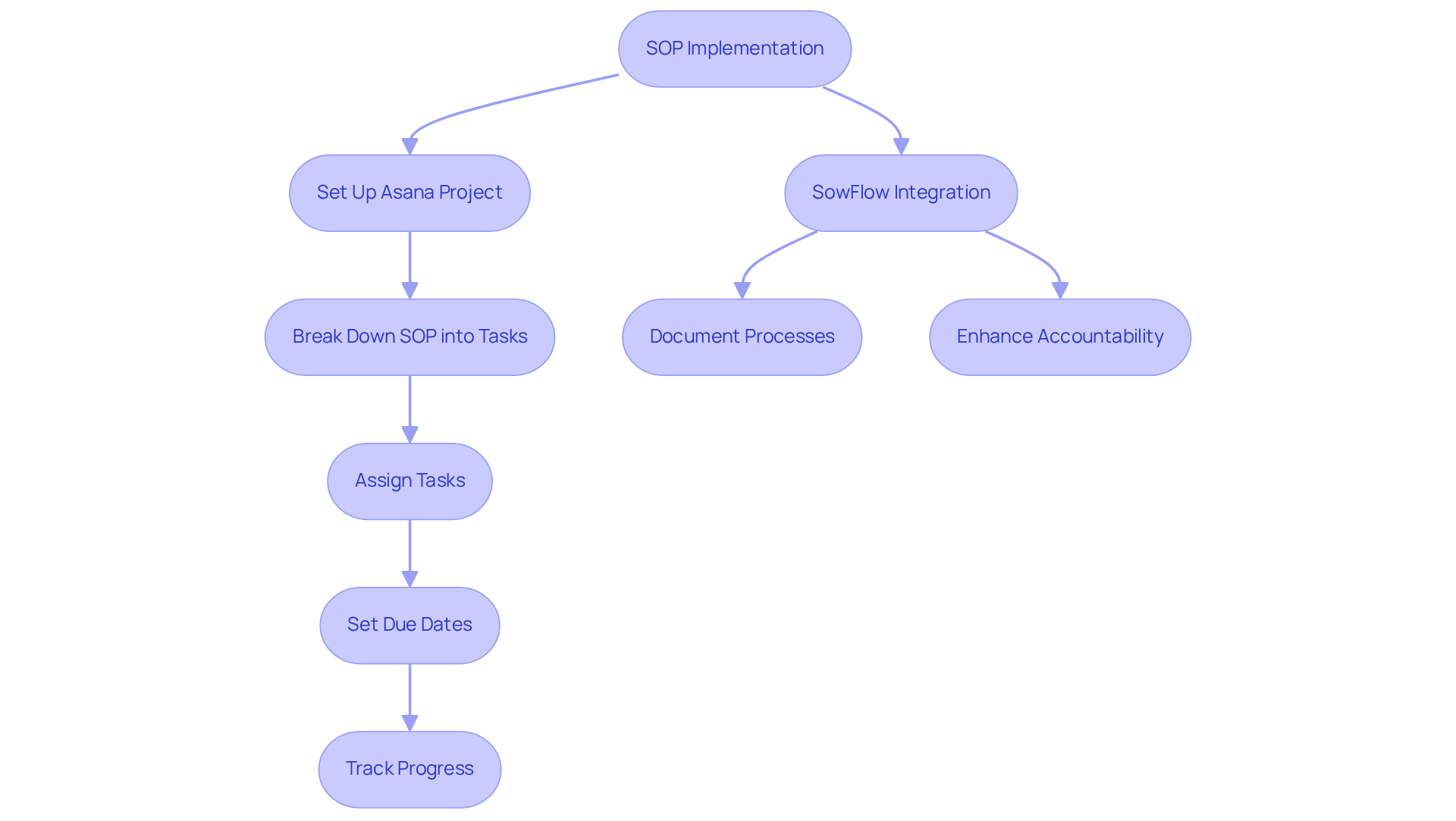
You might be wondering how to keep your team on track with all those SOPs. Well, Asana is here to help! It’s a powerful that makes it easy for groups to organize and related to execution. By setting up , teams can break down procedures into bite-sized tasks and subtasks. With features like task assignments, due dates, and progress tracking, everyone knows what they need to do and when they need to do it.
Now, let’s dive into how fits into this picture. Imagine being able to with just a few clicks! This handy integration ensures that all your documented workflows are right there in your group’s workspace. It’s all about and making the smoother across the organization. So, why not give it a try and see how it can transform your team's workflow?
Notion: All-in-One Workspace for SOP Documentation
You might be wondering how to streamline your team's documentation process. Well, let me introduce you to ! It’s a comprehensive workspace that makes it super easy for groups to create, manage, and document for . With its user-friendly interface, you can whip up in no time, keeping your materials relevant in today’s fast-paced business world.
Speaking of ease, offers an immediate that simplifies everything from process standardization to onboarding and . This means your team can work more efficiently together! Plus, the platform’s collaborative features allow for real-time editing and feedback, so you can rest assured that your records are always up-to-date and accessible.
Now, let’s dive into how makes updating and revising a breeze. With just a single command, you can avoid those endless meetings where everyone’s trying to find solutions. This not only but also . It’s all about teamwork, right? As Patrick Lencioni wisely said, 'Not finance. Not strategy. Not technology. It is .' So, why not embrace a tool that prioritizes that very essence?

Microsoft Word: Traditional Document Creation for SOPs
You might be wondering why Microsoft Word is still such a big deal for creating formal documents, including those that require for . Well, it’s all about those extensive formatting capabilities! With Word, you can whip up that include:
- Headings
- Bullet points
- Tables
Essential tools for keeping things clear and organized. Plus, organizations can easily create , which helps maintain uniformity across all records. That’s super important for .
Now, sure, Word might not have all the collaborative bells and whistles that some newer tools offer, but it’s still a solid choice for teams that prefer a more traditional writing approach. The ability to share documents effortlessly and track changes makes it a great fit for creating , helping teams maintain a clear and structured workflow. As more organizations recognize the value of organized records, Word’s role in crafting effective is still going strong, especially as we look ahead to 2025. There’s a trend brewing that suggests a comeback for traditional document creation tools!
Speaking of keeping things organized, have you heard about ? It’s a game-changer for record-keeping! With SowFlow, creating and updating [SOP headers](https://sowflow.io) becomes a breeze, ensuring your materials stay relevant in today’s fast-paced business world. Imagine being able to summon all that documentation wisdom with just one command-no more unnecessary meetings, just .
To really amp up the effectiveness of your SOPs, consider adding some visual aids, like flowcharts. And don’t forget to revisit those documents regularly to make sure they’re compliant and still relevant. It’s all about making your documentation work for you!

Google Docs: Collaborative SOP Writing in Real-Time
You might be wondering how Google Docs can help with your . Well, it’s a fantastic platform for collaboration! Imagine multiple users editing documents at the same time - pretty neat, right? This is a game-changer for teams looking to gather input from different stakeholders during the creation process of .
Speaking of collaboration, the is super handy. It lets you keep track of changes and even roll back to earlier versions if needed, so your records stay accurate and up-to-date. Plus, since it’s cloud-based, you and your team can work on SOPs from anywhere. No more being tied to a desk! This means you can make seamless updates and ensure that .
As more organizations jump on the , the trend of is only going to grow. Did you know that 78% of enterprise executives are highlighting the importance of for their 2025 initiatives? This shift not only boosts productivity but also nurtures a collaborative culture. So, tools like Google Docs are becoming essential for the development of . Why not give it a try and see how it can work for you?

Lucidchart: Visual SOP Flowcharts for Clarity
You might be wondering how to make creating a breeze for your team. Well, SowFlow has got you covered! It offers a super simple creation experience that lets groups whip up with ease, making the writing process smoother alongside handy tools like Lucidchart. By visually outlining workflows, organizations can really boost comprehension and communication among team members. ? They’re a game changer! They simplify complex procedures, helping employees follow steps with greater accuracy and confidence. Did you know that instead of just written instructions? That’s the power of visual aids in action!
Now, let’s talk about how SowFlow keeps things fresh. Its solution allows for immediate updates to resources, so your stay relevant in today’s fast-paced business world. With unique features that make a breeze, SowFlow stands out from the crowd. Plus, Lucidchart’s collaborative features let teams work together effortlessly on diagrams, ensuring everyone’s on the same page when it comes to workflows and responsibilities. This collaborative approach not only promotes clarity but also boosts involvement, as team members can share their insights and expertise to enhance the materials.
As more organizations jump on the bandwagon, the trend of using as is only getting stronger. In fact, ! And here’s a fun fact: . This shift reflects a broader movement towards efficiency and clarity in operations management. So, it’s clear that visual representations are becoming a vital part of . Why not explore how you can leverage these tools for your own team?

Smartsheet: Spreadsheet-Based SOP Tracking and Management
You might be wondering how Smartsheet can make your life easier when it comes to managing . Well, let me tell you, it’s a game changer! Smartsheet combines the straightforwardness of spreadsheets with some pretty advanced project management features. With it, you can create detailed sheets that not only track the status of each SOP header but also assign responsibilities and set deadlines.
Now, let’s dive into one of the coolest parts: automation. This feature is a lifesaver! It sends out timely reminders and notifications, making sure that your SOPs are always up-to-date and reviewed regularly. This structured approach doesn’t just help you stay compliant; it can also supercharge your . Imagine by up to 95%! That’s right-companies using automation in their can save as much as 77% of their time on routine activities.
As we look ahead to 2025, the trend toward is only going to grow. More and more organizations are jumping on board with and boost productivity. So, if you’re feeling overwhelmed with , why not explore how Smartsheet can help you out?

Monday.com: Customizable SOP Workflows for Teams
You might be wondering how to make your team's , right? Well, Monday.com is here to help! It’s a customizable work operating system that lets teams create workflows tailored just for their needs. You can set up boards that reflect your specific processes, assign tasks, and keep an eye on progress in real-time.
Speaking of visibility, the platform’s visual interface makes it super easy to see the status of each SOP header. It even helps you spot any bottlenecks in your workflow. And with , sharing workflows becomes a breeze! You’ll have the right documents at your fingertips, which really boosts the .
Imagine being able to respond quickly and effectively to changes - streamlining , onboarding, and all at once! Plus, Monday.com’s automation features take care of approvals and updates, so your remain relevant and effective. Now, doesn’t that sound like a game changer?

Conclusion
You might be wondering how to streamline your operations management, right? Well, effective SOP headers are key to boosting productivity and keeping things consistent in your organization. This article shines a light on some handy tools that make creating, managing, and implementing Standard Operating Procedures a breeze. By using platforms like SowFlow, Process Street, Trello, and others, teams can turn complex workflows into simple, manageable tasks. This shift can really ramp up your operational efficiency.
Let’s talk about some key insights! Automation can be a game-changer for compliance, and visual management tools can really enhance collaboration. Each platform has its own unique features - think real-time editing in Google Docs, customizable workflows in Monday.com, and the user-friendly interface of SowFlow. These tools not only help streamline your documentation processes but also encourage a culture of teamwork and continuous improvement.
As industries change, adopting efficient SOP management practices is more important than ever. Embracing these modern tools will not only get your organization ready for the future but also empower your teams to work better together. The move towards automation and visual aids in documentation isn’t just a passing trend; it’s a crucial step toward achieving operational excellence. So, why not explore these solutions today? Take that first step toward transforming your operations management strategy!
Frequently Asked Questions
What is SowFlow and how does it help with SOP creation?
SowFlow is an intuitive platform that allows users to create Standard Operating Procedure (SOP) headers quickly. It features a Chrome extension that enables documentation of workflows directly from the browser, saving time and keeping records up-to-date.
How does SowFlow improve team productivity?
SowFlow transforms complex workflows into simple, step-by-step guides, providing teams with instant access to documentation. This streamlines processes, aids in onboarding, and facilitates knowledge sharing, ultimately enhancing efficiency.
What is Process Street and what benefits does it offer for SOP management?
Process Street is a powerful workflow management platform designed for creating and managing SOP headers. It allows teams to create checklists, automate routine tasks, and ensure compliance with regulatory standards, leading to streamlined operations and fewer mistakes.
How does automation play a role in organizations using Process Street?
Automation is essential for organizations aiming to stay competitive. Process Street helps maintain operational excellence, with many organizations reporting a return on investment within 12 months of implementing workflow automation.
What challenges do organizations face when implementing automation?
A significant 90% of automation projects fail due to technical issues, highlighting the need for careful implementation to ensure success.
How does Trello assist in managing SOPs?
Trello is a visual project management tool that organizes tasks using boards, lists, and cards. It allows teams to create dedicated boards for tracking the development and approval of SOP headers, facilitating collaboration and clarity.
Can Trello be integrated with SowFlow?
Yes, Trello can be integrated with SowFlow, allowing users to share documented workflows quickly. This integration helps ensure that the correct SOP headers are easily accessible, improving the standardization of procedures.
What overall benefits do these tools provide for teams?
SowFlow, Process Street, and Trello collectively enhance team efficiency by streamlining documentation, improving onboarding processes, and facilitating better information exchange.
List of Sources
- SowFlow: Instant SOP Creation for Streamlined Operations
- Understanding SOP Meaning in Research: Importance and Components (https://sowflow.io/blog-post/understanding-sop-meaning-in-research-importance-and-components)
- 25+ Powerful AI quotes from Leaders of Top Companies about the Future of AI and Automation - Digityze Solutions (https://digityzesolutions.com/blog/ai-quotes)
- 9 Benefits of SOP in Manufacturing for Operational Excellence (https://sowflow.io/blog-post/9-benefits-of-sop-in-manufacturing-for-operational-excellence)
- SOP vs Work Instructions: Key Differences and Applications (https://sowflow.io/blog-post/sop-vs-work-instructions-key-differences-and-applications)
- 24 Inspiring Digital Transformation Quotes | Vista Projects (https://vistaprojects.com/digital-transformation-quotes)
- Process Street: Workflow Management for SOPs
- Workflow Automation Statistics You Need to Know (https://formstack.com/blog/workflow-automation-statistics)
- 50+ Workflow Automation Stats & Trends You Can’t Ignore in 2026 (https://kissflow.com/workflow/workflow-automation-statistics-trends)
- 65+ Workflow Automation Statistics and Forecast in 2025 (https://quixy.com/blog/workflow-automation-statistics-and-forecasts)
- 26 Quotes About Improving Processes That Will Inspire Change (https://niagarainstitute.com/blog/quotes-improving-processes)
- Trello: Visual SOP Management with Boards
- sowflow.io (https://sowflow.io/blog-post/lets-compare-the-best-software-for-standard-operating-procedures-features-pros-and-cons)
- 110+ project management statistics and trends for 2026 (https://monday.com/blog/project-management/project-management-statistics)
- How does Trello's SOP tool compare to other workflow management t (https://youexec.com/questions/how-does-trello-s-sop-tool-compare-to-other-workflow-ma)
- Cross-Team Collaboration: 9 Top Strategies for Success (https://helpjuice.com/blog/cross-team-collaboration)
- thedigitalprojectmanager.com (https://thedigitalprojectmanager.com/project-management/project-management-quotes-inspiration)
- Asana: Task Management for SOP Implementation
- sowflow.io (https://sowflow.io/blog-post/lets-compare-the-best-software-for-standard-operating-procedures-features-pros-and-cons)
- Powerful Accountability Quotes for Personal and Professional Growth (https://effy.ai/blog/accountability-quotes)
- deliberatedirections.com (https://deliberatedirections.com/70-quotes-about-accountability-in-the-workplace)
- 110+ project management statistics and trends for 2026 (https://monday.com/blog/project-management/project-management-statistics)
- Top 50 Project Management Statistics for 2025 Success (https://ravetree.com/blog/top-50-project-management-statistics-for-2025)
- Notion: All-in-One Workspace for SOP Documentation
- 200 Quotes That Fuel Team Culture and Leadership (https://deliberatedirections.com/team-culture-building-quotes-leadership)
- 11 Documentation Statistics to Make You Rethink Process in 2025 - Whale (https://usewhale.io/blog/documentation-statistics)
- effy.ai (https://effy.ai/blog/team-work-quotes)
- 100+ Employee teamwork quotes that motivate, unite, and inspire success (https://culturemonkey.io/employee-engagement/employee-teamwork-quotes)
- asana.com (https://asana.com/resources/team-motivational-quotes)
- Microsoft Word: Traditional Document Creation for SOPs
- 50 Key Statistics and Trends in Intelligent Document Processing (IDP) for 2025 (https://docsumo.com/blogs/intelligent-document-processing/intelligent-document-processing-market-report-2025)
- Case Study - Thermax | Trusted Partner in Energy Transition (https://thermaxglobal.com/case_studies)
- atlassian.com (https://atlassian.com/blog/loom/how-to-write-an-sop)
- Google Docs: Collaborative SOP Writing in Real-Time
- 50 Key Statistics and Trends in Intelligent Document Processing (IDP) for 2025 (https://docsumo.com/blogs/intelligent-document-processing/intelligent-document-processing-market-report-2025)
- forbes.com (https://forbes.com/sites/joemckendrick/2013/03/24/10-quotes-on-cloud-computing-that-really-say-it-all)
- 11 Documentation Statistics to Make You Rethink Process in 2025 - Whale (https://usewhale.io/blog/documentation-statistics)
- 75 Document Processing Statistics for 2025: Market Size, Trends & Automation ROI (https://sensetask.com/blog/document-processing-statistics-2025)
- Cloud Computing Quotes That Inspire You to Go CLOUD - IT Support Singapore | IT NEWS Singapore - IT Support (https://itsupportsingapore.sg/cloud-computing-quotes-that-inspire-you-to-go-cloud)
- Lucidchart: Visual SOP Flowcharts for Clarity
- flowforma.com (https://flowforma.com/blog/business-process-automation-statistics)
- 10 Neuroscience-Based Statistics That Prove Visual SOPs Are More Effective Than Written Procedures (https://speach.me/blog/10-neuroscience-based-statistics-that-prove-visual-sops-are-more-effective-than-written-procedures)
- 50+ Workflow Automation Stats & Trends You Can’t Ignore in 2026 (https://kissflow.com/workflow/workflow-automation-statistics-trends)
- docuclipper.com (https://docuclipper.com/blog/workflow-automation-statistics)
- psglobalconsulting.com (https://psglobalconsulting.com/blog/2025-workflow-automation-trends-key-statistics-and-insights-for-success)
- Smartsheet: Spreadsheet-Based SOP Tracking and Management
- 40 Best Workflow Management Software for Efficiency in 2025 (https://thedigitalprojectmanager.com/tools/workflow-management-software)
- psglobalconsulting.com (https://psglobalconsulting.com/blog/2025-workflow-automation-trends-key-statistics-and-insights-for-success)
- flowforma.com (https://flowforma.com/blog/business-process-automation-statistics)
- Smartsheet unveils AI-driven upgrades to boost enterprise agility (https://itbrief.com.au/story/smartsheet-unveils-ai-driven-upgrades-to-boost-enterprise-agility)
- Monday.com: Customizable SOP Workflows for Teams
- 110+ project management statistics and trends for 2026 (https://monday.com/blog/project-management/project-management-statistics)
- psglobalconsulting.com (https://psglobalconsulting.com/blog/2025-workflow-automation-trends-key-statistics-and-insights-for-success)
- 85 Quotes - Operational Excellence and Continuous Improvement | Rever (https://reverscore.com/85-quotes-operational-excellence-and-continuous-improvement)
- deliberatedirections.com (https://deliberatedirections.com/quotes-optimizing-productivity)
- The Top 200 Manufacturing & Operations Quotes (https://praxie.com/top-business-operations-manufacturing-quotes)
👍
What others are liking


5 Steps to outline your ideal documentation structure
5 MINS READ
Where to start the your journey of mapping out your ideal documentation structure, aligning it with the very heartbeat of your organization?
Defining a winning level of detail in your process
3 MINS READ
What is too much detail, and what is too little? This article described in that winning level detail about what detail is enough.


