
Remote Team Documentation Strategies
|
April 29, 2026
|

Maximize Training Efficiency with Screencasting on PC
Key Highlights
- Screencasting involves recording a computer screen with audio narration, enabling trainers to create visual tutorials.
- It enhances engagement and retention by catering to different learning styles, particularly benefiting visual learners (65-80%).
- Shorter screencasts (3-5 minutes) are more effective in preventing cognitive overload and improving retention.
- Screencasting supports asynchronous learning, allowing employees to revisit materials at their convenience.
- Key applications include software training, onboarding new hires, process documentation, and providing feedback.
- Effective onboarding through screencasting can increase new hire retention by over 70%.
- Best practises for creating engaging screencasts include planning content, keeping videos concise, ensuring quality audio, maintaining visual clarity, engaging the audience, and editing for quality.
- Integrating screencasting with traditional teaching methods, such as the flipped classroom model and blended education, enhances the overall training experience.
Introduction
You might be wondering how screencasting has become such a game-changer in employee training. Well, it’s all about how this tool mixes visuals and sounds to make learning not just easier but way more engaging! By catering to different learning styles, screencasting helps folks remember what they learn much better. But here’s the kicker: as companies look to make training as effective as possible, a big question pops up - how can we use screencasting to help employees not just grasp tricky concepts but actually put them into practice in the real world? Let’s dive into that!
Define Screencasting and Its Importance in Employee Training
You might be wondering what screencasting is all about. Well, it’s simply the process of screencasting a PC to record a digital video of your computer screen, often including some audio narration. This technique is a game-changer for trainers, allowing them to whip up visual tutorials that show how to use software, explain processes, or break down concepts in real-time.
So, why is screencasting such a big deal in employee training? It’s all about engagement and retention. By combining visual and auditory elements, screencasts cater to different learning styles, making complex information way easier to digest. Did you know that research shows 65% to 80% of people are primarily visual learners? That really highlights how effective visual teaching methods can be.
Now, here’s a tip: shorter animations - think 3 to 5 minutes - tend to yield better educational results. They help avoid cognitive overload, making screencasting even more effective. Plus, when the sound design matches the visuals, it supports dual-coding theory, which can really enhance the learning experience.
And let’s not forget about asynchronous education! Screencasting lets staff revisit materials whenever they want, which is super handy in fast-paced work environments. Research indicates that learners retain visual information much better than text alone, with visual methods boosting retention rates by up to 60%. That’s why screencasting is such a powerful tool for [effective instruction](https://hrdailyadvisor.hci.org/2021/10/05/5-key-benefits-to-using-video-in-the-training-process), ensuring that everyone grasps those essential concepts efficiently.

Explore Effective Applications of Screencasting in Training
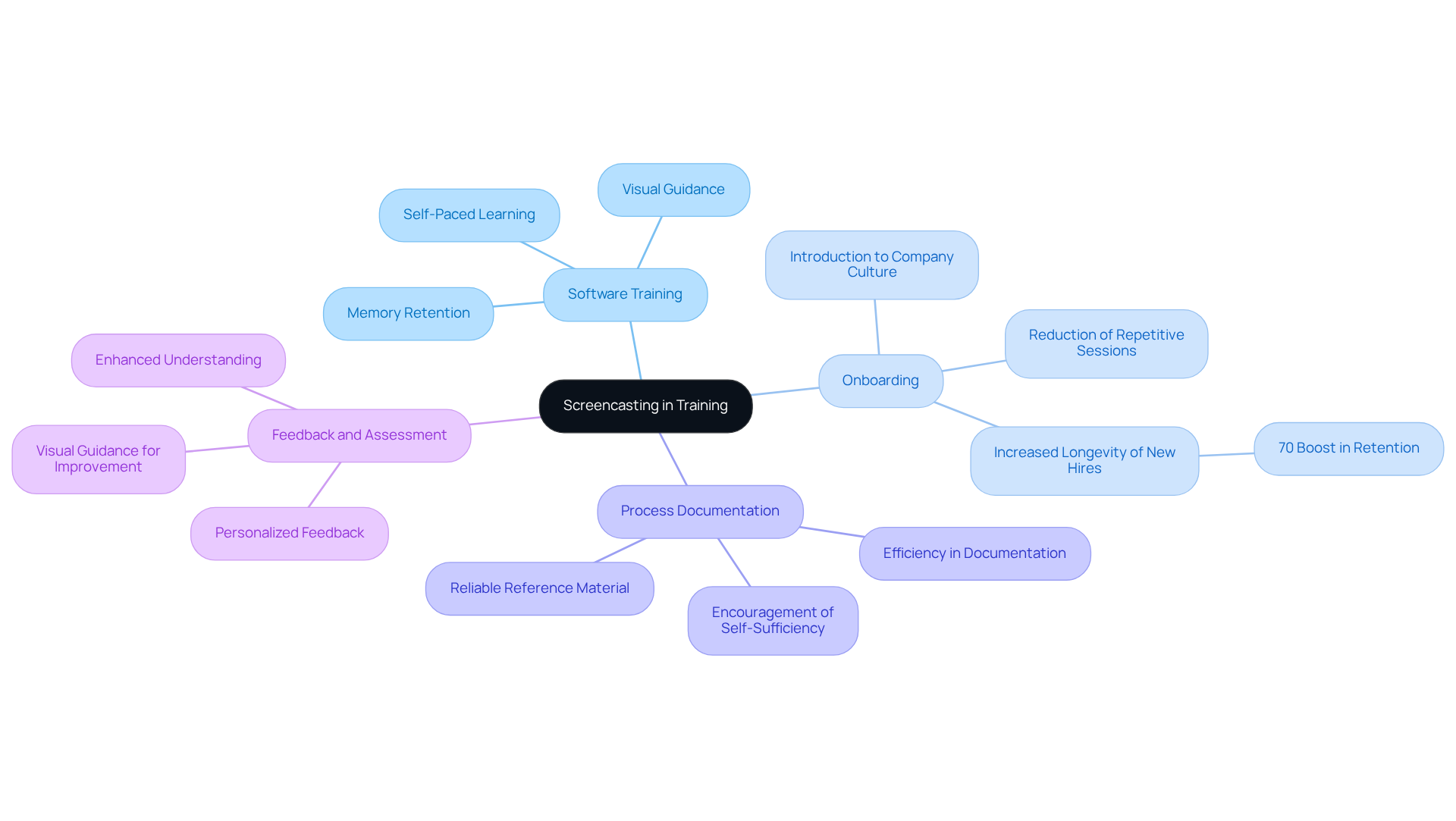
You might be wondering how screencasting can really make a difference in training. Well, it’s a powerful tool that can enhance both onboarding and ongoing staff development in a big way. Let’s break down some key applications:
- Software Training: Ever tried learning a new software tool? Screencasting on a PC lets trainers show how to use these tools, so employees can follow along at their own pace. This method really helps with memory since learners can revisit the material whenever they need to.
- Onboarding: Creating welcome videos through screencasting is a fantastic way to introduce new hires to company policies, culture, and essential processes. It cuts down on those repetitive in-person sessions, making onboarding smoother. Did you know that organizations with effective onboarding processes can boost new hire longevity by over 70%? That’s a huge win for everyone!
- Process Documentation: Recording step-by-step guides for complex tasks means employees have a reliable reference they can check anytime. This not only helps with knowledge retention but also encourages a culture of self-sufficiency among team members. As Anastasia Masadi, a Product Owner, puts it, "SowFlow has been a game changer in the way we document work and deliver to our clients. I do not have to take each screenshot separately, and do not even have to leave the browser while I am creating SOPs and training materials. SowFlow gave me time from my life back."
- Feedback and Assessment: Screencasting can also be a great way to give personalized feedback on worker performance or project submissions. It enhances understanding and improves outcomes since staff get clear, visual guidance on where they can improve.
These applications not only simplify the development process but also create a culture of ongoing learning within organizations. This ultimately leads to better productivity and happier staff. Remember what Henry Ford said? "The only thing worse than educating your employees and having them leave is not educating them and having them stay." It really highlights how crucial effective onboarding and training processes are!
Implement Best Practices for Creating Engaging Screencasts
Creating engaging screencasts? You might be wondering how to make them really stand out. Here are some friendly tips to help you out:
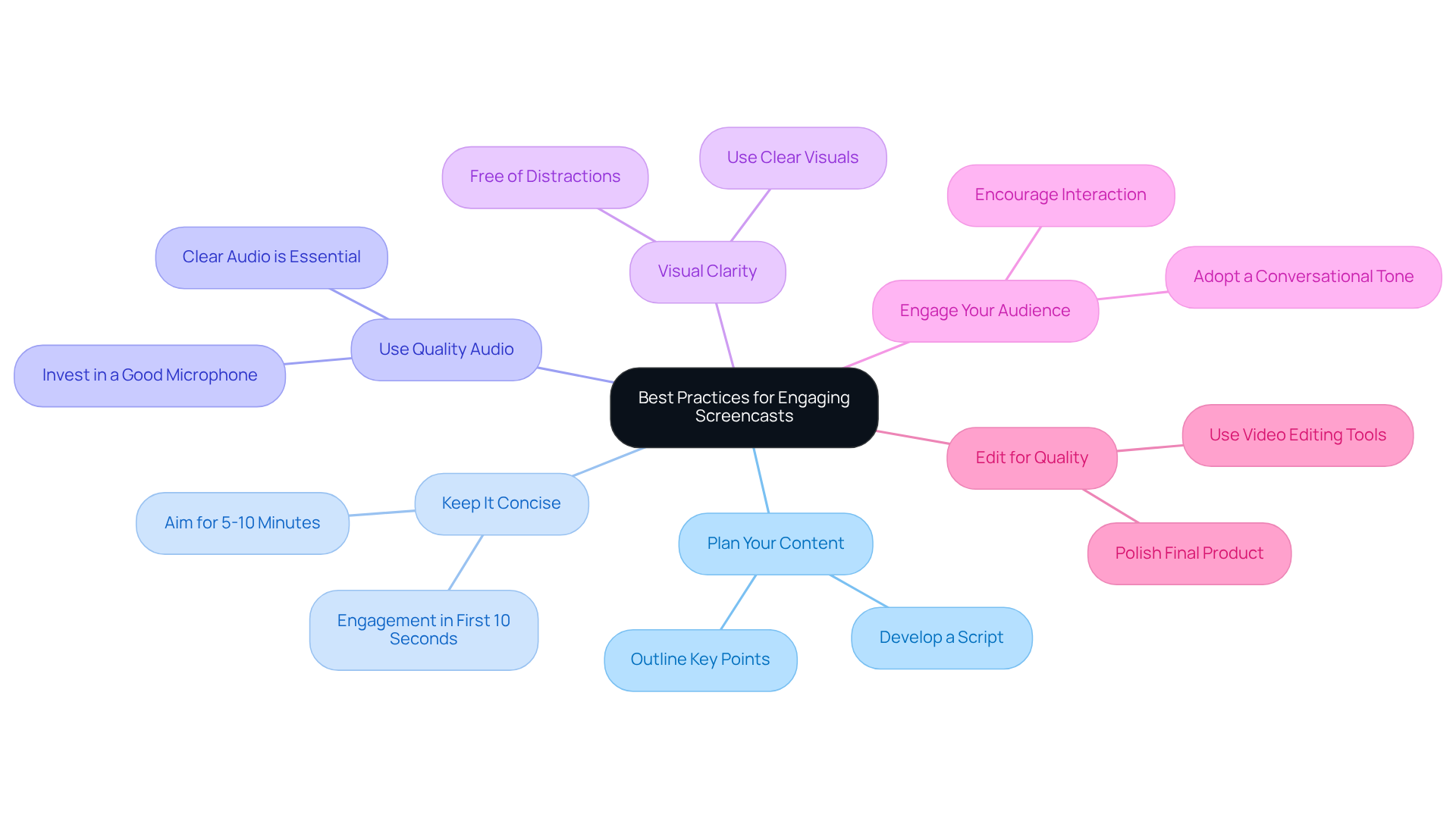
- Plan Your Content: Start by outlining your key points and developing a script. This prep work is super important! It helps keep your message clear and focused, which can really boost viewer engagement.
- Keep It Concise: Aim for videos that last about 5-10 minutes. Research shows that shorter videos tend to hold viewers' attention better. Did you know that most engagement happens in the first 10 seconds? In fact, 60% of viewers will watch a video before even glancing at any text on the site. So, keeping it concise is key!
- Use Quality Audio: Investing in a good microphone can make a world of difference. Clear audio is essential; poor sound can really take away from the learning experience and make it tough for viewers to absorb what you’re saying.
- Visual Clarity: Keep your screen free of distractions and use clear visuals to illustrate your points. Highlighting important areas can really help guide your viewers' attention where it needs to be.
- Engage Your Audience: Try to adopt a conversational tone. Encourage interaction by asking questions or prompting your viewers to think critically about the content. This approach helps build a connection, making your material feel more relatable.
- Edit for Quality: Don’t forget to use video editing tools to cut out any unnecessary pauses or mistakes. A polished final product can really enhance the viewer's experience and help them retain the information better.
And hey, remember that neglecting audio quality or failing to engage your audience are common pitfalls to watch out for. By following these practices, you can really maximize the effectiveness of your screencasting PC and boost your overall instructional efficiency!
Integrate Screencasting with Traditional Training Methods
You might be wondering how combining screencasting with [traditional teaching methods](https://sowflow.io/blog-post/10-best-employee-training-software-for-streamlined-onboarding) can really enhance the educational experience. Well, let’s dive into some effective strategies for making this integration work for you!
- Flipped Classroom Model: Imagine using a [[screencasting PC](https://sowflow.io/blog-post/10-business-process-document-examples-for-streamlined-operations)](https://link.springer.com/chapter/10.1007/978-981-96-6034-6_18) to share instructional content before class. This way, you can save in-person time for discussions, hands-on activities, and collaborative projects. It’s a fantastic way to boost engagement and make learning more interactive! Just remember, it’s super important to connect what happens in class with what students do outside of it to really maximize the benefits.
- Think of screencasting PC as bonus materials that complement your traditional resources, like manuals or face-to-face workshops. They can really help clarify concepts and provide extra context, making it easier for everyone to grasp the material.
- [Blended Education](https://turnitin.com/blog/flipped-classrooms-what-to-consider-when-making-the-switch): How about mixing online screencasting PC with in-person sessions? This blended approach caters to different learning preferences and can really improve accessibility and retention. Tools like Screencast-o-matic and Camtasia are great for this!
- Follow-Up Sessions: After your traditional learning sessions, why not use screencasts to recap key points or tackle any questions that popped up? This ensures that everyone has ongoing support and reinforces their understanding. Plus, giving prompt feedback on individual or group work can really enhance the learning experience.
By thoughtfully weaving screencasting into your traditional methods, you can create a more dynamic and effective training program. And who doesn’t want better training outcomes?

Conclusion
You might be wondering how screencasting can really change the game in employee training. Well, it’s become a fantastic tool that helps organizations boost learning experiences by engaging both visually and audibly. Trainers can whip up dynamic tutorials that break down complex info, cater to different learning styles, and help employees remember what they’ve learned. Plus, the chance to revisit materials whenever they want is a huge bonus, especially in fast-paced work settings.
Throughout this article, we’ve looked at some cool ways to use screencasting in training - think software training, onboarding, process documentation, and even personalized feedback. Each of these not only makes training smoother but also builds a culture of continuous learning and self-sufficiency among teams. We also touched on best practices for creating engaging screencasts, like planning your content, keeping things clear, and ensuring top-notch audio and visuals to really drive home the lessons.
So, what’s the takeaway? Blending screencasting with traditional training methods can seriously amp up educational outcomes. By mixing the best of both worlds, organizations can craft a training environment that’s not just effective but also engaging. Embracing screencasting enriches the learning experience and helps companies build a knowledgeable, skilled workforce ready to tackle the challenges of today’s workplace. Now, how exciting is that?
Frequently Asked Questions
What is screencasting?
Screencasting is the process of recording a digital video of your computer screen, often including audio narration. It is used to create visual tutorials that demonstrate how to use software, explain processes, or break down concepts in real-time.
Why is screencasting important in employee training?
Screencasting is important in employee training because it enhances engagement and retention. It combines visual and auditory elements, catering to different learning styles and making complex information easier to understand.
What percentage of people are primarily visual learners?
Research indicates that 65% to 80% of people are primarily visual learners, highlighting the effectiveness of visual teaching methods.
How long should screencasts be for better educational results?
Shorter animations, typically lasting 3 to 5 minutes, tend to yield better educational results as they help avoid cognitive overload.
What is dual-coding theory in relation to screencasting?
Dual-coding theory suggests that when sound design matches visuals, it enhances the learning experience by supporting the integration of auditory and visual information.
How does screencasting support asynchronous education?
Screencasting allows staff to revisit training materials whenever they want, making it convenient in fast-paced work environments.
How much can visual methods boost retention rates?
Research indicates that visual methods can boost retention rates by up to 60% compared to text alone, making screencasting a powerful tool for effective instruction.
👍
What others are liking


5 Steps to outline your ideal documentation structure
5 MINS READ
Where to start the your journey of mapping out your ideal documentation structure, aligning it with the very heartbeat of your organization?
Defining a winning level of detail in your process
3 MINS READ
What is too much detail, and what is too little? This article described in that winning level detail about what detail is enough.


