

Key Highlights
- User guides serve as essential roadmaps, enhancing user experience and reducing the burden on customer support.
- SowFlow's documentation solution simplifies the creation of up-to-date manuals, facilitating knowledge sharing and onboarding.
- Understanding the target audience through demographic analysis and surveys is crucial for effective manual development.
- Content organisation with headings, bullet points, and tables improves clarity and usability in user guides.
- Clear, actionable instructions encourage user interaction and confidence, minimising jargon where possible.
- Incorporating visuals like images and diagrams enhances engagement and aids understanding, catering to various learning styles.
- Usability testing and feedback from real users are vital for refining user guides and improving user satisfaction.
Introduction
Creating effective user guides isn’t just a task; it’s a skill that can really boost user experience and satisfaction. You might be wondering why these guides are so important. Well, they’re essential resources that help users navigate products or services easily, all while lightening the load on support teams. But here’s the kicker: crafting a user guide that truly connects with its audience can be a bit tricky. How do you ensure clarity, engagement, and usability in a document that often gets overlooked?
Now, let’s dive into a structured approach to developing user guides. This article will offer practical steps that not only enhance the quality of your documentation but also empower users to become more self-sufficient. So, stick around as we explore how to make your user guides not just informative, but also engaging!
Define User Guides and Their Importance
You might be wondering just how important instruction manuals really are. Well, think of them as your trusty roadmap, guiding you through the ins and outs of a product or service. They offer a how to user guide with step-by-step directions that help you make the most of what you’ve got, ultimately enhancing your experience.
Now, let’s talk about SowFlow's instant documentation solution. It makes creating manuals a breeze! This tool empowers organizations to whip up comprehensive documentation that stays relevant. Not only does it streamline processes, but it also makes onboarding and knowledge sharing within teams a whole lot easier, which means everyone can be more productive.
The importance of instruction manuals can’t be stressed enough. They help you become self-sufficient and lighten the load on customer support teams by tackling common questions and issues before they even arise. A well-organized how to user guide can lead to happier users, improved product adoption, and, yes, even higher retention rates. By clearly defining the purpose of these materials, organizations can create valuable resources that meet your needs while making it easy to keep everything up to date.

Identify Your Target Audience
You might be wondering how to kick off the development of an effective manual. Well, it all starts with really getting to know your target audience. Gathering demographic info - like age, profession, and tech skills - is super important. Why? Because it gives you a peek into what your audience needs, what they like, and the challenges they might face with your product. As Mandy Spivey puts it, "[Target market analysis](https://askattest.com/blog/uncategorized/how-to-identify-target-market) helps ecommerce businesses focus their efforts on the most valuable audiences - ensuring marketing spend, messaging, and product decisions are aligned with real customer needs."
Now, to dig even deeper, consider running some surveys or interviews. These can really help you understand your audience's expectations and pain points. This kind of primary research can reveal insights that shape your record-keeping strategy. Take Little Moons, for example - they figured out who their key audience was after a sales spike, which helped them tweak their marketing strategy effectively.
Speaking of understanding your audience, it’s a great idea to segment them into distinct personas based on their traits. This way, you can tailor the content, language, and examples in your how to user guide to really resonate with each group's specific needs. Keeping things engaging and relevant is key! Plus, don’t forget that regular target market analysis is crucial to stay in the loop with market trends and customer preferences. It reinforces the need for ongoing research in your documentation efforts.

Organize Content for Clarity and Usability
You might be wondering how to create a how to user guide that is user-friendly. Well, efficient content arrangement is key, and with SowFlow, it’s a breeze! Start by outlining the main topics and subtopics you want to cover. Using headings and subheadings helps create a clear hierarchy, making it easy for anyone to scan through the document.
Now, here’s the fun part: SowFlow lets you whip up manuals with just a single command! This means you can quickly update and modify your documentation to keep it relevant in our ever-changing business world.
Consider using the following to break down complex info into bite-sized pieces:
- Bullet points
- Numbered lists
- Tables
And don’t forget to add a table of contents at the beginning of your how to user guide. This little addition helps folks find specific sections in a snap! By focusing on clarity and usability in your content organization, you’re not just enhancing the experience for your readers; you’re also making navigation a whole lot easier, which can really boost team efficiency.

Write Clear and Actionable Instructions
You might be wondering why clarity is so crucial when creating guidelines. Well, using straightforward, direct language is key! Try to minimize jargon unless it’s absolutely necessary for your audience. Breaking tasks into simple, sequential steps can really help, too. For example, instead of saying, 'The button should be clicked,' just say, 'Click the button.' This makes your instructions feel more dynamic and encourages people to interact.
Speaking of interaction, integrating conditional statements can guide folks through different situations. For instance, you could say, 'If you encounter an error message, follow these steps.' This not only enhances clarity but also empowers individuals to act with confidence.
Now, let’s dive into the how to user guide for making this even easier. By using SowFlow's instant documentation solution, you can create manuals that are always relevant and up-to-date. This way, you can avoid those unnecessary meetings and really boost knowledge sharing within your team!

Incorporate Visuals and Examples
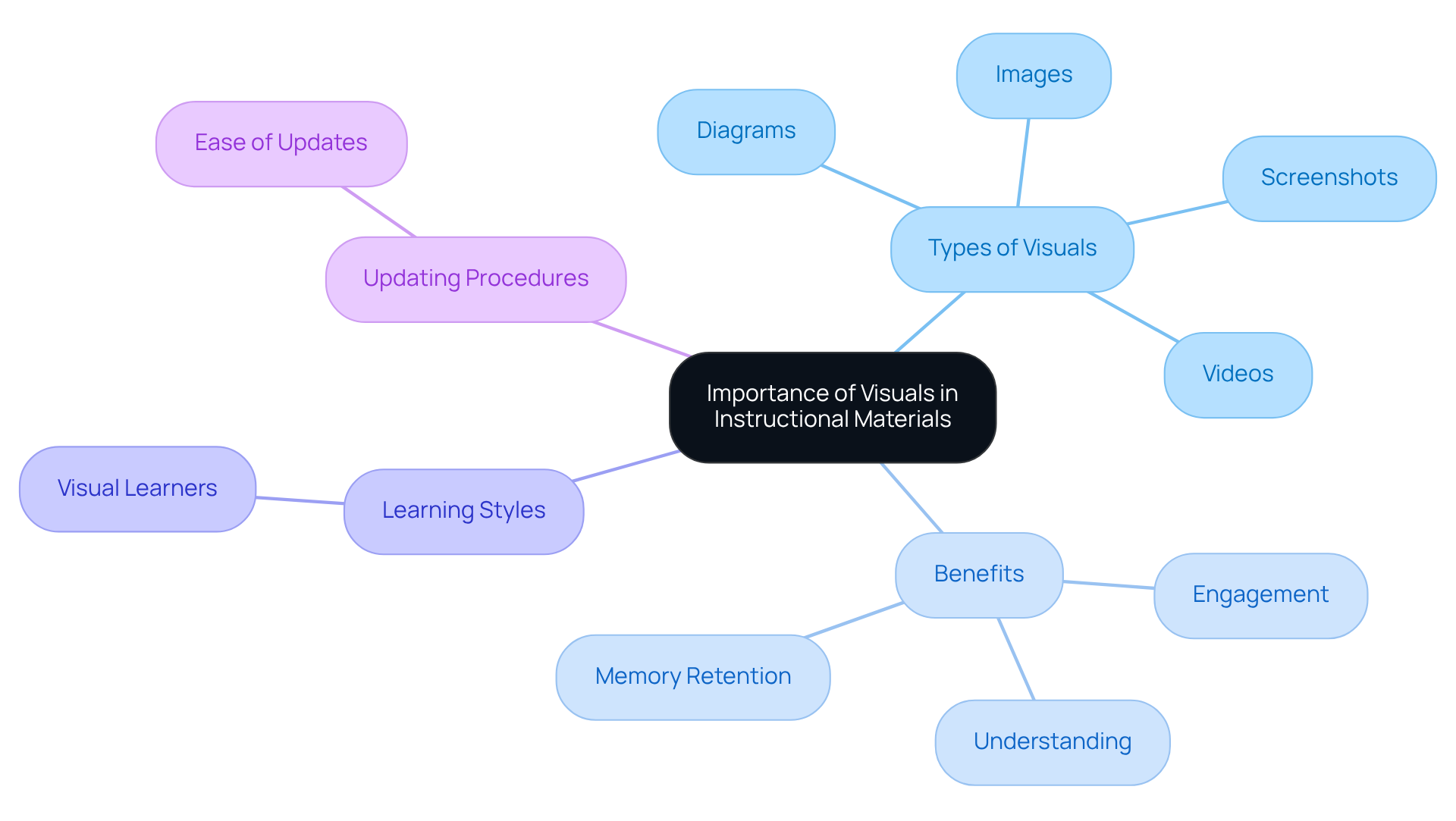
Visuals are super important for making instructional materials more engaging and easier to understand. You might be wondering how images, diagrams, screenshots, and videos can really help. Well, think about it: when you're trying to figure out how to navigate a software interface, a how to user guide with annotated screenshots that highlight the key buttons or features can make a world of difference, right?
Now, let’s dive into how SowFlow's instant documentation solution makes creating and updating these visuals a breeze. With just a single command, you can create a how to user guide in no time, ensuring that all your images and diagrams are clearly labeled and directly relevant to the content. This not only boosts usability but also helps you grasp those complex concepts much quicker.
Have you ever thought about how real-world examples can really bring instructions to life? They not only help with understanding but also let you visualize what the end result should look like. Research shows that people remember 42% more information when it’s presented visually compared to just text. That’s pretty powerful! Plus, around 65% of folks are visual learners, which highlights the importance of catering to different learning styles.
Speaking of keeping things fresh, visual SOPs in SowFlow can be easily updated to reflect any changes in procedures. This means your documentation stays current and effective. By simplifying processes and presenting information in a clear, intuitive way, visuals help eliminate confusion and create a more effective learning environment.
Review and Test Your User Guide
So, you’ve put together your manual - great job! But before you hit that publish button, it’s super important to take a step back and see how it holds up in the real world. Why not ask a few coworkers or potential clients to take a look? Their feedback on the content and organization can be invaluable. Encourage them to follow the instructions and see if anything trips them up. You might be surprised by what they find!
Now, let’s talk about usability testing. This is where the magic happens! Get some actual participants to try out the guide and tackle tasks using it. Watching how they interact with your manual can give you some eye-opening insights into what works and what doesn’t. For instance, companies like Housing.com have revamped their materials based on client feedback, and guess what? They saw a 20% boost in feature adoption!
Here’s a stat that might make you think:
That really drives home how crucial effective documentation is. By weaving in feedback from real users, you can make your document way more effective, leading to a better experience for everyone involved. Remember, a well-reviewed and tested how to user guide not only improves usability but also builds user satisfaction and loyalty. So, let’s get to it!

Conclusion
Creating an effective user guide is super important! Not only does it boost user experience, but it also helps your organization run smoothly. You might be wondering how clear documentation can really make a difference. Well, when users feel empowered to navigate products and services confidently, it leads to greater satisfaction and retention. So, let’s kick off this journey by figuring out who your target audience is. This way, you can tailor the content to meet their specific needs and challenges.
Throughout this guide, we’ve highlighted some key strategies. For instance, organizing content for clarity is crucial, and writing actionable instructions can really help users. Don’t forget to incorporate visuals - they can make a world of difference! Plus, reviewing and testing your documentation is a must. Each of these elements plays a part in creating a manual that’s not just informative but also engaging and user-friendly. Tools like SowFlow can really streamline this process, making it easier to create and keep your documentation relevant.
Now, let’s wrap this up! Crafting a user guide isn’t just a task; it’s a vital investment in user success and satisfaction. By focusing on clarity, organization, and user feedback, you can create a culture of continuous improvement in your documentation practices. Embracing these best practices will not only enhance the user experience but also ensure that your documentation evolves alongside user needs. So, why not take the plunge and maximize the value of your products and services?
Frequently Asked Questions
What are user guides and why are they important?
User guides are instruction manuals that serve as a roadmap, providing step-by-step directions to help users understand and utilize a product or service effectively. They enhance user experience, promote self-sufficiency, and reduce the burden on customer support by addressing common questions and issues.
How does SowFlow's documentation solution benefit organizations?
SowFlow's instant documentation solution simplifies the creation of comprehensive manuals, streamlining processes and facilitating easier onboarding and knowledge sharing within teams, ultimately increasing productivity.
What impact do well-organized user guides have on users?
Well-organized user guides lead to happier users, improved product adoption, and higher retention rates by meeting user needs and making it easier to keep information up to date.
How can organizations identify their target audience for user guides?
Organizations can identify their target audience by gathering demographic information such as age, profession, and tech skills, which helps understand their needs, preferences, and challenges with the product.
What methods can be used to gather insights about the target audience?
Methods like surveys and interviews can be employed to gather insights about audience expectations and pain points, shaping the record-keeping strategy effectively.
Why is it beneficial to segment the target audience into distinct personas?
Segmenting the target audience into distinct personas allows organizations to tailor the content, language, and examples in user guides to better resonate with each group's specific needs, keeping the information engaging and relevant.
Why is ongoing target market analysis important?
Ongoing target market analysis is crucial to stay updated with market trends and customer preferences, reinforcing the need for continuous research in documentation efforts.
👍
What others are liking


5 Steps to outline your ideal documentation structure
5 MINS READ
Where to start the your journey of mapping out your ideal documentation structure, aligning it with the very heartbeat of your organization?
Defining a winning level of detail in your process
3 MINS READ
What is too much detail, and what is too little? This article described in that winning level detail about what detail is enough.


