

Key Highlights
- Incorporating screen recording into documentation improves clarity and engagement.
- Choose user-friendly tools like Loom, Screencastify, and Nimbus that offer editing and annotation features.
- Define clear objectives before recording to maintain focus on the content.
- Engage viewers with a conversational tone and contextual explanations during recordings.
- Use annotations to emphasise critical points and clarify complex information.
- Select screen capture tools with editing capabilities, annotation tools, and integration features for optimal documentation.
- Establish a recording template to ensure consistency in documentation.
- Plan recordings to outline steps and key points for better organisation.
- Set standards for video quality and length, aiming for 3-10 minutes for viewer engagement.
- Regularly review and update recorded content to keep it relevant and accurate.
- Solicit user feedback to identify areas for improvement in recorded materials.
- Archive outdated recordings instead of deleting them to maintain a historical record.
Introduction
You might be wondering how to make your documentation more engaging, right? Well, in a world where visual communication is everything, integrating screen recording into your documentation process can really change the game. Imagine transforming those complex workflows into easy-to-follow visual guides that not only clarify but also stick in your audience's minds. Tools like Chrome plugin screen recorders can help you do just that!
But here’s the kicker: it’s not just about hitting record. What are the best practices to ensure your screen recordings capture the essence of what you want to convey and truly resonate with your users? Let’s dive into that!
Integrate Screen Recording for Enhanced Documentation
Incorporating screen capture into your writing process can really boost clarity and involvement. You might be wondering how capturing workflows in real-time can help. Well, teams can create visual guides that are way easier to follow than traditional text-based records. Let’s dive into some best practices for making this work effectively:
- Choose the Right Tool: First things first, pick a screen recording tool that suits your needs. Tools like Loom, Screencastify, and Nimbus, which include features like annotations and editing options, can also serve as a chrome plugin screen recorder. You’ll want something user-friendly that fits seamlessly with your existing documentation systems.
- Define Clear Objectives: Before you start documenting, take a moment to outline your goals. Are you showcasing a software feature or explaining a complex process? Having a clear objective will help keep your presentation focused and relevant.
- Engage Your Audience: As you record, use a conversational tone and explain your actions. This not only makes the content more relatable but also helps viewers grasp the context behind each step, boosting their engagement.
- Utilize Annotations: Don’t forget to enhance your recordings with annotations, arrows, and highlights to emphasize critical points. Visual aids can really clarify complex information and make your materials more effective.
By sticking to these practices, organizations can create materials that truly resonate with users and enhance knowledge transfer. Did you know that combining images and audio in video formats can significantly improve retention? Viewers retain about 95% of a video's message compared to just 10% when reading text! This really shows how important it is to incorporate visual elements into your written materials for better comprehension and involvement.
And speaking of tools, leveraging SowFlow's capabilities can make this process even smoother. With SowFlow, you can easily create user guides and update them on the fly, keeping your materials relevant in a fast-paced business environment. Check out the case study on "Transforming SOP Documentation with Screen Recording" - it illustrates how this method not only brings clarity and saves time but also creates practical resources that teams can actually use.
Lastly, keep an eye out for common pitfalls in video creation, like information overload or poor audio quality, to make sure your outputs are as effective as possible.

Select Features that Optimize Your Documentation Process
When you're on the hunt for a screen capture tool, what features should you keep an eye out for? Let’s break it down together:
- Editing Capabilities: You’ll want a tool that lets you edit your recordings after capturing them. Think about trimming out the fluff, adding text overlays, or even throwing in some background music or voiceovers to really polish your final product.
- Annotation Tools: Have you ever tried to follow a tutorial that just didn’t make sense? Features that let you annotate while capturing can really boost clarity. Highlighting key steps or jotting down notes can help your viewers grasp those tricky concepts much more easily.
- Integration with Information Platforms: It’s super important that your screen capturing tool can connect with your existing platforms, like SowFlow. This kind of integration makes uploading and sharing recordings a breeze, giving your team quick access to materials and ramping up productivity.
- Export Options: Look for tools that offer a variety of export formats, like MP4 or GIF. This way, you can cater to different needs, whether it’s for internal training or helping out customers.
By picking the right features, you can really amp up the quality and effectiveness of your documentation, making it more user-friendly and accessible. And with SowFlow’s solution for easy user guide creation and instant updates, your documentation will stay fresh and relevant in our fast-paced business world. So, what are you waiting for? Let’s make your documentation shine!
Establish a Structured Approach to Screen Recording
To really make the most out of your screen captures, having a structured approach is key. You might be wondering how to create a consistent recording process, right? Here are some essential steps to help you out:
- Create a Recording Template: Start by developing a template that outlines the key elements you want to include in each recording. Think objectives, steps, and expected outcomes. This way, you ensure consistency across all your documentation, which boosts clarity and usability.
- Plan Your Recordings: Before you hit that record button, take a moment to plan the flow of your presentation. Outline the steps you’ll take and the key points you want to emphasize. This little prep work helps keep you focused and organized during the session.
- Set Recording Standards: It’s important to define some standards for video quality, audio clarity, and length. Aim for videos that are around 3-10 minutes long to keep your viewers engaged. Shorter, focused videos are just easier to digest and update, don’t you think?
- Examine and Modify: Once you’ve captured your footage, take the time to review it. Make sure it meets your quality standards. Don’t hesitate to make edits to enhance clarity and cut out any mistakes or irrelevant content.
By adopting this structured method, you can create high-quality screen recordings that effectively convey your operations and procedures. This not only enhances employee training but also boosts engagement. So, why not give it a try?

Review and Update Recorded Content Regularly
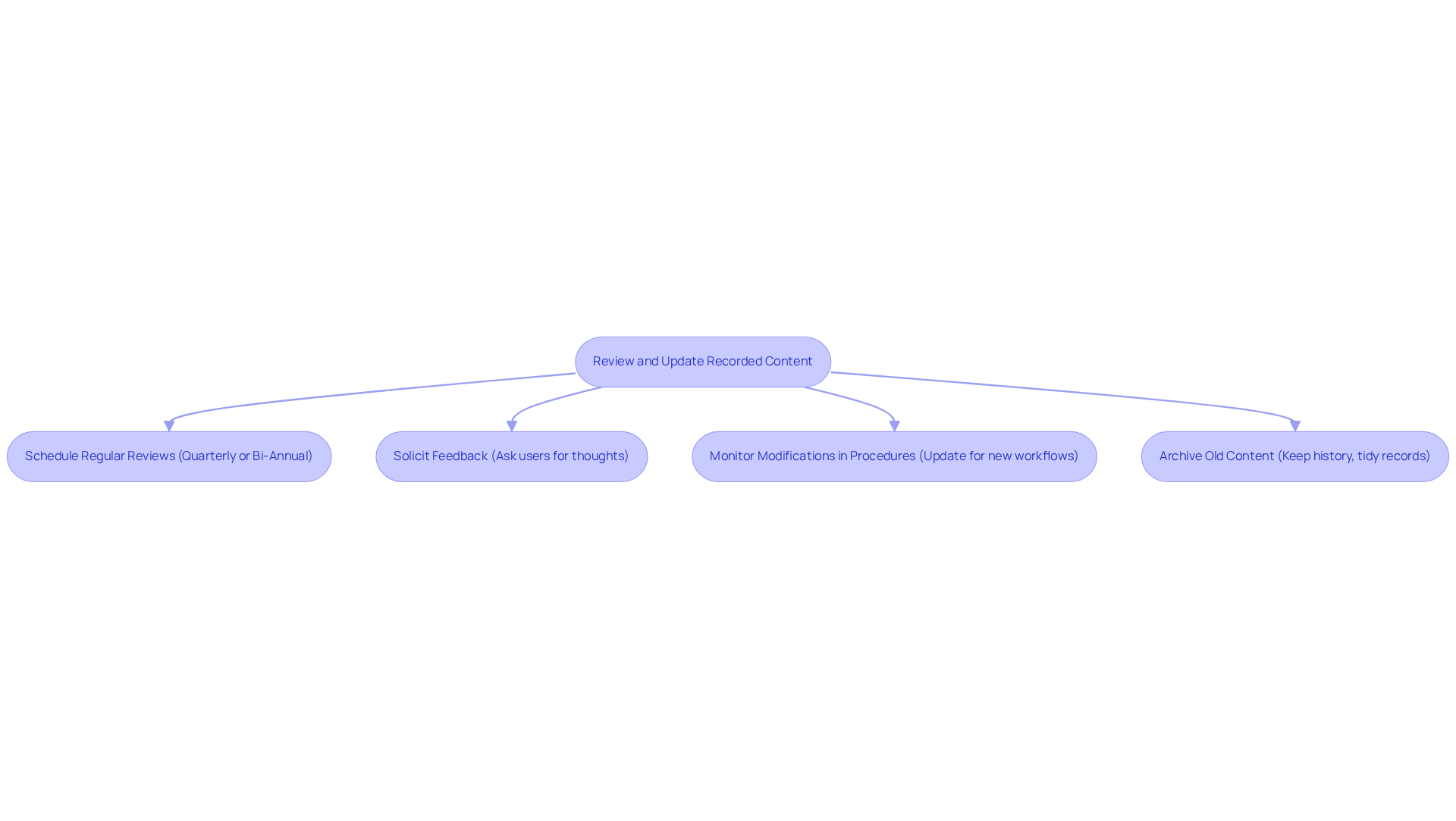
To keep your materials relevant and effective, it’s super important to regularly review and update your recorded content. With SowFlow, your team can access records instantly, making this whole process a breeze! So, how can you ensure your documentation stays fresh? Here are some friendly tips:
- Schedule Regular Reviews: You might be wondering how often you should check in on your recorded content. Setting up a routine-like quarterly or bi-annual reviews-can really help. This way, you can spot outdated info and make quick updates, especially since SowFlow makes it easy to tweak things on the fly.
- Solicit Feedback: Have you thought about asking users for their thoughts on the recorded content? Getting feedback can shine a light on areas that need a little love and help ensure your records meet everyone’s needs. As Brett Shavers puts it, "If you didn’t document it, it didn’t happen," which really drives home the importance of keeping accurate records. Plus, SowFlow’s platform makes gathering and acting on this feedback a piece of cake.
- Monitor Modifications in Procedures: As your organization evolves, it’s crucial to keep your records in sync. Regularly updating your recordings to reflect new workflows or software changes is key to staying accurate. With SowFlow, you can pull up the knowledge you need with just one command, saving you tons of time. Did you know that knowledge workers spend about 2.8 hours a week just searching for information? That’s why keeping your records up to date is so important!
- Archive Old Content: What about those recordings that have outlived their usefulness? Instead of hitting delete, consider archiving them. This way, you keep a history of activities while keeping your current records neat and tidy.
By setting up a solid review process and tapping into SowFlow’s features, your organization can really boost the accuracy and effectiveness of its documentation. This way, your records will always be ready to serve their purpose!
Conclusion
You might be wondering how screen recording can really change the game for your documentation practices. Well, let me tell you, it’s a game-changer! By incorporating screen recording, especially with a handy Chrome plugin, you can create visual guides that make understanding information so much easier. It’s like moving from black-and-white TV to color-everything just pops!
Now, let’s talk about some key strategies to make your screen recording efforts shine. First off, pick the right tool that fits your needs. Then, set clear objectives-what do you want your audience to take away? And don’t forget to keep it conversational! Engaging your audience with a friendly tone makes a world of difference. Plus, using annotations to highlight important points can really help drive your message home.
Oh, and here’s a tip: regular reviews and updates are crucial! Keeping your documentation fresh ensures it stays relevant and useful. By leveraging features like editing tools, integration with your existing platforms, and various export options, you can really optimize your documentation process for maximum impact.
Ultimately, integrating screen recording into your documentation not only makes knowledge transfer smoother but also enhances the overall user experience. Embracing these practices creates a culture of continuous improvement, making sure your documentation remains a valuable resource. So, why not give it a shot? Tools like SowFlow can help you create engaging, effective, and up-to-date documentation that meets the ever-evolving needs of your team!
Frequently Asked Questions
How can screen recording enhance documentation?
Screen recording can boost clarity and involvement by allowing teams to create visual guides that are easier to follow than traditional text-based records.
What should I consider when choosing a screen recording tool?
Choose a user-friendly screen recording tool that fits seamlessly with your existing documentation systems. Recommended tools include Loom, Screencastify, and Nimbus, which offer features like annotations and editing options.
Why is it important to define clear objectives before recording?
Defining clear objectives helps keep your presentation focused and relevant, whether you're showcasing a software feature or explaining a complex process.
How can I engage my audience during screen recordings?
Use a conversational tone and explain your actions as you record. This approach makes the content more relatable and helps viewers understand the context behind each step.
What role do annotations play in screen recordings?
Annotations, arrows, and highlights can emphasize critical points and clarify complex information, making your materials more effective.
How does combining images and audio in videos impact information retention?
Combining images and audio significantly improves retention; viewers retain about 95% of a video's message compared to just 10% when reading text.
What is SowFlow and how can it assist in documentation?
SowFlow is a tool that helps create and update user guides easily, keeping your materials relevant in a fast-paced business environment.
What common pitfalls should I avoid in video creation?
Avoid pitfalls like information overload and poor audio quality to ensure your video outputs are as effective as possible.
List of Sources
- Integrate Screen Recording for Enhanced Documentation
- 7 Stats that Prove Why Video Instructions are More Effective than Written (https://speach.me/blog/7-stats-that-prove-why-video-instructions-are-more-effective-than-written)
- Screen Recording Secrets That Will Make You Document SOPs Faster (https://businessplaybookformula.com/screen-recording-sop)
- Importance of Documentation - Expert and Influential Leader Quotes : Erase Your Risk with Proper Documentation (https://forensicnotes.com/importance-of-documentation-expert-and-influential-leader-quotes)
- Quotes on Documentation (https://pinterest.com/ideas/quotes-on-documentation/935641870339)
- Screen recording to documentation: fastest workflow (https://vidocu.ai/blog/screen-recording-documentation-the-fastest-workflow-with-screenshots)
- Select Features that Optimize Your Documentation Process
- 2023 Screen-Recording Software Market Growth Trends (https://unfoldlabs.medium.com/2023-screen-recording-software-market-growth-trends-105ddf9002ee)
- Top Features to Look For in an Online Documentation Tool (https://clickhelp.com/clickhelp-technical-writing-blog/top-features-to-look-for-in-an-online-documentation-tool)
- Video Editing Statistics And Facts By Market Share, Software, Demographics, And Trends (2025) (https://electroiq.com/stats/video-editing-statistics)
- Top 15 Best Screen Recorder Tools in 2025 (https://atlassian.com/blog/loom/best-screen-recorder)
- Establish a Structured Approach to Screen Recording
- Employee training statistics show learning is moving beyond L&D - Coassemble (https://coassemble.com/blog/employee-training-statistics)
- Mind-blowing Statistics Prove the Value of Employee Training - Shift E-learning (https://shiftelearning.com/blog/statistics-value-of-employee-training-and-development)
- Employee Training Statistics, Trends, and Data in 2025 | Devlin Peck (https://devlinpeck.com/content/employee-training-statistics)
- Screen Recording Best Practices for Professionals (https://reqo.me/blog/screen-recording-best-practices)
- Employee Training Statistics, Trends, And Data In 2025 (https://elearningindustry.com/employee-training-statistics-trends-and-data)
- Review and Update Recorded Content Regularly
- 30+ Data Documentation Statistics You Should Know (https://proprofskb.com/blog/documentation-facts)
- 11 Documentation Statistics to Make You Rethink Process in 2025 - Whale (https://usewhale.io/blog/documentation-statistics)
- Importance of Documentation - Expert and Influential Leader Quotes : Erase Your Risk with Proper Documentation (https://forensicnotes.com/importance-of-documentation-expert-and-influential-leader-quotes)
- Rethinking Your Document Management (https://business.com/articles/7-statistics-that-will-make-you-rethink-your-document-management-strategy)
- 100 Document Management Statistics to Make You Rethink Your Processes in 2025 (https://filecenter.com/blog/document-management-statistics)
👍
What others are liking


5 Steps to outline your ideal documentation structure
5 MINS READ
Where to start the your journey of mapping out your ideal documentation structure, aligning it with the very heartbeat of your organization?
Defining a winning level of detail in your process
3 MINS READ
What is too much detail, and what is too little? This article described in that winning level detail about what detail is enough.


