

Integrating Documentation Tools
|
April 29, 2026
|

Discover the Best Software to Create Manuals for Your Business Needs
Key Highlights
- Key criteria for manual authoring software include user-friendly interface, collaboration features, integration capabilities, customization options, version control, publishing formats, support and training, security aspects, and cost.
- MadCap Flare is ideal for technical documentation with advanced features but has a steeper learning curve and higher cost.
- Adobe RoboHelp is user-friendly and supports interactive content, but may have limited collaboration features.
- Document360 excels in knowledge management with an intuitive editor but might lack advanced capabilities for complex needs.
- Scribe automates process documentation, saving time, but offers limited customization for advanced users.
- Typemill is budget-friendly and straightforward, suitable for small businesses but lacks advanced features.
- Confluence enhances collaboration for teams using Atlassian products but is not primarily designed for manual creation.
- SowFlow allows for instant SOP creation, boosting efficiency, but may require time for users to explore its full capabilities.
- Choosing the right software depends on specific business needs, such as complexity of documentation, customer interaction, internal knowledge management, and team collaboration.
Introduction
You might be wondering how to navigate the vast landscape of manual authoring software. It can feel pretty daunting, especially when you’re trying to enhance your documentation processes. With so many options out there, it’s crucial to understand what features can really take your manuals from blah to brilliant. What if the right software could not only streamline your workflows but also boost team collaboration and productivity?
As you weigh your choices, the challenge remains: how do you pick the best tool that fits your specific needs while ensuring it integrates smoothly into your existing systems? Let’s dive into this together and explore how to make the right choice for your team!
Key Comparison Criteria for Manual Authoring Software
When you're on the hunt for manual authoring software, there are a few key things you might want to keep in mind:
- Interface and Usability: You know how frustrating it can be to wrestle with complicated software. That’s why an intuitive interface is a must! It should let you whip up manuals without needing a PhD in tech. A user-friendly design can really boost customer satisfaction and make the learning curve feel like a gentle slope instead of a steep hill.
- Collaboration Features: Ever tried working on a document with a team and felt like you were all pulling in different directions? Look for tools that let multiple users jump in at the same time. Real-time collaboration can really speed things up - some studies even say teams using these features see a productivity boost of up to 30%! Plus, without good records, productivity can take a hit, costing big companies around $12 billion a year. Yikes!
- Integration Capabilities: Imagine having your manual authoring software play nice with your project management or CRM tools. Seamless integration means less manual data entry and smoother workflows, which is a win-win for everyone involved.
- Customization Options: You want your manuals to reflect your brand, right? Look for the best software to create manuals that allows you to tweak templates and formats to fit your unique style and documentation needs. It’s all about making sure the final product meets your organization’s standards.
- Version Control: Keeping track of changes can be a headache, but effective version control can save the day. It helps you track edits and restore previous versions when needed, keeping everything organized and reducing confusion.
- Publishing Formats: The software should have your back when it comes to output formats. Whether you need PDFs or HTML, it should cater to different distribution needs and ensure your content is accessible across platforms.
- Support and Training: Let’s face it - having solid customer support and training resources can make or break your experience. Proper training can boost employee performance by up to 25%, so don’t overlook this aspect!
- Security Aspects: If you’re managing sensitive data, security is a big deal. Look for features like encryption and compliance with industry standards to keep your information safe and sound.
- Cost: Finally, let’s talk money. Transparent pricing that reflects the value you’re getting is essential. Be sure to consider both the initial costs and ongoing expenses to find software that fits your budget while still delivering the features you need.

Overview of Leading Manual Authoring Software Options
Are you searching for the best software to create manuals? You’re in the right place! Let’s explore some top options that can really make a difference in your documentation process:
- MadCap Flare: If you’re into technical writing, you might have heard of MadCap Flare. It’s known for its powerful features that let you customize and publish your content just the way you want. Users love its advanced indexing and content reuse capabilities, which make keeping records a breeze and help with training development. Plus, it’s often seen as the best software to create manuals, serving as the gold standard for technical documentation thanks to its sophisticated analytics and reporting tools.
- Adobe RoboHelp: Now, if you’re looking for something user-friendly, Adobe RoboHelp could be your go-to. It’s the best software to create manuals, making it ideal for both newbies and pros. With features like cross-referencing and support for over 35 languages, plus integration with popular apps like Salesforce and Zendesk, it’s super versatile. And guess what? Recent updates have made the authoring experience even better!
- Document360: For those focused on knowledge management, Document360 is a strong contender. It helps teams create and manage internal records efficiently. With its powerful search functions and advanced content organization, it streamlines workflows, making it the best software to create manuals for businesses that prioritize knowledge sharing.
- Scribe: Need to document processes quickly? Scribe is the best software to create manuals that has your back! As the best software to create manuals, it automates the creation of step-by-step guides, saving your team a ton of time. Its straightforward approach means you can document workflows without breaking a sweat, boosting productivity without the hassle of extensive training.
- Typemill: If you’re part of a small enterprise, Typemill might be just what you need. It offers an easy-to-use interface and basic options for manual creation. Plus, it’s budget-friendly-only 22 Euros a year for the open-source version and 122 Euros for extra features. It’s a solid choice for organizations looking for the best software to create manuals that simplify record-keeping without overwhelming their teams.
- Confluence: While it’s mainly a collaboration tool, Confluence also supports content creation, making it a versatile pick for teams already using Atlassian products. Its integration features enhance collaboration and project management, making record-keeping a lot smoother in a team setting.
So, which one catches your eye? Each of these tools has its unique strengths, and finding the right fit can really elevate your documentation game!

Pros and Cons of Each Manual Authoring Software
Let’s break down the pros and cons of each software, shall we?
-
MadCap Flare:
- Pros: This one’s packed with features that are perfect for technical documentation. It shines when it comes to multi-channel publishing, making it a go-to for complex projects. If you’re in a field that demands strict documentation standards, you’ll find it’s a favorite among teams working with structured content.
- Cons: However, if you’re new to it, be prepared for a bit of a learning curve. Plus, it can be pricier than some simpler options out there.
-
Adobe RoboHelp:
- Pros: Known for its user-friendly interface, RoboHelp really excels at creating interactive content that boosts user engagement. Matt Sullivan, an Adobe Certified Instructor, is pretty excited about its native online help creation for Mac, especially since it keeps that familiar look and feel of the Windows version.
- Cons: On the flip side, its collaboration features are a bit limited compared to other tools, which might slow down team workflows. And as your projects grow, it can get a bit cluttered, which isn’t ideal for usability.
-
Document360:
- Pros: If you’re looking for knowledge management, Document360 is fantastic. Its intuitive editor makes the documentation process a breeze. It’s even been recognized as a leader in the software resource tool market, thanks to its AI-driven tools and advanced analytics that enhance content creation.
- Cons: That said, it might not have all the advanced capabilities you need for managing more intricate requirements.
-
Scribe:
- Pros: Scribe is all about quick and easy process documentation. Its automation features can save you a ton of time, which is always a win.
- Cons: But if you’re an advanced user looking for customization, you might find its options a bit lacking.
-
Typemill:
- Pros: Typemill is simple and straightforward, making it a budget-friendly choice for small businesses that just need basic documentation capabilities.
- Cons: However, it doesn’t offer the advanced features that more robust tools do, which could limit its effectiveness for larger projects.
-
Confluence:
- Pros: This one’s great for collaboration! It integrates seamlessly with other Atlassian products, which can really boost team productivity.
- Cons: Just keep in mind that it’s not primarily designed for manual creation, so it might not be the best software to create manuals for more intricate writing tasks.
-
SowFlow:
- Pros: Users have called SowFlow a game changer for documentation processes. It allows for instant SOP creation right in your browser, saving time and improving efficiency in producing training materials and written content.
- Cons: Being a newer tool, some users might need a little time to explore all its functions and capabilities.

Suitability of Software for Different Business Needs
Are you searching for the best software to create manuals? You’ve got options that cater to different business needs, and I’m here to help you find the best software to create manuals to navigate through them!
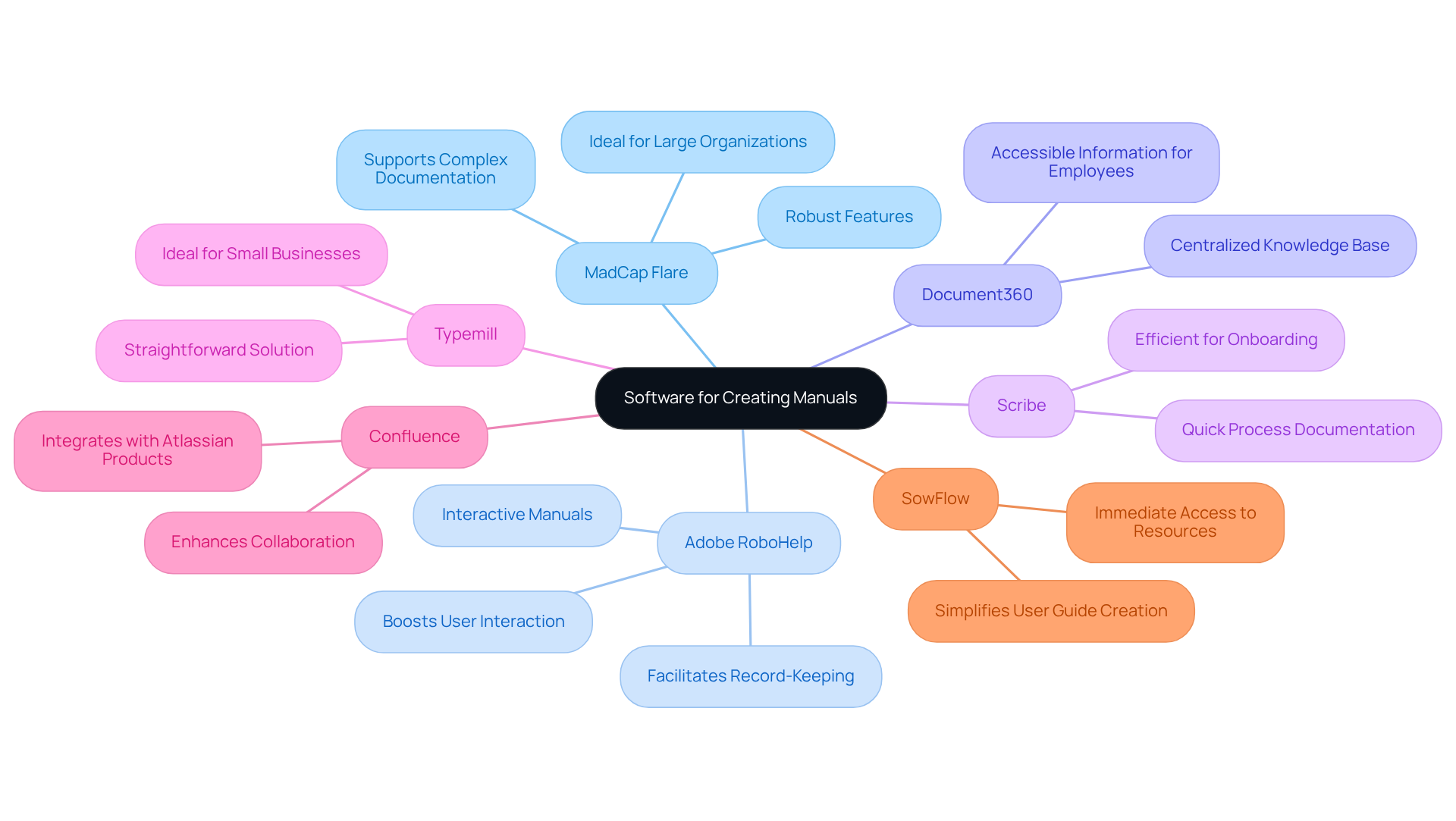
- MadCap Flare: If you’re part of a large organization with complex documentation needs, MadCap Flare might just be your best friend. It’s packed with robust features that support intricate projects, especially in technical fields, ensuring you get high-quality outputs every time.
- Adobe RoboHelp: Now, if you’re on a customer-facing team, Adobe RoboHelp is a fantastic choice for creating interactive manuals and instructional content. It really boosts user interaction and makes record-keeping a breeze.
- Document360: For those companies that prioritize internal knowledge management, Document360 is a gem. It helps you create a centralized knowledge base, making information super accessible for your employees.
- Scribe: Need to document processes quickly? Scribe is perfect for teams, especially during onboarding or training sessions. It streamlines the recording of workflows, ensuring you stay efficient.
- Typemill: If you’re a small business or startup, Typemill offers a straightforward solution. It provides essential features without overwhelming you, making it a great pick for anyone new to record-keeping.
- Confluence: Already using Atlassian products? Confluence is best suited for you! It enhances collaboration while offering fundamental record-keeping features, making it a valuable addition to your existing workflows.
- SowFlow: Now, let’s dive into SowFlow. This standout option is perfect for teams looking to enhance their workflow with immediate access to resources. It simplifies the user guide creation process, allowing for effortless updates and revisions. With SowFlow, you can summon the wisdom of your documentation with just a command, cutting down on unnecessary meetings and boosting overall productivity.
So, which one resonates with you? Consider your documentation challenges and explore the best software to create manuals to find the perfect fit!
Conclusion
Choosing the right software to create manuals is super important for making your documentation processes smoother and boosting productivity. You might be wondering what to look for, right? Well, this article dives into key features like usability, collaboration capabilities, integration options, and support services. Picking the best manual authoring software that fits your business needs can really streamline your workflows and help your documentation hit the mark with your organizational goals.
Throughout this piece, we explored some key criteria for manual authoring software. Think user interface, customization options, version control, and security features. Each software option, from MadCap Flare to Scribe and Typemill, has its own perks and potential downsides. So, it’s crucial for businesses to take a good look at their specific needs before making a choice. By understanding these factors, you can find a tool that not only meets your immediate documentation needs but also supports your future growth.
Ultimately, investing in the right manual authoring software can really change the game for how businesses handle their documentation processes. As technology keeps evolving, staying in the loop about the best software options for 2025 and beyond is key. By focusing on the right features and functionalities, you can enhance your documentation practices, boost team collaboration, and drive greater success in your operations. So, what are you waiting for? Let’s get started on finding that perfect tool!
Frequently Asked Questions
What should I consider regarding the interface and usability of manual authoring software?
Look for an intuitive interface that allows you to create manuals easily, enhancing customer satisfaction and making the learning process smoother.
Why are collaboration features important in manual authoring software?
Collaboration features enable multiple users to work on documents simultaneously, potentially increasing productivity by up to 30% and helping avoid productivity losses due to poor record-keeping.
What are integration capabilities in manual authoring software?
Integration capabilities allow the software to connect seamlessly with project management or CRM tools, reducing manual data entry and creating smoother workflows.
How can customization options benefit my manual authoring process?
Customization options enable you to adjust templates and formats to align with your brand and specific documentation needs, ensuring the final product meets your organization’s standards.
What is the significance of version control in manual authoring software?
Version control helps track changes, restore previous versions, and keep everything organized, reducing confusion during the authoring process.
What publishing formats should manual authoring software support?
The software should support various output formats, such as PDFs and HTML, to cater to different distribution needs and ensure accessibility across platforms.
Why is support and training important when choosing manual authoring software?
Solid customer support and training resources can significantly enhance your experience, with proper training potentially boosting employee performance by up to 25%.
What security aspects should I look for in manual authoring software?
Look for features like encryption and compliance with industry standards to ensure the protection of sensitive data.
How should I evaluate the cost of manual authoring software?
Consider transparent pricing that reflects the value provided, taking into account both initial costs and ongoing expenses to find a solution that fits your budget while delivering necessary features.
👍
What others are liking


5 Steps to outline your ideal documentation structure
5 MINS READ
Where to start the your journey of mapping out your ideal documentation structure, aligning it with the very heartbeat of your organization?
Defining a winning level of detail in your process
3 MINS READ
What is too much detail, and what is too little? This article described in that winning level detail about what detail is enough.


