


Key Highlights
- Instruction manuals are essential for performing tasks and using products effectively.
- Key purposes include training new employees, serving as a reference for current staff, standardising processes, and improving efficiency.
- Gather necessary materials by identifying key topics, collecting existing documentation, consulting experts, compiling visual aids, and organising information.
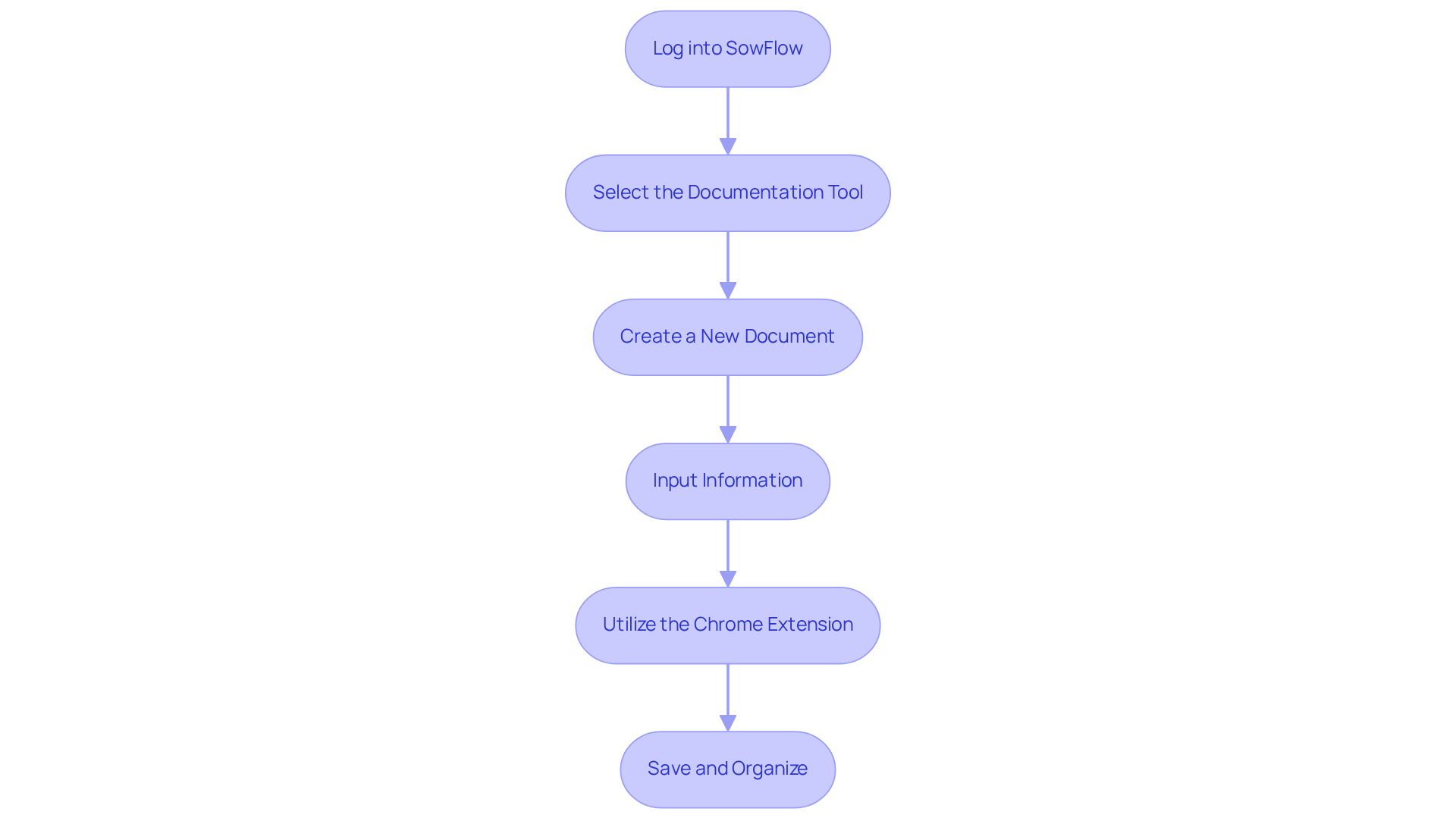
- Creating an instruction manual with SowFlow involves logging in, selecting tools, creating documents, inputting information, utilising extensions, and saving work.
- The review process includes proofreading, checking clarity, verifying accuracy, incorporating visuals, and revising based on feedback.
- Sharing the manual effectively requires choosing the right format, using SowFlow's sharing features, communicating availability, seeking feedback, and scheduling regular updates.
Introduction
You might be wondering how creating an effective instruction manual can really change the game for organizations. Well, it can! It brings clarity and consistency to processes, making everything run smoother. In this guide, we’ll walk you through a simple five-step approach to crafting a manual online, using tools like SowFlow to boost productivity and streamline your documentation efforts.
But here’s a thought: what if your manual ends up being more of a barrier than a bridge? That’s where understanding the ins and outs of crafting user-friendly guides comes into play. It’s super important to ensure that these manuals actually serve their intended purpose effectively. So, let’s dive into how you can make your documentation work for you!
Understand the Purpose of an Instruction Manual
You might be wondering why an instruction guide is so important. Well, it’s a vital resource that helps you perform specific tasks or use particular products, making everything run a lot smoother. By clearly defining what your guide is all about, you can tailor it to fit the needs of your audience-whether they’re new employees, customers, or team members. Let’s break down some key purposes:
- Training: Instruction manuals are super helpful for onboarding new employees. They provide essential info that speeds up their integration into the team. Organizations that use thorough guides often see faster onboarding experiences, which can cut down on training costs and improve how resources are used.
- Reference: These guides are a reliable resource for current employees, helping them refresh their knowledge and ensuring they have accurate information when they need it. This means less time troubleshooting and fewer mistakes, leading to smoother operations.
- Standardization: By keeping processes consistent across the organization, guidelines help maintain quality and reliability in service delivery. For example, a fast-food franchise that created a detailed operating guide saw uniformity in customer service across its locations, boosting its brand reputation.
- Efficiency: Clear instructions can really cut down on the time spent training and troubleshooting. Research shows that optimized workflows from well-designed guides can boost productivity by up to 20%, allowing employees to focus on more valuable tasks instead of the mundane ones.
Understanding these objectives helps you to create instruction manual online that effectively shares essential details, ultimately improving productivity and operational effectiveness in your organization. So, what do you think? Ready to dive into how to create instruction manual online?

Gather Necessary Materials and Information
Before you dive into the process to create an instruction manual online with SowFlow, let’s gather all the essential materials and information first. This prep phase is super important for making sure your guide is spot-on and covers everything it needs to. With SowFlow's instant documentation solution, you can whip up user guides in no time and keep them fresh, boosting productivity and team efficiency. Imagine having all your documentation wisdom at your fingertips with just one command - no more endless meetings searching for answers!
So, how do you get started? Here are some steps to follow:
- Identify Key Topics: What are the main topics you need to cover in your manual? Think about the purpose you identified earlier.
- Collect Existing Documentation: Gather any documents, guides, or resources that might have valuable info. Did you know that 46% of small businesses waste time every day because of clunky paper workflows? That’s why it’s crucial to use what you have to make your documentation efforts shine.
- Consult Subject Matter Experts: Chat with team members or experts who really know their stuff about the processes or products you’re documenting. Their insights can really boost the quality of your documentation. In fact, 43% of employees might consider jumping ship if their company doesn’t have a solid record-keeping system - talk about motivation to get this right!
- Compile Visual Aids: Gather images, diagrams, or screenshots that can help clarify things. Visual aids can make complex guidelines a breeze to follow.
- Organize Information: Create an outline to structure everything logically. A well-organized Table of Contents is key, especially if your documentation has over 20-30 articles. It makes navigation so much easier for users.
By taking the time to collect resources and consult with specialists, you’re laying the groundwork to create an instruction manual online that is both well-informed and effective. Plus, you’ll be leveraging SowFlow's capabilities to streamline the whole process!

Utilize SowFlow to Create Your Instruction Manual
It is a breeze to create an instruction manual online with SowFlow! Let’s walk through these simple steps together:
- Log into SowFlow: First things first, log into your SowFlow account. The interface is super intuitive, so you’ll feel right at home in no time.
- Select the Documentation Tool: Next, head over to the documentation tool. This is where the magic happens, specifically designed for whipping up guides that are easy to follow.
- Create a New Document: Ready to get started? Click on 'Create New Document' and pick a template that fits your guide’s goals. This way, you’re setting yourself up for success right from the get-go!
- Input Information: Now, it’s time to fill in the details. Enter all the info you’ve gathered into your chosen template. Don’t forget to use headings, bullet points, and visuals to keep things clear and engaging - this makes your manual super user-friendly!
- Utilize the Chrome Extension: Have you tried the SowFlow Chrome extension yet? It’s a game changer! You can document workflows directly from your browser, capturing processes in real-time. Talk about efficiency!
- Save and Organize: Lastly, remember to save your work regularly. Organizing your sections logically will help maintain a smooth flow of information, which is key for effective communication.
By following these steps, you’ll be well on your way to creating an instruction manual online that meets your organization’s needs. This not only boosts operational efficiency but also enhances knowledge management. So, what are you waiting for? Let’s get started!
Review and Refine Your Instruction Manual
Once you’ve got your guide manual drafted, it’s time to roll up your sleeves and dive into the review process. You might be wondering why this step is so crucial. Well, refining your document is key to making sure everything is clear and accurate. Let’s break it down into some easy steps to enhance your guide:
- Proofread for Errors: Start with a thorough read-through. Catching those pesky grammatical and typographical mistakes can really boost your professionalism.
- Check for Clarity: Are your guidelines straightforward? Make sure they’re easy to follow. Engaging a colleague for feedback can give you some valuable insights into any potential ambiguities.
- Verify Accuracy: It’s super important to cross-reference your content with original materials. Don’t hesitate to consult subject matter experts to confirm that the information is reliable.
- Incorporate Visuals: Visuals can be a game-changer! Just make sure they’re labeled correctly and actually help the reader understand the instructions better.
- Revise Based on Feedback: After gathering feedback, implement the necessary changes. This fosters a culture of continuous improvement, which is always a win.
Investing time in this review process not only boosts the effectiveness of your guide but also ensures it meets your audience's needs. In the end, this leads to better operational outcomes. So, what do you think? Ready to make your guide shine?

Share Your Instruction Manual with the Audience
Once you’ve got your instruction guide all set, it is super important to create an instruction manual online and share it with your audience. So, how do you make sure it gets out there effectively? Let’s break it down:
- Pick the Right Format: First off, think about how you want to share the guide. Should it be a PDF, an online document, or maybe a printed copy? It all depends on what your audience prefers and needs.
- Use SowFlow’s Sharing Features: Have you checked out SowFlow’s sharing tools? They’re pretty robust! You can easily distribute the document directly to your team or stakeholders, making access and collaboration a breeze.
- Let Everyone Know It’s Available: Don’t forget to tell your audience about the guide! Clear communication is key. You might want to send out an email announcement or even host a meeting to introduce the guide and highlight its key features.
- Ask for Feedback: Here’s a thought: why not actively seek input from users? Getting their feedback can help you spot areas for improvement. Plus, it creates a culture of continuous enhancement, which is always a win.
- [Keep It Updated](https://sowflow.io): Finally, set a regular schedule for reviewing and updating the document. This way, you’ll keep it relevant and accurate over time. Frequent updates are essential to ensure the information stays useful and trustworthy.
By sharing your knowledge, you can create instruction manual online effectively, enhancing knowledge transfer and empowering your audience to make the most of it!

Conclusion
Creating an effective instruction manual online isn’t just a task; it’s a smart way to boost productivity and streamline operations in your organization. You might be wondering how to get started. Well, by understanding the purpose of these manuals, gathering the right materials, using tools like SowFlow, and refining your content, you can craft a resource that truly guides users. This process not only helps with training and standardization but also brings clarity and consistency to your operations.
Now, let’s break down the key steps to create your instruction manual:
- Pinpoint essential topics
- Consult experts
- Use visual aids
- Gather feedback
Each phase is designed to make sure your final product is user-friendly and informative. And don’t forget, sharing the manual effectively with your audience is crucial! Regular updates and open communication are key to keeping everyone on the same page.
Ultimately, creating an instruction manual online is a powerful tool for sharing knowledge and achieving operational excellence. By following these steps and embracing a culture of continuous improvement, you can empower your teams and boost overall performance. So, why wait? Start implementing these practices now, and watch your workforce become more efficient and ready to tackle challenges with confidence!
Frequently Asked Questions
What is the purpose of an instruction manual?
An instruction manual serves as a vital resource to help users perform specific tasks or use products effectively. It aids in training new employees, provides a reference for current staff, ensures standardization of processes, and enhances efficiency by reducing training time and troubleshooting.
How do instruction manuals benefit employee training?
Instruction manuals facilitate faster onboarding for new employees by providing essential information that helps them integrate into the team more quickly, ultimately reducing training costs and improving resource utilization.
In what ways do instruction manuals serve as a reference for current employees?
They act as reliable resources that allow employees to refresh their knowledge and access accurate information when needed, resulting in less time spent troubleshooting and fewer mistakes.
How do instruction manuals contribute to standardization within an organization?
By maintaining consistent processes across the organization, instruction manuals help ensure quality and reliability in service delivery, which can enhance brand reputation, as seen in examples like fast-food franchises.
What impact can well-designed instruction manuals have on productivity?
Clear instructions can improve productivity by up to 20% by optimizing workflows, allowing employees to focus on more valuable tasks rather than mundane ones.
What initial steps should be taken to create an instruction manual online?
Initial steps include identifying key topics, collecting existing documentation, consulting subject matter experts, compiling visual aids, and organizing information into a logical structure.
Why is it important to gather existing documentation when creating an instruction manual?
Gathering existing documentation helps utilize valuable information and can prevent wasted time due to inefficient workflows, especially since many businesses struggle with clunky paper processes.
How can consulting subject matter experts improve the quality of an instruction manual?
Insights from experts can enhance the accuracy and relevance of the documentation, making it more effective for users.
What role do visual aids play in instruction manuals?
Visual aids, such as images and diagrams, help clarify complex guidelines, making them easier for users to understand.
Why is organizing information important when creating an instruction manual?
A well-organized structure, including a clear Table of Contents, facilitates easier navigation, especially in manuals with a large number of articles.
👍
What others are liking


5 Steps to outline your ideal documentation structure
5 MINS READ
Where to start the your journey of mapping out your ideal documentation structure, aligning it with the very heartbeat of your organization?
Defining a winning level of detail in your process
3 MINS READ
What is too much detail, and what is too little? This article described in that winning level detail about what detail is enough.


