
Knowledge Management through Documentation
|
April 29, 2026
|

Create Software Demos: 5 Steps to Engage Your Audience Effectively
Key Highlights
- Identify the purpose of the demo to shape content and structure effectively.
- Set measurable goals, like increasing user sign-ups by 20%, to drive engagement.
- Align demo objectives with broader business goals to enhance relevance.
- Communicate objectives clearly with the team for cohesive presentations.
- Conduct audience research to understand demographics and preferences.
- Create detailed buyer personas to reflect real user data and needs.
- Segment the audience to tailor presentation content for better engagement.
- Engage potential participants before the demo to gauge expectations.
- List key features of the application that resonate with audience needs.
- Create participant scenarios to illustrate real-life applications of the software.
- Highlight benefits of features to demonstrate their value to users.
- Utilise engaging visuals like screenshots and videos to enhance understanding.
- Review presentation content to ensure alignment with goals and audience needs.
- Eliminate jargon to maintain clarity and relatability.
- Practise delivery to improve confidence and message clarity.
- Seek feedback through trial runs to refine the presentation.
- Research presentation software tools like Navattic and Storylane for interactive demos.
- Evaluate features of demo software to ensure user-friendliness and customization.
- Consider integration capabilities with existing systems for smooth presentations.
- Test demo tools thoroughly to identify potential issues before presenting.
Introduction
Crafting an effective software demo can really make or break a deal, right? You might be wondering how to make your presentation not just a showcase of features, but something that truly resonates with your audience's needs. When done right, these demos can drive engagement and conversions like nothing else. But let’s be honest - many folks struggle with how to structure their demos to achieve that impact. So, what essential steps should you take to ensure your presentation captivates and informs? Let's dive into that!
Define Your Software Demo Objectives
- Identify the Purpose: So, what’s the goal of your demonstration? Are you looking to inform potential clients, highlight specific features, or maybe boost those sales numbers? Knowing your main aim will really help shape how you structure and present your content.
- Set : Let’s talk about setting some clear, for your presentation. For example, how about aiming to increase user sign-ups by 20% or ramping up by 15%? Research shows that , so having those clear metrics is super important. As Zig Ziglar put it, "," which really drives home the point about defining measurable goals to sway buyer decisions effectively.
- Align with : It’s crucial to make sure your presentation goals align with the bigger picture of your business, like boosting or cutting down churn rates. This alignment not only makes your presentation more relevant but also helps your organization succeed overall. Using the can really help here, ensuring your goals are Specific, Measurable, Achievable, Relevant, Time-bound, and Evaluated.
- Communicate Objectives: Don’t forget to share your objectives with your team! This way, everyone’s on the same page and knows what the demo is all about. Clear communication is key to effectively that deliver a cohesive and impactful presentation. Plus, referencing case studies that showcase the effectiveness of can really drive home the importance of these objectives.

Identify Your Target Audience and Their Needs
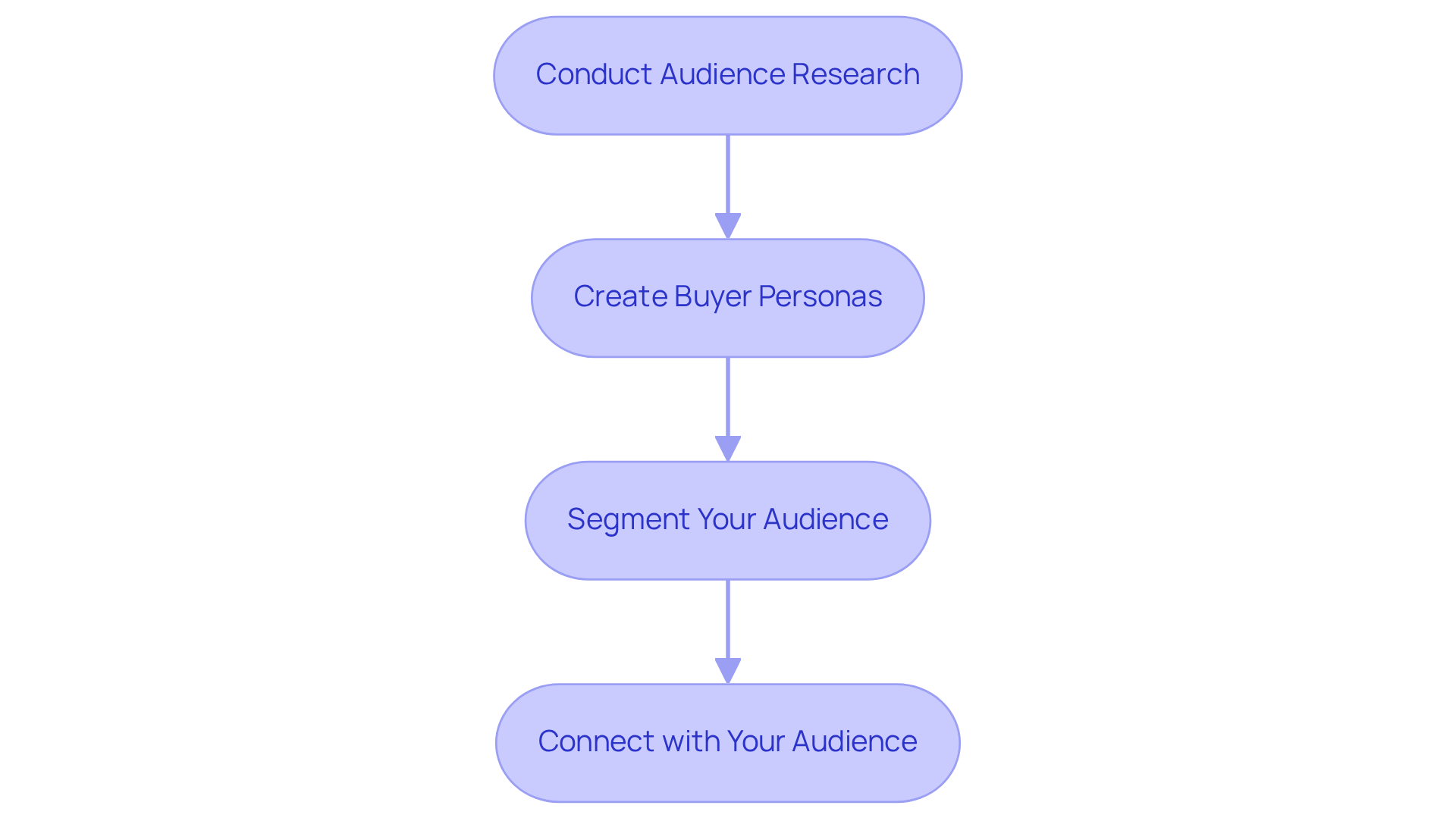
- Conduct : You might be wondering how to really get to know your audience. Well, gathering insights through surveys, interviews, and analytics is a great start! Understanding your audience's is crucial. Did you know that companies that regularly update their are over five times more likely to exceed lead and revenue goals? Plus, 96% of growing companies say that is a key driver of their success. So, knowing what your customers need is super important!
- Create : Now, let’s talk about buyer personas. Think of them as detailed profiles of your ideal customers. What are their goals? What challenges do they face? And how does your software help them out? should include demographics, professional backgrounds, and specific pain points. It’s all about reflecting real user data, not just assumptions. One case study even found that led to a whopping 124% increase in ROI. That’s some serious motivation to get this right!
- Segment Your Audience: Next up, let’s dive into . Why is this important? Well, dividing your audience into distinct segments based on their needs and behaviors allows you to customize your presentation content. This way, you can really resonate with each group, enhancing engagement and relevance. Most organizations find that 3-5 distinct personas effectively represent their market, making it easier to target specific audience groups.
- Connect with Your Audience: Before your demo, why not reach out to potential participants? Gauge their expectations and learning objectives. can provide valuable insights that inform your presentation, ensuring it aligns with what your listeners truly want to learn. This proactive approach can significantly boost and retention rates. Plus, buyer personas can help your whole team get on the same page about who your customers are and how to target them.
Capture Key Features and Map User Experiences
- List : You might be wondering where to start. Begin by pinpointing the of your application that really resonate with your audience's needs. This way, when you , they will feel relevant and impactful, making it easier for everyone to connect with what you’re showing.
- Create : Let’s get creative! Think about realistic situations that showcase how people will actually use the application in their daily lives. For example, a tech company could illustrate how a project management tool helps teams streamline their workflow by simulating a typical project kickoff meeting. This not only puts the software in context but also boosts engagement. After all, did you know that 88% of people are less likely to return after a bad experience? And a staggering 91% of unhappy clients who don’t voice their concerns just disappear!
- : Now, let’s talk benefits. For each feature, make sure to clearly explain how it helps users tackle their . If a feature automates reporting, for instance, highlight how this saves time and cuts down on errors, ultimately leading to a productivity boost. Who wouldn’t want that?
- Utilize : Don’t forget about visuals! Incorporate elements like screenshots, videos, or live demos to vividly showcase the features and user experiences. Engaging visuals can really help to that enhance understanding and retention. Remember, users form opinions about websites in less than 500 milliseconds, and 94% of are tied to a website's design. So, making a great first impression is key!

Edit and Refine Your Demo for Clarity
- Review Content: Have you taken a good look at your ? It’s super important to make sure they and meet your viewers' needs. This alignment keeps everyone engaged and helps your message shine through clearly.
- Eliminate Jargon: You might be wondering why jargon is a no-go. Well, . Research shows that too much jargon can cloud understanding, so stick to simple language that everyone can relate to.
- : Now, let’s talk about practice. Rehearsing your presentation a few times can really polish your delivery and timing. A well-rehearsed presentation not only boosts your confidence but also makes your message clearer, ensuring those key points hit home.
- Seek Feedback: Ever thought about doing a ? Grab a colleague or a small audience and get their feedback. This step is golden for and making tweaks that lead to a more polished and impactful presentation.

Explore Tools and Software for Interactive Demos
- : You might be wondering what tools can help you create software demos for interactive showcases. Well, look no further than platforms like Navattic, Storylane, and Demoboost! These tools are all about boosting user engagement with their intuitive interfaces and customizable features.
- : Now, let’s talk about assessing the functionalities of different demo software solutions. It’s important to find a solution that can help you create software demos that fit your needs perfectly. Consider user-friendliness, customization options, and how effectively it enables you to create software demos that truly connect with your audience. For example, FlowShare lets you whip up that can seriously enhance your training and onboarding processes. Remember what John Ruskin said: "Quality is never an accident; it is always the result of intelligent effort." This really highlights how crucial quality is in your selection process. Plus, did you know that presentations with a checklist see a 17% higher completion rate? That’s a big deal when you’re choosing features!
- : Speaking of features, make sure the trial tools you’re looking at can easily integrate with your existing systems and workflows. This is key to create software demos that provide a smooth experience for everyone involved and enhance the overall efficiency of your presentations. Integrating with CRM systems like Salesforce or HubSpot can give you valuable insights into user engagement and how well your presentations are performing.
- Test the Tools: Before you dive into your presentation, it’s super important to get familiar with the program’s features by doing some thorough testing. This step is crucial for spotting any potential hiccups and ensuring you can navigate the tool like a pro during your presentation. As Edsger Dijkstra wisely pointed out, "." This really underscores the need for comprehensive testing before you present. Businesses that take the time to evaluate their trial applications often report higher completion rates and happier users, with interactive displays hitting completion rates of 75-85%. And here’s a fun fact: companies see a 20% ! That’s the kind of impact effective demo software can have.

Conclusion
Creating effective software demos is a skill you definitely want to have in your toolkit. Why? Because it can really boost audience engagement and drive your business success. When you take the time to define your objectives, understand who your audience is, and present key features in a way that resonates with them, you’re setting yourself up for success. A well-structured demo doesn’t just show off what your software can do; it also aligns with your broader business goals, making sure every presentation has a clear purpose.
You might be thinking, "What’s the secret sauce?" Well, throughout this article, we’ve highlighted the importance of:
- Setting measurable goals
- Doing your homework on your audience
- Refining your content for clarity
By creating detailed buyer personas and using engaging visuals, you can really enhance the user experience and build stronger connections with your audience. Plus, using the right tools can turn a standard demo into an interactive showcase that truly resonates, leading to higher engagement and conversion rates.
So, what’s the takeaway? Crafting software demos is all about paying attention to the details at every step. By embracing these best practices, you can elevate your presentations, making them not just informative but also compelling and impactful. As the world of software presentations keeps evolving, focusing on audience engagement and clarity will always be key. Now’s the perfect time to put these strategies into action, ensuring that each demo not only informs but also inspires action among potential users.
Frequently Asked Questions
What are the main objectives to define for a software demo?
The main objectives include identifying the purpose of the demonstration, setting measurable goals, aligning with business goals, and communicating these objectives with the team.
How can I set measurable goals for my software demo?
You can set measurable goals by aiming for specific outcomes, such as increasing user sign-ups by a certain percentage or improving engagement metrics. It’s important to establish clear metrics to influence buyer decisions effectively.
Why is it important to align demo goals with business objectives?
Aligning demo goals with business objectives ensures that the presentation is relevant and contributes to overall organizational success, such as enhancing customer satisfaction or reducing churn rates.
How can I effectively communicate demo objectives to my team?
You can effectively communicate demo objectives by sharing them clearly with your team, ensuring everyone understands the goals and purpose of the demonstration, which helps create a cohesive and impactful presentation.
What steps should I take to identify my target audience for the demo?
To identify your target audience, conduct audience research through surveys, interviews, and analytics to understand their demographics, preferences, and pain points.
What are buyer personas and why are they important?
Buyer personas are detailed profiles of your ideal customers that include their goals, challenges, and how your software addresses their needs. They are important because they help tailor your presentation to meet the specific needs of your audience.
How can audience segmentation enhance my software demo?
Audience segmentation allows you to divide your audience into distinct groups based on their needs and behaviors, enabling you to customize your presentation content for better engagement and relevance.
What is the benefit of connecting with potential participants before the demo?
Connecting with potential participants before the demo helps gauge their expectations and learning objectives, providing valuable insights that inform your presentation and improve customer satisfaction and retention rates.
👍
What others are liking


5 Steps to outline your ideal documentation structure
5 MINS READ
Where to start the your journey of mapping out your ideal documentation structure, aligning it with the very heartbeat of your organization?
Defining a winning level of detail in your process
3 MINS READ
What is too much detail, and what is too little? This article described in that winning level detail about what detail is enough.


