

Knowledge Management through Documentation
|
April 29, 2026
|

Compare Top SOP Software for Small Business Success in 2025
Key Highlights
- SOP software is crucial for small businesses to document, manage, and enforce procedures, ensuring operational efficiency.
- Using SOP software reduces operational errors, streamlines training, and enhances compliance with regulations.
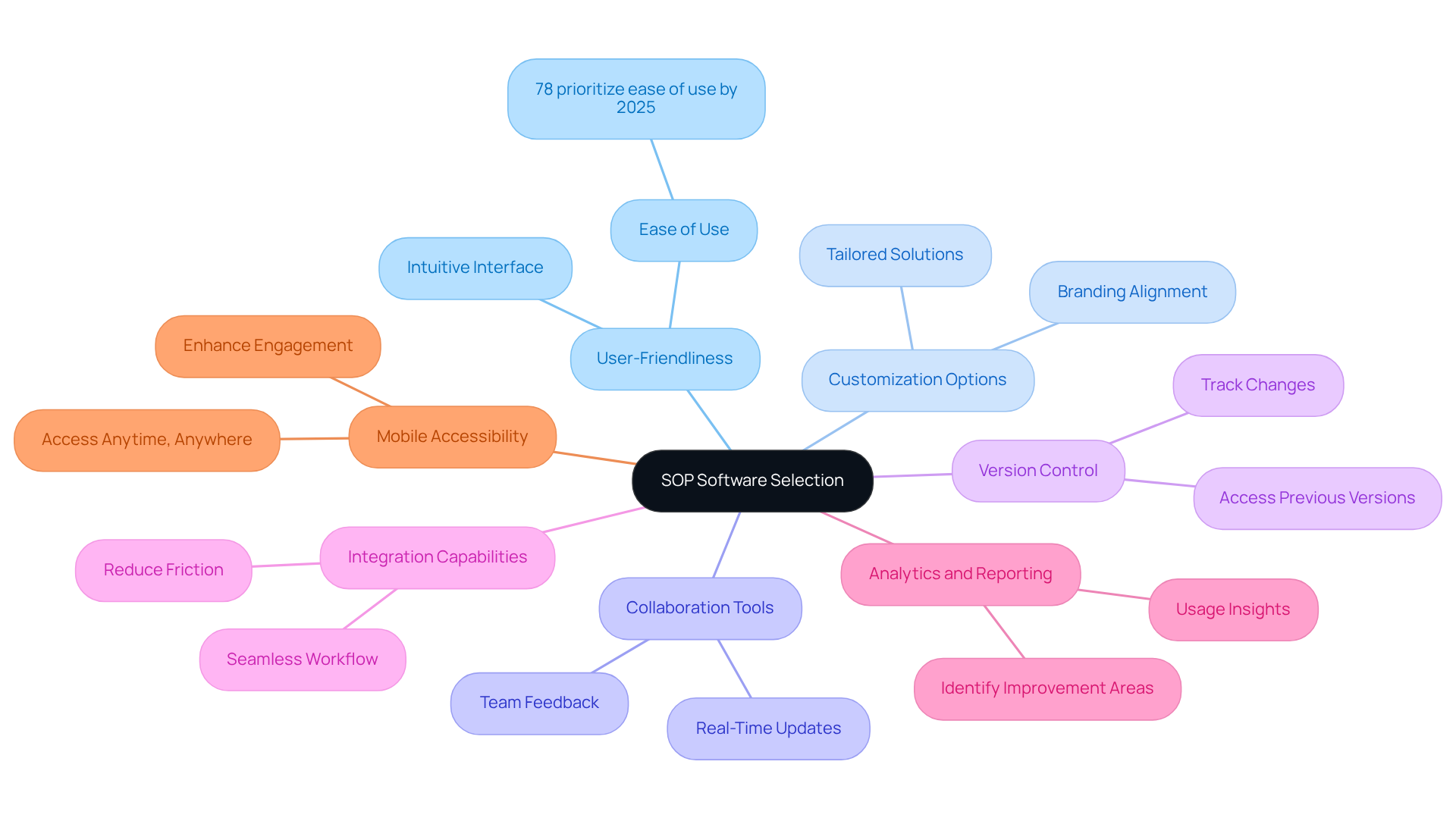
- Key features for SOP software selection include user-friendliness, customization, collaboration tools, version control, integration capabilities, analytics, and mobile accessibility.
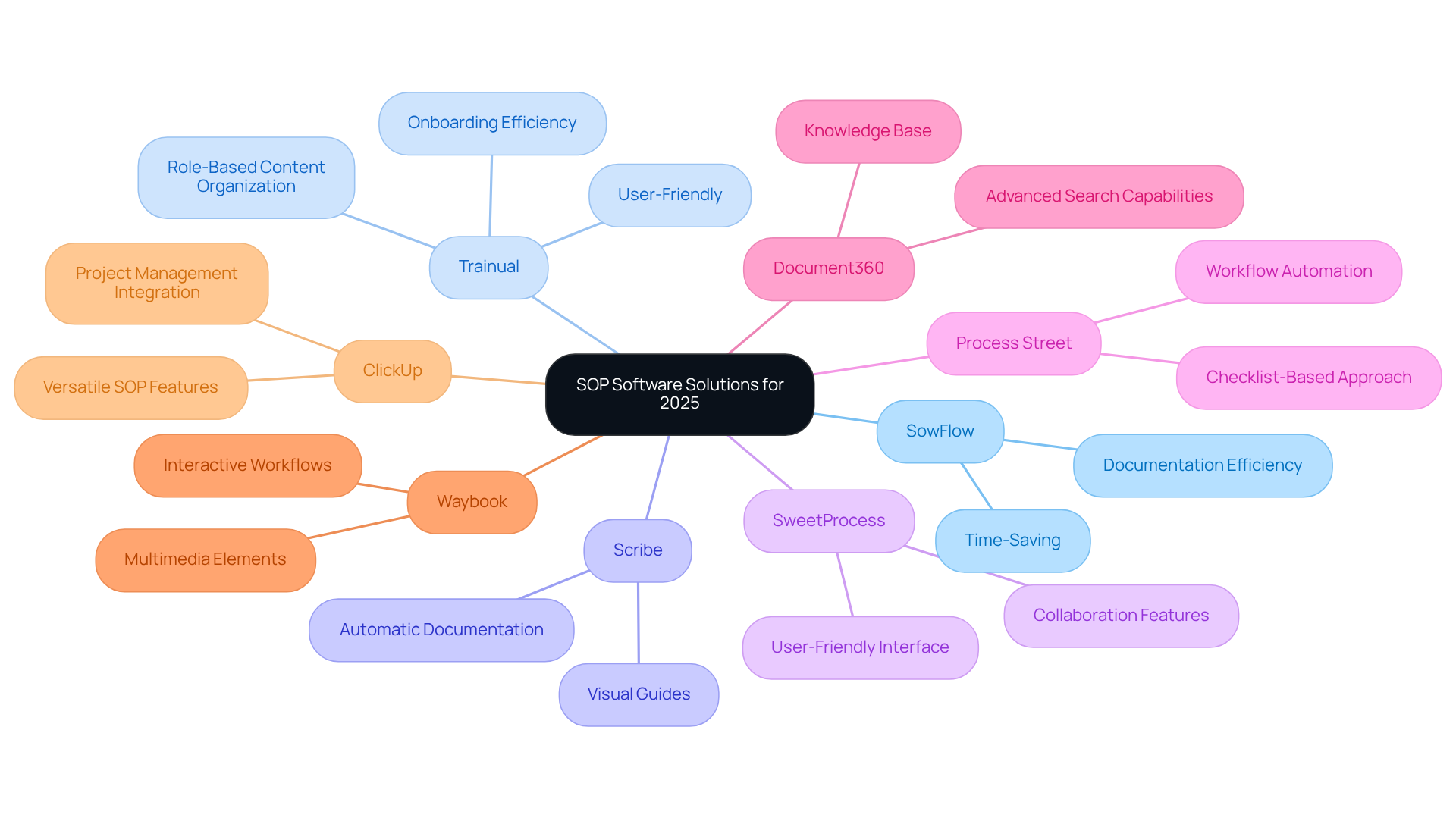
- Top SOP software solutions for 2025 include SowFlow, Trainual, Scribe, SweetProcess, Process Street, Document360, Waybook, and ClickUp, each offering unique strengths.
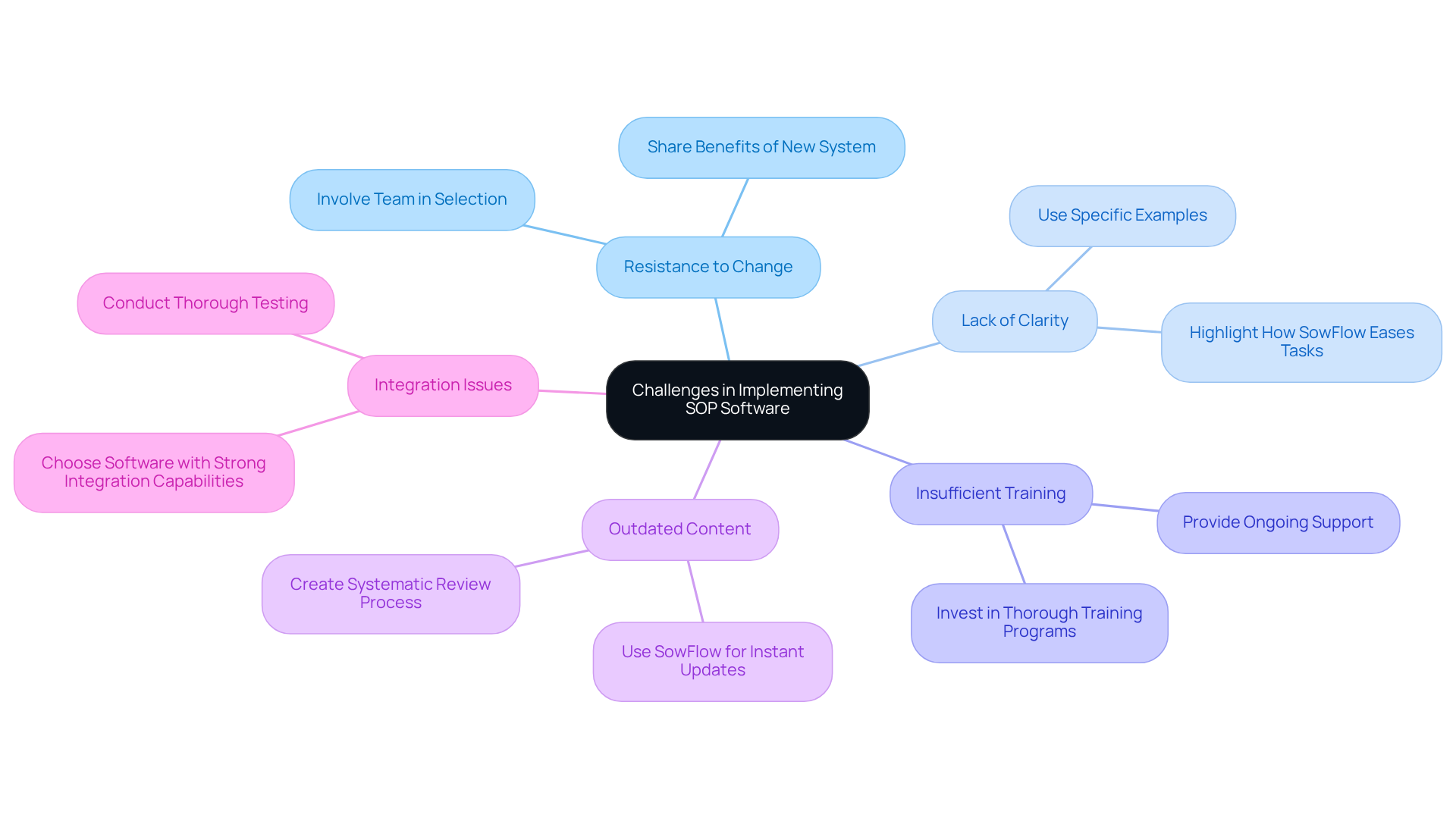
- Common challenges in implementing SOP software include resistance to change, lack of clarity, insufficient training, outdated content, and integration issues.
- Strategies to overcome implementation challenges involve involving employees in the selection process, providing thorough training, and ensuring software integration compatibility.
Introduction
You might be wondering just how important Standard Operating Procedure (SOP) software really is for small businesses today. Well, let me tell you, it’s a game changer! These handy tools not only help streamline operations but also boost compliance and efficiency. As we look ahead to 2025, they’re becoming essential for any organization aiming for success.
But here’s the thing: small businesses often face unique challenges when it comes to adopting new technologies. So, how can you navigate the selection process to find the right SOP software that fits your specific needs? Let’s dive into that!
Define SOP Software and Its Importance for Small Businesses
You might be wondering why SOP software for small business is such a big deal for organizations. Well, they’re essential tools for creating, managing, and enforcing those all-important procedures. Think of SOP applications as a centralized hub where you can document processes, making sure everyone on your team has access to the same, up-to-date information. This is super important for small enterprises, where resources can be tight and [operational efficiency](https://sowflow.io/blog-post/10-benefits-of-an-enterprise-wiki-for-streamlined-operations) is key.
By using SOP software for small business, operational errors can be reduced, training can be streamlined, and compliance with industry regulations can be boosted. Take SowFlow, for example. It’s not just another documentation tool; it’s a game-changer that integrates smoothly into your organization. This approach clearly defines who owns each document, ensuring that your SOPs are always current and easy to find when you need them. Plus, it helps build a culture of accountability and clarity, allowing your team to work together more effectively.
Now, let’s think about the benefits. Companies that embrace solid SOP management solutions often see significant drops in operational costs and compliance risks. Regularly updating your SOPs is crucial for staying compliant and relevant, keeping your documentation fresh. As the landscape for small businesses evolves, using SOP software for small business like SowFlow isn’t just a nice-to-have; it’s essential for maintaining a competitive edge and ensuring long-term growth. So, are you ready to explore how effective documentation can transform your business?

Evaluate Key Features and Criteria for SOP Software Selection
When you're on the hunt for SOP software for small business, there are a few must-have features that can really make a difference. Let’s break it down together:
- User-Friendliness: You might be wondering how easy it is to use. An intuitive interface is key! It lets you create and manage SOPs without needing a ton of training. In fact, by 2025, 78% of users will tell you that ease of use is a top priority when picking their applications.
- Customization Options: Ever feel like off-the-shelf solutions just don’t fit your style? Look for software that lets you customize things to match your unique business processes and branding. This way, your SOPs will truly reflect what makes your organization special.
- Collaboration Tools: In today’s remote work world, teamwork is everything. You want an SOP application that allows for real-time updates and feedback among your team. With great collaboration features, communication gets a boost, and the documentation process becomes a breeze.
- [Version Control](https://gluu.biz/blog/sop-work-instructions/guide-select-best-sop-software): This one's a game changer! Version control helps you keep track of changes and ensures everyone’s on the same page. You can easily access previous versions of your SOPs, so there’s no confusion about what’s current.
- Integration Capabilities: Let’s talk about workflow efficiency. If your SOP software can seamlessly integrate with the tools you already use, you’re in for smoother operations. It’s all about reducing friction in your processes!
- Analytics and Reporting: Who doesn’t love a little insight? Good analytics can give you valuable data on how your SOPs are being used. This helps you spot areas for improvement, so you can optimize your documentation practices and stay compliant.
- Mobile Accessibility: With remote work on the rise, having mobile access to your SOPs is a must. This feature means your team can grab important documents anytime, anywhere, making it easier to stay compliant and engaged.
By focusing on these key features, small businesses can discover SOP software for small business that not only meets their operational needs but also supports their growth and efficiency in a competitive landscape. So, what are you waiting for? Let’s find the right fit for you!
Compare Leading SOP Software Solutions for 2025
In 2025, several SOP software for small business solutions stand out, and one that’s generating a lot of buzz is SowFlow. It’s been praised for how it changes the game when it comes to documentation. One product owner put it perfectly: "SowFlow has been a game changer in the way we document work and deliver to our clients. I do not have to take each screenshot individually, and do not even have to leave the browser while I am creating standard operating procedures and training materials. SowFlow gave me time from my life back." That [time-saving feature](https://sowflow.io/blog-post/10-benefits-of-manufacturing-so-ps-for-operations-managers)? It’s a real boost for documentation efficiency, making it a top pick for operations managers.
You might be wondering what other options are out there. Let’s take a look at some standout choices:
- Trainual: If you’re part of a small team, Trainual is a fantastic fit. It’s user-friendly and packed with onboarding features, allowing you to quickly whip up standard operating procedures using sop software for small business. Perfect for new ventures!
- Scribe: This one’s all about automatic documentation. Scribe captures workflows straight from your actions, so you can create SOPs without all that tedious manual work.
- SweetProcess: Need to streamline your operations? SweetProcess excels in process documentation and offers great collaboration features that are super easy to use.
- Process Street: With a focus on workflow automation, Process Street lets you create checklists and SOPs that fit right into your daily operations, boosting efficiency.
- Document360: If you need a knowledge base alongside your SOPs, Document360 is your go-to. It has powerful search capabilities and analytics to help you track usage.
- Waybook: For visual learners, Waybook is a gem. It allows you to create SOPs with multimedia elements, making complex processes easier to grasp.
- ClickUp: While it’s mainly a project management tool, ClickUp also offers SOP features that integrate smoothly with task management, making it a versatile choice for small businesses.
Each of these solutions, such as sop software for small business, has its own unique strengths. The best fit for you will really depend on your specific needs and workflows. So, which one are you leaning towards?
Identify Challenges in Implementing SOP Software and Solutions
You might be wondering about the challenges that small businesses face when implementing SOP software for small business. Let’s dive into some common hurdles and how to tackle them effectively!
- Resistance to Change: It’s no secret that employees often resist new systems. They’re comfortable with the way things are, right? To ease this transition, get your team involved in the selection process. When they feel their input matters, it fosters a sense of ownership. Plus, sharing the benefits of the new system can really help calm those nerves.
- Lack of Clarity: If the purpose of the SOP program isn’t clear, employees might not see its value. Regularly highlight how SowFlow makes life easier by allowing for quick user guide creation. Use specific examples to show how it can positively impact daily tasks.
- Insufficient Training: Let’s face it, without proper training, new software can feel overwhelming. Investing in thorough training programs is key. And don’t forget ongoing support! It’s all about making sure everyone feels confident and ready to tackle the new system.
- Outdated Content: Keeping standard operating procedures up to date can be a real challenge. But with SowFlow, you can instantly update your documentation. This helps create a systematic review process, ensuring all SOPs reflect the latest practices-super important for compliance and efficiency!
- Integration Issues: Sometimes, new applications just don’t play nice with existing systems, right? To avoid disruptions, choose software with strong integration capabilities. And definitely conduct thorough testing before going all in.
By proactively addressing these challenges and developing targeted strategies, small businesses can boost their chances of successfully implementing SOP software for small business. Tools like SowFlow can really streamline those documentation processes, making everything a bit smoother!
Conclusion
Implementing SOP software for small businesses isn’t just a trend; it’s a crucial step toward operational excellence and sustainable growth. You might be wondering how tools like SowFlow can help. Well, they streamline processes, enhance compliance, and foster a culture of accountability. The right SOP software acts as a backbone for efficient operations, making sure every team member has the latest info to do their jobs effectively.
Throughout this article, we’ve highlighted key features like user-friendliness, customization options, and integration capabilities as essential when picking the best SOP software. Take a look at the comparison of leading solutions like Trainual, Scribe, and SweetProcess. It shows just how many options are out there to meet different business needs. But let’s not forget about the challenges, like resistance to change and lack of training. Tackling these issues is vital for a successful implementation, ensuring your team can fully benefit from these innovative tools.
Ultimately, adopting SOP software isn’t just about documenting procedures; it’s about transforming how small businesses operate. Embracing these technologies can lead to big improvements in efficiency and productivity, setting your organization up for success in a competitive landscape. So, small business leaders, why not take the next step? Evaluate your current processes, explore the top-rated SOP software solutions for 2025, and invest in the future of your operations!
Frequently Asked Questions
What is SOP software and why is it important for small businesses?
SOP software is a tool for creating, managing, and enforcing standard operating procedures (SOPs). It serves as a centralized hub for documenting processes, ensuring that all team members have access to the same, up-to-date information, which is crucial for operational efficiency in small businesses.
How does SOP software benefit small businesses?
SOP software helps reduce operational errors, streamline training, and enhance compliance with industry regulations. It allows for better management of documentation, ensuring that processes are clearly defined and easily accessible.
Can you provide an example of SOP software?
SowFlow is an example of SOP software that integrates into organizations to manage documentation effectively. It clarifies document ownership, keeps SOPs current, and fosters a culture of accountability among team members.
What are the advantages of using SOP management solutions?
Companies that utilize effective SOP management solutions often experience significant reductions in operational costs and compliance risks. Regularly updating SOPs is essential for maintaining compliance and relevance in a changing business landscape.
Why is regular updating of SOPs important?
Regularly updating SOPs is crucial for staying compliant with industry regulations and ensuring that documentation remains relevant and effective as the business landscape evolves.
Is SOP software necessary for small businesses?
Yes, using SOP software like SowFlow is essential for small businesses to maintain a competitive edge, ensure long-term growth, and improve operational efficiency.
👍
What others are liking


5 Steps to outline your ideal documentation structure
5 MINS READ
Where to start the your journey of mapping out your ideal documentation structure, aligning it with the very heartbeat of your organization?
Defining a winning level of detail in your process
3 MINS READ
What is too much detail, and what is too little? This article described in that winning level detail about what detail is enough.


