

Knowledge Management through Documentation
|
April 29, 2026
|

Best Free Wiki: 4 Essential Practices for Effective Implementation
Key Highlights
- User-friendliness is crucial; an intuitive interface encourages participation and ease of navigation.
- Customization options allow organisations to tailor the wiki's appearance and functionality to their needs.
- Integration capabilities with existing tools enhance workflow efficiency.
- A robust search functionality is essential for users to quickly find information.
- Access control is important for managing user permissions and securing sensitive data.
- Support resources and an active community enhance the user experience and problem-solving.
- Clear categories and logical hierarchies improve content organisation and navigation.
- Using templates standardises documentation processes and saves time.
- Incorporating tags and labels boosts the searchability of wiki content.
- Regular content reviews and updates keep the information relevant and accurate.
- A structured training programme helps users understand the wiki's functionalities.
- Interactive learning methods enhance engagement and retention during training.
- Ongoing support systems are vital for assisting users as they adapt to the wiki.
- Encouraging peer learning fosters community and knowledge sharing.
- Gathering user feedback is essential for continuous improvement of the wiki.
- Regular content audits ensure accuracy and relevance of the information.
- Monitoring user engagement metrics helps identify areas needing improvement.
- Establishing maintenance roles ensures accountability and ongoing contributions.
- The wiki should adapt to organisational changes to remain relevant.
Introduction
You might be wondering how to choose the right free wiki platform for your team. It can really change the way you collaborate and share knowledge! But let’s be honest - many organizations find it tough to implement these tools effectively. By focusing on key factors like user-friendliness, customization options, and integration capabilities, you can tap into the full potential of these platforms.
Now, what happens when things don’t go as planned? Maybe the implementation falls short, or users are hesitant to adopt the new system. This article is here to help! We’ll explore some essential practices for successful wiki implementation, offering insights that can turn potential pitfalls into powerful opportunities for collaboration and continuous improvement. So, let’s dive in!
Identify Key Criteria for Selecting a Free Wiki
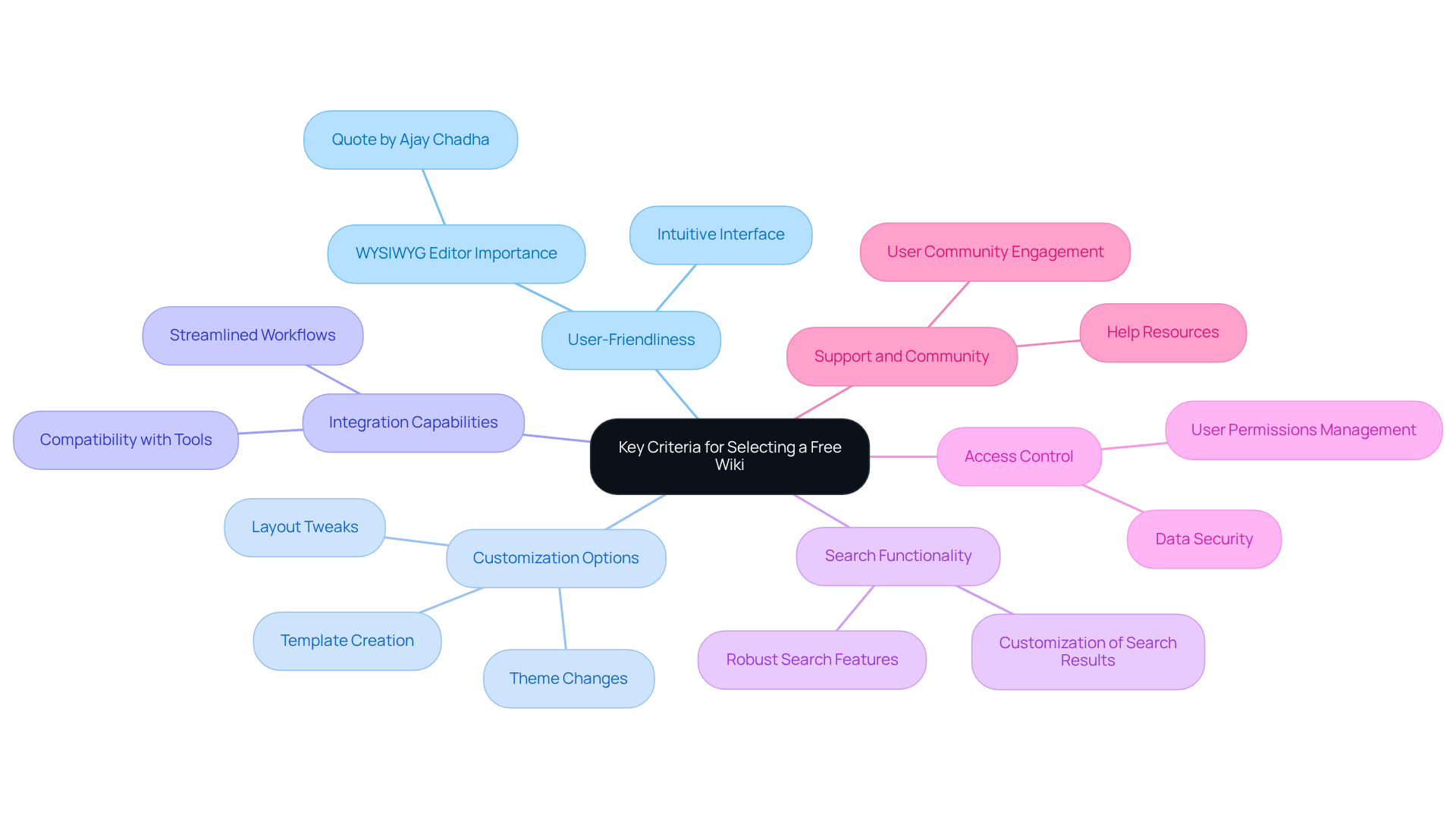
When you're on the hunt for the best free wiki platform, you might be wondering what to look for. Here are some key criteria to keep in mind:
- User-Friendliness: You want an intuitive interface that lets users navigate easily without needing a manual. A user-friendly design, like that of the best free wiki, encourages participation and makes it simpler for teams to jump on board. As Ajay Chadha puts it, "A wiki without a good WYSIWYG editor is useless," which really highlights how important those editing tools are.
- Customization Options: Look for platforms that let you customize things to fit your organization's vibe. This means tweaking layouts, changing themes, and creating templates that improve the best free wiki user experience even better.
- Integration Capabilities: It’s crucial that your wiki can play nice with the tools you already use, like project management systems or communication apps. This kind of integration can really streamline your workflows and boost efficiency.
- Search Functionality: A solid search feature is a must-have. It helps folks quickly find the info they need, making the best free wiki much more usable. After all, a wiki without a good search engine can really slow things down, right?
- Access Control: Managing user permissions is key for keeping your data secure. To protect your organization’s integrity, you want to ensure that sensitive information is only accessible to those who need it, which can be managed using the best free wiki.
- Support and Community: Don’t forget to check out the support resources and the user community. Having a place to turn for help and sharing information from the best free wiki can really enhance how effective the system is.
Common Pitfalls: Watch out for platforms that skimp on a good search engine or WYSIWYG editor-those can really cramp usability. And steer clear of overly complicated permission systems that might confuse users.
Real-World Example: Companies that have rolled out user-friendly wiki systems often see better collaboration and quicker onboarding for new hires. It just goes to show how picking the right platform can make a real difference!
Plan and Structure Your Wiki Content Effectively
To make your wiki truly effective, let’s chat about some essential planning and structuring practices that can really help:
- Define Clear Categories: You might be wondering where to start. Begin by identifying the main categories of information you want in your wiki. Think about organizing them around departments, projects, or specific types of documentation. This way, everything stays clear and focused.
- Create a Logical Hierarchy: Now, let’s dive into structuring your content. Arrange it hierarchically, with broad categories at the top and more specific topics underneath. This logical setup makes it super easy for users to navigate and find what they need.
- Use Templates: Have you ever spent too much time formatting documents? Developing standardized templates for common types of documentation, like meeting notes or project updates, can save you a ton of time. Plus, it keeps everything consistent. With SowFlow's user-friendly interface, creating and customizing templates is a breeze, making the documentation process smoother for everyone.
- Incorporate Tags and Labels: Want to boost your wiki’s searchability? Utilize tags and labels! This allows folks to filter content by specific topics or keywords, making it easier to find relevant information quickly. SowFlow has robust tagging features that can really enhance user experience and help your content shine.
- Regularly Review and Update Content: It’s important to keep your content fresh. Set up a routine for reviewing and updating information to ensure it stays relevant and accurate. Assign different sections of the wiki to specific team members for accountability and ongoing maintenance. With SowFlow, updating and revising documentation is a snap, so your wiki remains current and useful.
By following these practices, you can create a well-structured wiki that not only serves as a valuable resource but also encourages collaboration and knowledge sharing among your team. Just steer clear of common pitfalls like vague categorization or infrequent updates, which can really undermine your resource's effectiveness.

Train and Onboard Users for Successful Adoption
To make sure your wiki gets adopted successfully, let’s chat about some essential training and onboarding practices you might want to consider:
- Develop a Training Program: First off, think about setting up a structured training program. This should introduce users to the wiki's functionalities-like how to navigate, create content, and edit. Getting this foundational knowledge down is super important for effective use.
- Utilize Interactive Learning: You might be wondering how to keep everyone engaged. Well, incorporating interactive elements like quizzes, hands-on exercises, and real-time feedback can really help! These methods not only strengthen learning but also encourage deeper cognitive engagement, leading to better satisfaction and retention. As Nina M. Trocky points out, "Wikis facilitate student writing skills, group collaboration, and knowledge acquisition," which really highlights how effective they can be in boosting user engagement.
- Provide Ongoing Support: Now, let’s dive into support. It’s crucial to have a strong support system in place where folks can ask questions and get help as they get used to the wiki. Think about a dedicated help desk, participant forums, or even regular Q&A sessions to tackle common challenges. With SowFlow's instant documentation solution, users can easily update and revise their guides, keeping support materials relevant and accessible.
- Encourage Peer Learning: Have you thought about fostering a culture of peer learning? Encouraging experienced users to mentor newcomers can really enhance community building and facilitate knowledge sharing. This makes the onboarding process more collaborative and effective.
- Gather Feedback: Lastly, don’t forget to regularly ask for user feedback about their experiences with the wiki and the training process. This input is gold for making continuous improvements to both the platform and the training materials, ensuring they meet user needs and expectations. By leveraging SowFlow's capabilities, teams can streamline process standardization and boost overall efficiency.

Establish a Maintenance Plan for Continuous Improvement
To keep your wiki running smoothly, it’s a great idea to have a solid maintenance plan in place. Here are some key steps to consider:
- Regular Content Audits: You might be wondering how often you should check in on your content. Scheduling periodic audits is a smart move! This way, you can review everything for accuracy, relevance, and completeness. It helps you spot any outdated info that needs a little TLC.
- Participant Engagement Metrics: Ever thought about how engaged your users are? Keeping an eye on metrics like page views, edits, and contributions can really shine a light on areas that might need some extra love or improvement.
- Feedback Mechanism: What if your users had a way to share their thoughts? Creating a feedback system allows them to voice their opinions on the content and structure of your online resource. This can help you pinpoint pain points and areas that could use some enhancement.
- Assign Maintenance Roles: You know how teamwork makes the dream work? Designating specific team members to handle different sections of the documentation ensures accountability and encourages ongoing contributions. Everyone has a role to play!
- Adapt to Organizational Changes: As your organization evolves, so should your wiki! Be ready to adapt by adding new categories, updating processes, or integrating new tools to boost functionality. It’s all about staying relevant and useful.

Conclusion
You might be wondering how to choose the right free wiki platform and make it work wonders for your organization. Well, it’s all about enhancing collaboration and knowledge sharing! By focusing on user-friendliness, customization options, integration capabilities, search functionality, access control, and support, you can create a wiki that truly meets your unique needs and encourages everyone to jump on board.
Now, let’s talk about some key practices. Planning and structuring your content, training users, and having a solid maintenance plan are essential to keep your wiki a valuable resource. Think about clear categorization, logical hierarchies, templates, tags, and regular content updates. These elements contribute to a well-organized and efficient system. Plus, fostering a culture of peer learning and gathering feedback can lead to continuous improvement, making your wiki even more effective over time.
Ultimately, implementing a free wiki isn’t just about the tech; it’s about engaging users, providing ongoing support, and adapting as your organization evolves. By applying these essential practices, you can unlock the full potential of your wiki, turning it into a dynamic tool that drives collaboration and boosts productivity. So, are you ready to dive in and make your wiki a game-changer?
Frequently Asked Questions
What are the key criteria for selecting a free wiki platform?
The key criteria include user-friendliness, customization options, integration capabilities, search functionality, access control, and support and community resources.
Why is user-friendliness important in a wiki platform?
User-friendliness is important because it provides an intuitive interface that allows users to navigate easily without needing a manual, encouraging participation and simplifying onboarding for teams.
What customization options should I look for in a free wiki?
Look for platforms that allow you to customize layouts, change themes, and create templates to enhance the user experience.
Why are integration capabilities essential for a free wiki?
Integration capabilities are essential because they allow the wiki to work seamlessly with existing tools, such as project management systems and communication apps, streamlining workflows and boosting efficiency.
How important is search functionality in a wiki?
Search functionality is crucial as it helps users quickly find the information they need, making the wiki much more usable.
What is the significance of access control in a wiki?
Access control is significant for managing user permissions and ensuring that sensitive information is only accessible to those who need it, thereby protecting the organization’s data integrity.
What should I consider regarding support and community resources?
It's important to check the availability of support resources and a user community, as these can enhance the effectiveness of the wiki by providing help and facilitating information sharing.
What common pitfalls should I avoid when selecting a free wiki?
Avoid platforms that lack a good search engine or WYSIWYG editor, as these can hinder usability. Also, steer clear of overly complicated permission systems that might confuse users.
What benefits have companies experienced from using user-friendly wiki systems?
Companies that have implemented user-friendly wiki systems often see improved collaboration and quicker onboarding for new hires, demonstrating the impact of choosing the right platform.
👍
What others are liking


5 Steps to outline your ideal documentation structure
5 MINS READ
Where to start the your journey of mapping out your ideal documentation structure, aligning it with the very heartbeat of your organization?
Defining a winning level of detail in your process
3 MINS READ
What is too much detail, and what is too little? This article described in that winning level detail about what detail is enough.


