


Key Highlights
- SowFlow allows teams to create Standard Operating Procedures (SOPs) quickly with a user-friendly interface and Chrome extension.
- 76% of office workers spend up to three hours daily on manual data entry, highlighting the need for efficient documentation tools.
- Lucidchart helps visualise workflows, reducing the average time employees waste searching for documents by 4.5 hours weekly.
- Confluence facilitates collaborative documentation with real-time editing and version control, improving team efficiency.
- 55% of businesses report faster document processing as a major benefit of digital documentation solutions like Confluence.
- Notion combines note-taking, task management, and database features, enhancing organisational efficiency and employee satisfaction.
- 79% of businesses believe smart information management solutions will be crucial by 2025, emphasising Notion's relevance.
- ProcessMaker streamlines workflow management with user-friendly features for automating repetitive tasks.
- Bizagi Modeller enables clear visualisation of workflows using BPMN, significantly improving communication and process efficiency.
- Document360 is an AI-driven knowledge base platform that automates documentation tasks, improving onboarding and reducing costs.
- 97% of organisations face challenges with digital document workflows, making Document360 a valuable solution.
- Trello offers a flexible project management tool that helps teams organise tasks and workflows effectively.
Introduction
The world of operations management is changing fast, and let’s be honest - efficiency and organization are more important than ever in today’s competitive landscape. You might be wondering how to streamline your documentation processes, right? Well, the right tools can really make a difference!
In this article, we’re diving into seven free process documentation software options that not only boost productivity but also make creating and managing Standard Operating Procedures (SOPs) a breeze. But with so many choices out there, how do you figure out which tool will actually transform your workflow and fit your team’s unique needs? Let’s explore this together!
SowFlow: Instant SOP Creation and Efficient Documentation Management
You might be wondering how to make your smoother and more efficient with . Well, let me introduce you to SowFlow! This tool is a game-changer for organizations looking to whip up in no time. With its super intuitive interface and a handy Chrome extension, teams can right from their browser. This means you can capture all your activities accurately and efficiently, without the usual hassle.
Now, think about it: how often do you find yourself bogged down by record-keeping? SowFlow not only simplifies this but also ensures everything stays current, easily adapting to the fast-paced changes in today’s business world. Imagine cutting down the hours you spend on ! Operations managers using SowFlow can do just that, boosting and creating a more organized operational framework.
And here’s a stat that might surprise you:
- 76% of office workers spend up to three hours a day on manual data entry!
- Ineffective can lead to a whopping 21.3% drop in productivity.
That’s where SowFlow steps in as a vital solution for enhancing productivity and in 2026. Just ask a Director of Accounting from a leading firm, who said, "Our has transformed our operations, allowing us to focus on what truly matters-growing our business." So, are you ready to take your documentation to the next level?

Lucidchart: Visualize Processes for Enhanced Documentation
You might be wondering how a tool like Lucidchart can make your life easier. Well, let me tell you! Lucidchart is a fantastic diagramming tool that helps you whip up , and all sorts of . With its super intuitive drag-and-drop interface, you can collaborate with your team in real-time, making sure everyone’s on the same page and clear about what needs to be done.
Now, think about this: how much time do you spend searching for documents? On average, employees waste about 4.5 hours each week just looking for what they need! That’s where Lucidchart comes in, helping you visualize processes so you can spot bottlenecks, , and .
Speaking of efficiency, Lucidchart plays nicely with other platforms, which really amps up its usefulness in . As more organizations start to see the value in , it’s clear that tools like Lucidchart are becoming essential. Companies that have jumped on the bandwagon are reporting some pretty impressive improvements in their operations. So, if you’re looking to enhance your workflows, Lucidchart might just be the game-changer you need!

Confluence: Collaborative Documentation for Team Efficiency
You might be wondering how Confluence by Atlassian can make your life easier. Well, it’s a powerful that lets teams create, share, and manage documents all in one spot. With features like , , and comment threads, it really fosters a collaborative vibe where everyone can jump in and contribute seamlessly.
If you’re an operations supervisor, you’ll find this tool especially handy for and ensuring that everyone’s on the same page with the latest info. Many have noticed that using Confluence not only streamlines their record-keeping but also boosts team performance by cutting down on those pesky issues. For example, companies like [Example Company] have successfully with Confluence, leading to better efficiency and fewer mistakes.
And here’s a fun fact: research shows that 55% of businesses see faster as a major perk of going digital. Confluence really shines in this area with its centralized record-keeping features. So, if you’re looking to tackle the challenges of , Confluence could be your go-to solution. It’s all about within your team!

Notion: Versatile Tool for Comprehensive Process Documentation
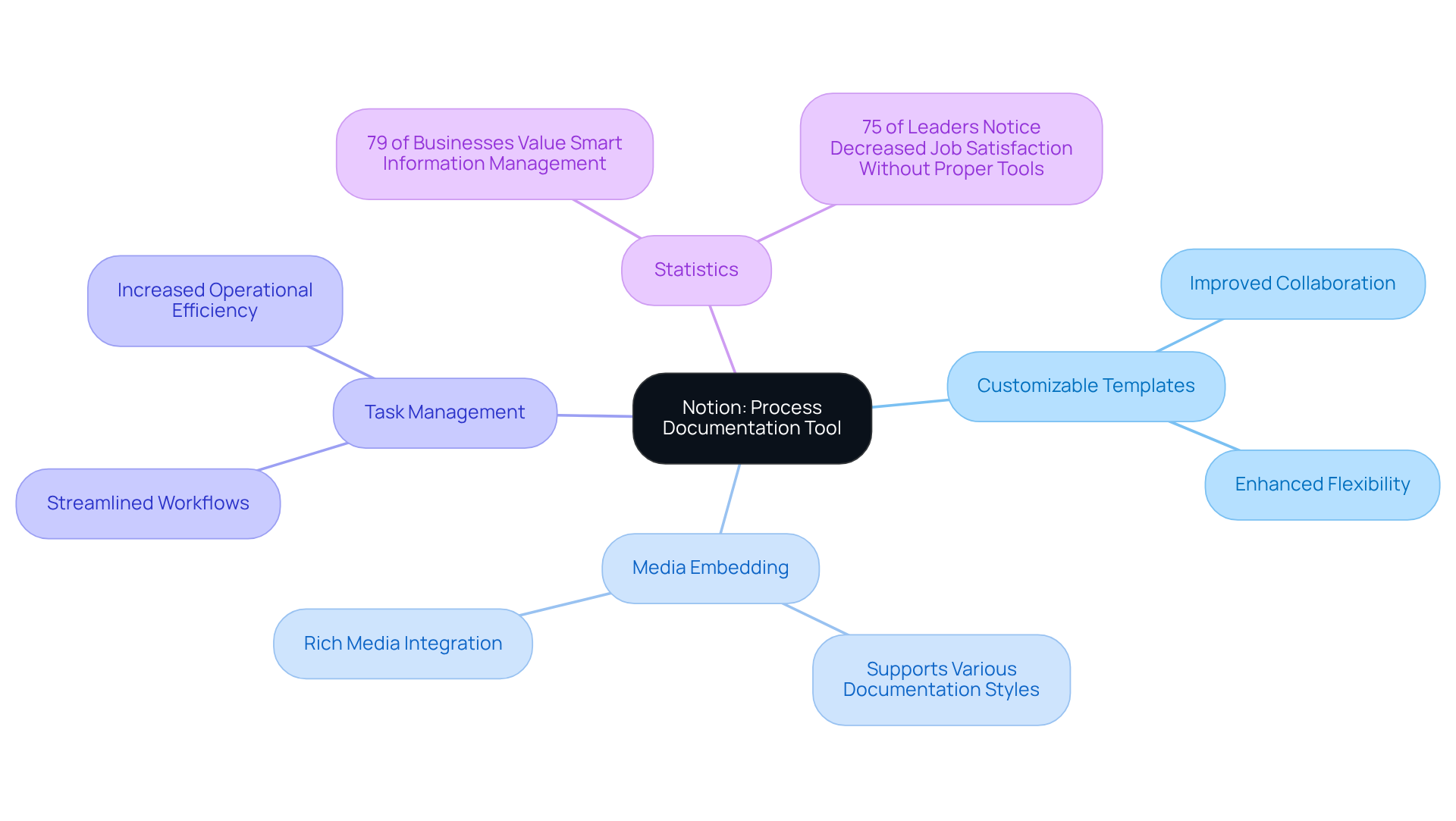
You might be wondering how to keep all your information organized without losing your mind. Well, Notion is here to help! It’s a super adaptable tool that combines note-taking, task management, and database features all in one place. This means you can create using that are not just easy to search but also neatly organized.
Notion, as a , provides and the ability to embed all sorts of media to fit various documentation styles. It’s perfect for who need a flexible solution. Speaking of flexibility, did you know that 79% of businesses believe that will be crucial by 2025? That’s a big deal! It shows just how important tools like Notion are for boosting operational efficiency.
And here’s something to think about: 75% of business leaders have noticed that employees feel less satisfied when they don’t have the right tools to manage their documents. That’s where Notion shines! Teams using it report , proving it’s effective for different recording needs across various operational scenarios.
So, why not dive deeper into Notion? Check out its and see how you can tweak your documentation methods to fit your team’s unique needs!
ProcessMaker: Streamline Workflows with Dedicated Process Management
You might be wondering how to , right? Well, let me introduce you to ProcessMaker. It’s a super handy that helps organizations like yours design, automate, and with ease.
With its user-friendly interface, operations managers can whip up and . Imagine how much time you could save! Plus, features like drag-and-drop workflow modeling and real-time analytics mean you can really .
So, if you’re looking to make your workflows smoother and more efficient, ProcessMaker might just be the solution you need. Now, let’s dive into how it can transform your daily operations!

Bizagi Modeler: User-Friendly Process Modeling for Documentation
You might be wondering how free can make your easier and more effective. Well, let me introduce you to Bizagi Modeler! It’s a powerful yet super user-friendly tool designed for and is available as free. With its simple drag-and-drop interface, you can whip up in no time.
What’s really cool is that Bizagi focuses on , which helps operations managers like you visualize complex workflows clearly. This makes communication easy, especially with free! If you’re part of a team looking to without a steep learning curve, this tool is perfect for you.
For instance, did you know that OCS Group managed to from two weeks to just 24 hours using Bizagi? That’s a real game-changer! Claire Vanner pointed out that can boost efficiency, lower costs, and improve customer experience across various operations.
And it doesn’t stop there! Tecpetrol has recorded over 300 business workflows using Bizagi, demonstrating how this free can significantly aid in documentation and visualization. So, if you’re looking to , why not give Bizagi a try?

SweetProcess: Targeted Solution for SOP Creation
You might be wondering how to make documenting a breeze. Enter SweetProcess! This handy tool is all about using . With its user-friendly interface, you and your team can whip up, manage, and keep track of your SOPs in no time. Plus, you’ll always have the .
But that’s not all! SweetProcess, which is a type of , comes packed with features like version control and task assignments. It’s a fantastic choice for operations managers who want to and . So, why not give it a try? You might just find it’s the solution you’ve been looking for!

Visio: Established Diagramming Tool for Process Documentation
You might be wondering how Microsoft Visio can help you with your diagramming needs. Well, it’s a top-notch tool that lets you whip up , , and all sorts of . With its huge collection of templates and shapes, it makes recording those intricate tasks a breeze - definitely a must-have for !
Now, let’s dive into how Visio plays nicely with other Microsoft applications. This integration really boosts its capabilities in record-keeping and project management. Teams can create clear visual aids that not only enhance understanding but also improve communication. And let’s be real, who doesn’t want that?
Speaking of clarity, contemporary trends in flowchart development really emphasize the importance of . More and more organizations are turning to tools like Visio to . Companies using Visio have even reported significant boosts in and clarity. Pretty impressive, right?
Industry leaders agree that diagramming tools are crucial in operations management. They help facilitate and optimize workflows. So, if you’re looking to improve your process records and overall , consider using free like Visio!

Document360: Knowledge Base Software for Effective Documentation
You might be wondering how Document360 stands out in the crowded world of knowledge base platforms. Well, it’s all about being AI-driven and super efficient! This platform lets teams create, manage, and share content like pros. With features like version control, rich text editing, and analytics, it keeps everything organized in one easy-to-access spot. For organizations looking to simplify their record-keeping and boost , this is a game changer.
Now, let’s talk about a common struggle: . That’s where Document360 comes in! By , it frees up employees to focus on what really matters - getting their work done without drowning in paperwork. Teams using Document360 have seen some impressive results, especially in onboarding. One operations manager even said, "Document360 has transformed our , making it faster and more efficient for new hires." How cool is that?
But wait, there’s more! The platform’s analytics feature gives insights into how documents are being used. This means operations managers can spot knowledge gaps and tackle them head-on. It’s all about fostering a collaborative culture where everyone can easily share and access important info. And let’s not forget the financial side - ! With tools like Document360, organizations can drive efficiency and success in today’s fast-paced business world. A recent case study even showed a company slashing its record-keeping costs by 30% after implementing Document360. Talk about tangible benefits!

Trello: Flexible Project Management Tool for Process Documentation
You might be wondering how Trello can help you manage your projects better. Well, let me tell you, it’s a pretty versatile tool! Trello uses boards, lists, and cards to help teams organize tasks and workflows. While it’s mainly known for project management, it’s also great for keeping track of processes. Operations managers can whip up boards to , assign tasks, and track progress, making sure everyone’s on the same page.
With its user-friendly interface and flexibility, Trello is a fantastic choice for teams looking to using free while juggling projects. Did you know that a recent study found that 90% of companies believe ? That really highlights how important tools like Trello are for optimizing processes.
Industry leaders see the value in Trello’s adaptability. Peter Drucker once said, "." This really drives home the point that having effective tools is key to achieving . Companies like [specific examples or case studies] have successfully used Trello to , showing just how effective it can be in real-world situations.
And here’s something to think about: as automation becomes more common in project management - - Trello’s flexibility makes it a key player in adapting to these changes. So, why not give it a try and see how it can work for you?

Conclusion
You might be wondering how free process documentation software can really make a difference for your team. Well, let’s dive into it! There’s a whole range of tools out there, from SowFlow to Trello, each packed with features that can help operations managers like you streamline documentation, boost collaboration, and ultimately ramp up productivity.
These tools tackle common challenges head-on. For example:
- SowFlow makes creating SOPs a breeze
- Lucidchart helps visualize processes
- Confluence brings teams together for better collaboration
Not only do these solutions cut down on the time spent on manual documentation, but they also nurture a culture of continuous improvement. This way, your team can focus more on strategic goals instead of getting bogged down by administrative tasks.
As you navigate the complexities of operational management, embracing these innovative tools is key. The right process documentation software can really change the game, ensuring everyone has access to the info they need, right when they need it. So, why not explore these options a bit more? Finding the tool that fits your operational goals could lead your team to even greater achievements in 2025 and beyond!
Frequently Asked Questions
What is SowFlow and how does it help with documentation?
SowFlow is a process documentation software that allows organizations to create Standard Operating Procedures (SOPs) quickly and efficiently. It features an intuitive interface and a Chrome extension that enables teams to document workflows directly from their browser, ensuring accurate and current documentation.
How does SowFlow impact productivity?
SowFlow enhances productivity by simplifying the documentation process, allowing operations managers to save hours on record-keeping. It helps organizations adapt to rapid changes, improving knowledge management and creating a more organized operational framework.
What are the statistics related to manual data entry and productivity?
Research indicates that 76% of office workers spend up to three hours a day on manual data entry. Additionally, ineffective document workflows can result in a 21.3% drop in productivity.
What is Lucidchart and what functionalities does it offer?
Lucidchart is a diagramming tool that helps users create flowcharts, workflow maps, and visual representations of their processes. Its drag-and-drop interface allows for real-time collaboration, making it easier for teams to stay aligned on tasks.
How does Lucidchart improve efficiency in document management?
Lucidchart helps reduce the time employees spend searching for documents, which averages about 4.5 hours each week. By visualizing processes, it enables users to identify bottlenecks and streamline workflows, ultimately boosting overall efficiency.
How does Lucidchart integrate with other platforms?
Lucidchart is designed to work well with various other platforms, enhancing its utility in documentation and project management, which makes it a valuable tool for organizations seeking to improve their operations.
What is Confluence and what are its key features?
Confluence is a collaboration tool by Atlassian that allows teams to create, share, and manage documents in one place. Key features include real-time editing, version control, and comment threads, fostering a collaborative environment for teams.
How does Confluence benefit operations supervisors?
Confluence helps operations supervisors standardize procedures and ensure that all team members have access to the latest information. It streamlines record-keeping and improves team performance by minimizing version control issues.
What are the advantages of using Confluence for document processing?
Research shows that 55% of businesses experience faster document processing as a significant benefit of going digital. Confluence's centralized record-keeping features contribute to this efficiency, promoting continuous improvement within teams.
List of Sources
- SowFlow: Instant SOP Creation and Efficient Documentation Management
- Just the Numbers: 10 Document Management Stats You Need to Know (https://foxit.com/blog/just-the-numbers-10-document-management-stats-you-need-to-know)
- 100 Document Management Statistics to Make You Rethink Your Processes in 2025 (https://filecenter.com/blog/document-management-statistics)
- 5 Quotes from Customers Who Are Thankful for Document Management • Altec (https://doclinkai.com/5-quotes-from-customers-who-are-thankful-for-document-management)
- Rethinking Your Document Management (https://business.com/articles/7-statistics-that-will-make-you-rethink-your-document-management-strategy)
- Document Management Stats & Trends in Digital Era | Insights丨PDF Reader Pro (https://pdfreaderpro.com/blog/document-management-statistics)
- Lucidchart: Visualize Processes for Enhanced Documentation
- Just the Numbers: 10 Document Management Stats You Need to Know (https://foxit.com/blog/just-the-numbers-10-document-management-stats-you-need-to-know)
- 100 Document Management Statistics to Make You Rethink Your Processes in 2025 (https://filecenter.com/blog/document-management-statistics)
- Document Management Stats & Trends in Digital Era | Insights丨PDF Reader Pro (https://pdfreaderpro.com/blog/document-management-statistics)
- 75 Document Processing Statistics for 2025: Market Size, Trends & Automation ROI (https://sensetask.com/blog/document-processing-statistics-2025)
- 100 Essential Data Storytelling Quotes (https://effectivedatastorytelling.com/post/100-essential-data-storytelling-quotes)
- Confluence: Collaborative Documentation for Team Efficiency
- 100 Document Management Statistics to Make You Rethink Your Processes in 2025 (https://filecenter.com/blog/document-management-statistics)
- 85 Quotes - Operational Excellence and Continuous Improvement | Rever (https://reverscore.com/85-quotes-operational-excellence-and-continuous-improvement)
- 90+ Workplace Collaboration Statistics That Matter in 2026 (https://hireborderless.com/post/workplace-collaboration-statistics)
- Notion: Versatile Tool for Comprehensive Process Documentation
- matthiasfrank.de (https://matthiasfrank.de/en/case-studies)
- Rethinking Your Document Management (https://business.com/articles/7-statistics-that-will-make-you-rethink-your-document-management-strategy)
- 100 Document Management Statistics to Make You Rethink Your Processes in 2025 (https://filecenter.com/blog/document-management-statistics)
- 11 Documentation Statistics to Make You Rethink Process in 2025 - Whale (https://usewhale.io/blog/documentation-statistics)
- Importance of Documentation - Expert and Influential Leader Quotes : Erase Your Risk with Proper Documentation (https://forensicnotes.com/importance-of-documentation-expert-and-influential-leader-quotes)
- ProcessMaker: Streamline Workflows with Dedicated Process Management
- 25 Inspirational Business Process Improvement Quotes (https://teamguru.com/blog/25-inspirational-business-process-improvement-quotes/1632)
- Workflow automation quotes that separate hype from reality (https://tallyfy.com/workflow-automation-quotes)
- 8 Pivotal Features of Business Process Management Software (https://processmaker.com/blog/8-pivotal-features-of-business-process-management-software)
- 10 Features Your Workflow Management System Needs (https://processmaker.com/blog/workflow-management-system)
- 5 inspiring quotes about business process management – Novacura (https://novacura.com/5-inspiring-quotes-about-business-process-management)
- Bizagi Modeler: User-Friendly Process Modeling for Documentation
- A Comprehensive Guide to Business Analysis Tools in 2026 (https://synergixtech.com/news-event/business-blog/business-analysis-tools-guide)
- Real-World Business Process Automation Examples That Sparked Success (https://bizagi.com/en/blog/business-process-automation-examples)
- 20 best data visualization quotes - The Data Literacy Project (https://thedataliteracyproject.org/20-best-data-visualization-quotes)
- Process Automation Case Studies | Bizagi (https://bizagi.com/en/customers)
- bernardzitzer.com (https://bernardzitzer.com/powerful-visualization-quotes)
- SweetProcess: Targeted Solution for SOP Creation
- Customer Stories Archives - SweetProcess (https://sweetprocess.com/category/customer-stories)
- Why Are SOPs Important? Understanding Their Impact on ROI - Whale (https://usewhale.io/blog/the-importance-of-sops)
- Mastering Efficiency: A Comprehensive Guide to Effective SOPs in Manufacturing (https://dewstack.com/blog/comprehensive-guide-to-effective-sops-in-manufacturing)
- Visio: Established Diagramming Tool for Process Documentation
- operational-excellence-consulting.com (https://operational-excellence-consulting.com/operational-excellence-quotes)
- 16 Best Project Management Quotes (https://projectmanager.com/blog/10-best-project-management-quotes)
- The Top 200 Manufacturing & Operations Quotes (https://praxie.com/top-business-operations-manufacturing-quotes)
- Document360: Knowledge Base Software for Effective Documentation
- 11 Documentation Statistics to Make You Rethink Process in 2025 - Whale (https://usewhale.io/blog/documentation-statistics)
- Trello: Flexible Project Management Tool for Process Documentation
- Project Management Software Statistics, Facts & Trends (2025) (https://mosaicapp.com/post/project-management-software-statistics-facts-trends-2025)
- One moment, please... (https://pm360consulting.ie/25-project-management-statistics-to-guide-your-plans-in-2025)
- 110+ project management statistics and trends for 2026 (https://monday.com/blog/project-management/project-management-statistics)
- operational-excellence-consulting.com (https://operational-excellence-consulting.com/operational-excellence-quotes)
- 125 Management Quotes: Essential Wisdom for Excellence | ITD World (https://itdworld.com/blog/leadership/management-quotes)
👍
What others are liking


5 Steps to outline your ideal documentation structure
5 MINS READ
Where to start the your journey of mapping out your ideal documentation structure, aligning it with the very heartbeat of your organization?
Defining a winning level of detail in your process
3 MINS READ
What is too much detail, and what is too little? This article described in that winning level detail about what detail is enough.


