
Knowledge Management through Documentation
|
April 29, 2026
|

4 Best Practices for Effective User Manual Writing
Key Highlights
- Identifying the audience is crucial for creating effective user manuals; demographics and technical skills should guide content complexity.
- SowFlow's documentation solution allows for quick updates and tailored content based on audience needs.
- Clear structure in manuals, with logical sections and headings, enhances navigation and comprehension.
- Using bullet points, numbered lists, and tables improves readability and highlights essential information.
- Employing plain language and avoiding jargon makes manuals more accessible to users.
- Incorporating visuals like diagrams and screenshots aids in understanding and retention of information.
- Usability testing with real users is vital for gathering feedback and improving manual effectiveness.
- Regular updates based on user feedback ensure manuals remain relevant and user-friendly.
Introduction
Crafting an effective user manual isn’t just about slapping words on a page; it’s really about making the reader’s experience as smooth as possible. You might be wondering, how can you turn complex information into something that’s easy to digest? By focusing on a few best practices - like knowing your audience, structuring your content clearly, and using plain language - you can create guides that truly resonate.
But here’s the kicker: how do you make sure these manuals not only inform but also engage users? This article dives into some essential strategies that can take your user manual writing from ordinary to extraordinary. So, let’s explore the nuances of clarity and usability together!
Identify Your Audience for Tailored Content
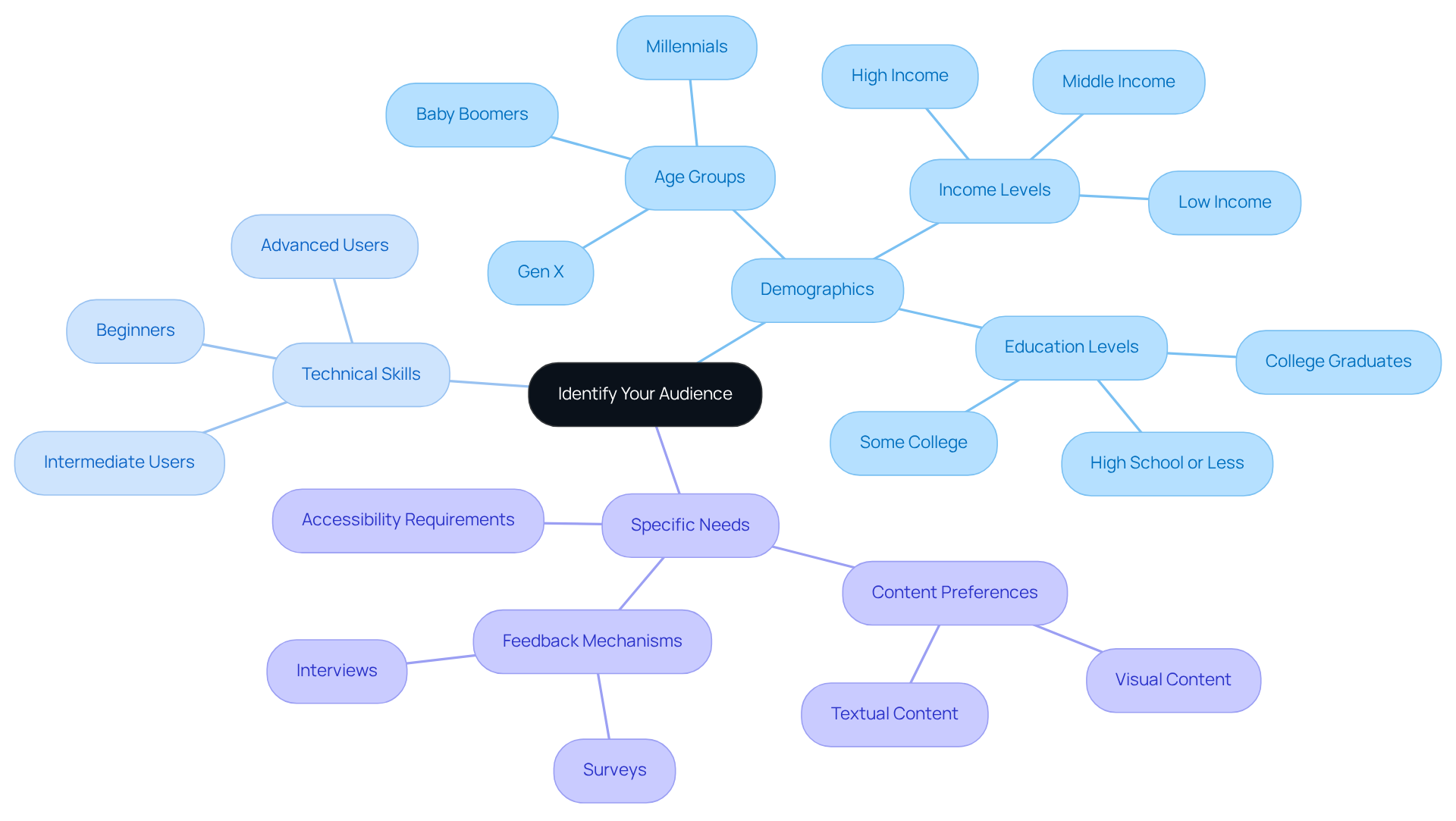
You might be wondering why recognizing your audience is such a big deal in when it comes to . Well, it’s all about ! Start by outlining the . For example, if you’re , you’ll want to avoid technical jargon and complicated instructions. On the flip side, if your audience is more advanced, feel free to dive into the nitty-gritty details.
Speaking of tools, is a game changer! It lets you whip up guides with ease and adapt them quickly based on what you learn. Have you ever thought about conducting surveys or interviews? They can really shed light on your audience’s preferences and challenges, helping you tailor your content just right. This approach not only boosts usability but also ramps up satisfaction-did you know that 85% of people believe ?
So, by with your audience’s needs and leveraging SowFlow’s capabilities for instant updates, you’re not just creating guides; you’re crafting a more engaging and effective experience for everyone involved. Now, doesn’t that sound like a win-win?
Organize Content with Clear Structure and Flow
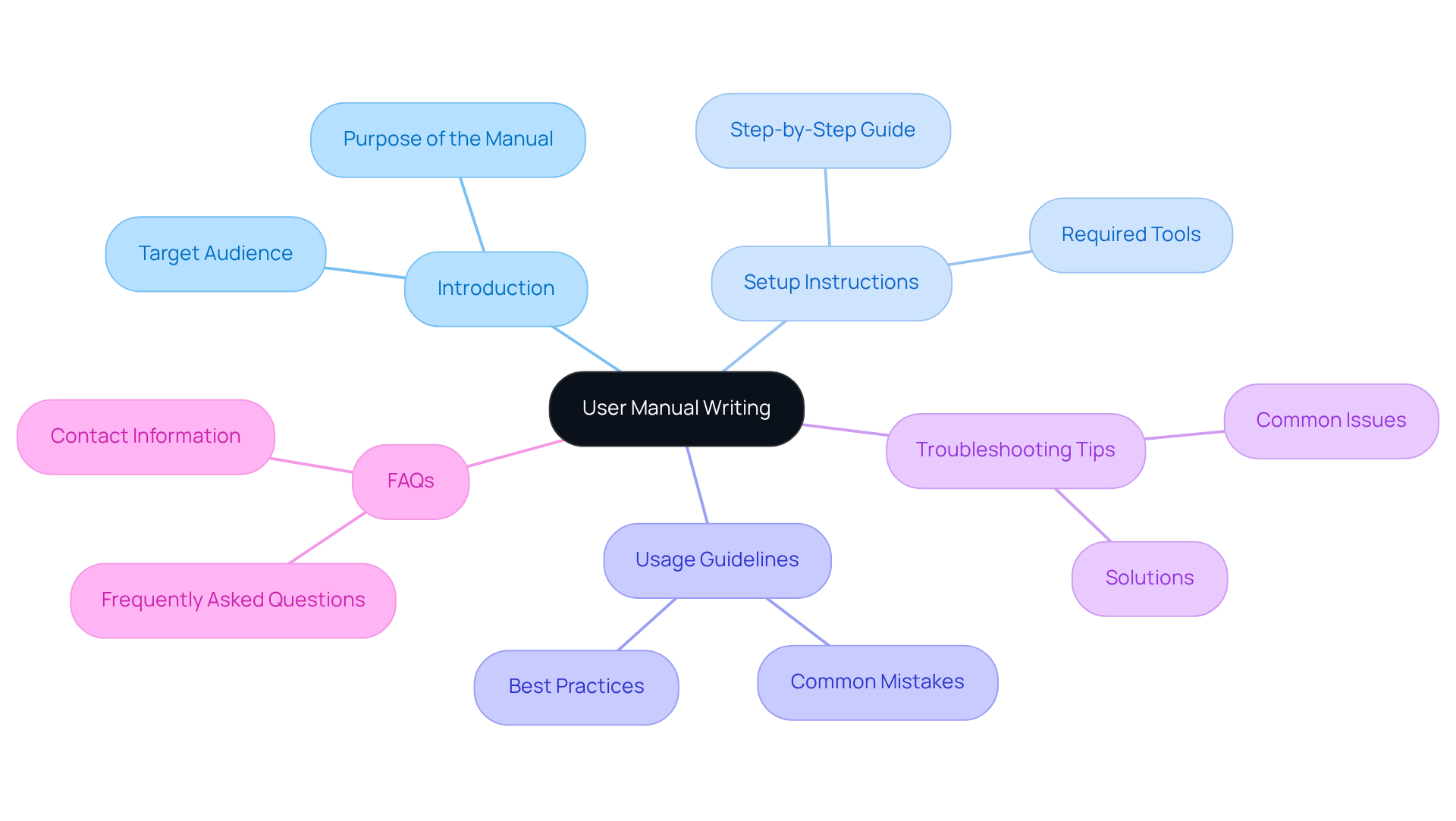
You might be wondering how can be both informative and super easy to navigate. Well, it all starts with outlining your main sections and subsections. By using clear headings and subheadings, you’re setting up a logical hierarchy that makes everything flow nicely. Think about it: you could kick things off with an introduction, then move on to , , , and finally, FAQs. This kind of logical progression in helps users follow along without getting lost, which benefits everyone!
Now, let’s talk about readability. Incorporating bullet points, numbered lists, and tables can really break up dense text and highlight key information. Did you know that:
- 94% of consumers say is the most ?
- 88% of internet visitors are less likely to return to a website after a negative experience?
That just goes to show how important it is to have a . On the flip side, if your manual is , it can lead to some serious frustration. Yikes!
So, user manual writing in a not only helps with comprehension but also makes it super easy for folks to find the info they need, right when they need it. By ensuring each section flows logically into the next, you’re empowering people to get the answers they’re looking for without any unnecessary delays. And let’s be honest, that’s what we all want-to enhance the overall experience!
Utilize Plain Language and Visuals for Clarity
When you're engaged in user manual writing, think about using . You might be wondering why this matters - well, makes a big difference! For instance, instead of saying 'utilize,' just say 'use.'
Now, let’s talk visuals! can really help clarify your instructions and give context. that relate directly to your content make it so much easier for folks to follow along.
Speaking of that, have you checked out ? With simple updates and easy , you can keep your fresh in a fast-paced business world. This mix of clear language, helpful visuals, and efficient will not only boost comprehension but also help people retain the information better. So, why not give it a try?

Test Instructions with Real Users for Feedback
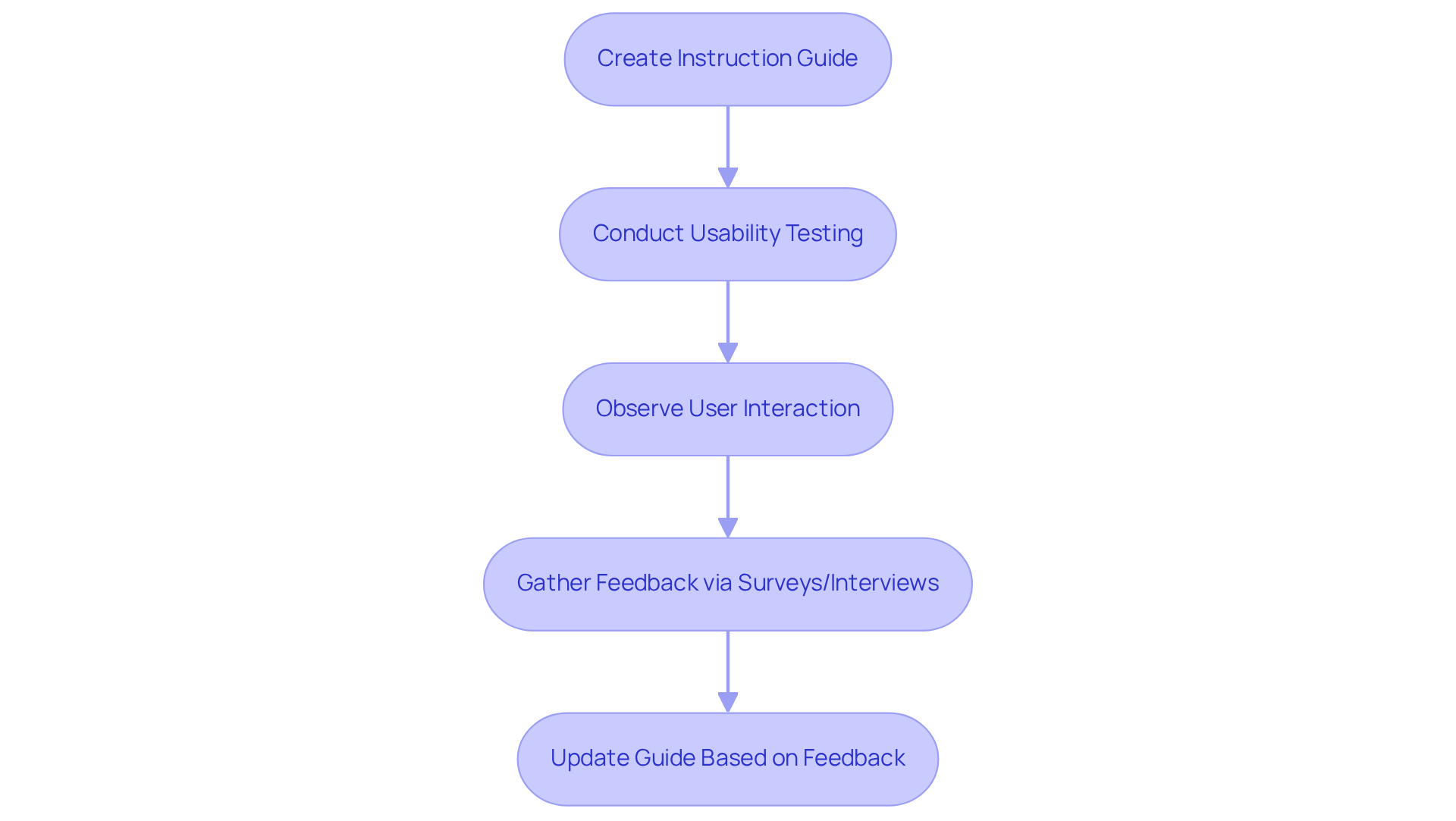
After you create your instruction guide, you might be wondering how to make sure it really works for people. Well, is key! This means having participants try out tasks using your guide while you watch how they interact with it. Keep an eye out for any spots where they seem to struggle or look confused.
Once the testing session wraps up, or interviews. This is your chance to learn about their experiences and get their suggestions for improvement. Research shows that when you , it can really . In fact, teams that prioritize input from users often see a and usability scores.
So, what’s the takeaway? Regularly evaluating and updating your guide based on this feedback not only helps clear up any confusing instructions or missing info, but it also ensures that your document stays relevant and effective over time. Remember, as experts point out, the best products focus on . That’s why is such a vital part of the user manual writing process.
Speaking of making things easier, with SowFlow's , you can streamline this whole process. It’s designed to help you update and revise your based on real , which can really enhance your team's efficiency and productivity!
Conclusion
You might be wondering how to make your user manuals truly effective. Well, it all boils down to a few best practices that can really boost clarity, usability, and engagement. By getting to know your audience, organizing your content in a logical way, using plain language and visuals, and listening to user feedback, you can create manuals that not only inform but also enhance the user experience. Tailoring your content to meet the specific needs of your audience helps build a meaningful connection, while a clear structure lets users navigate the information with ease.
The article pointed out just how important it is to identify your target audience. This step is crucial for crafting content that resonates. Plus, organizing your information coherently makes it accessible - think clear headings and helpful visuals. And let’s not forget about language! Using straightforward terms can’t be overstated, as it directly affects how well users understand your manual. Finally, testing your manuals with real users and integrating their feedback is key for continuous improvement. This way, your guides stay effective and user-friendly.
In a time when user expectations are always changing, these practices aren’t just suggestions; they’re essential strategies for anyone involved in writing user manuals. Embracing these approaches will lead to documentation that not only meets but exceeds user needs, ultimately boosting satisfaction and loyalty. Prioritizing clarity and usability in your user manuals is a commitment to excellence that benefits both you and your users!
Frequently Asked Questions
Why is identifying the audience important in user manual writing?
Identifying the audience is crucial because it helps writers understand who they are addressing, allowing them to tailor content to meet the specific demographics, technical skills, and needs of their readers.
How should content differ for beginners versus advanced users?
For beginners, content should avoid technical jargon and complicated instructions, whereas for advanced users, it can include detailed and technical information.
What tool is mentioned as beneficial for creating user manuals?
SowFlow’s instant documentation solution is mentioned as a beneficial tool that allows for easy creation and quick adaptation of guides based on audience feedback.
How can surveys or interviews help in content creation?
Surveys or interviews can provide insights into the audience’s preferences and challenges, enabling writers to tailor their content more effectively to meet user needs.
What impact does well-organized content have on brand credibility?
Well-organized content enhances a brand's credibility, with 85% of people believing that it contributes positively to their perception of a brand.
What is the overall goal of aligning user manual writing with audience needs?
The goal is to create a more engaging and effective experience for users, resulting in increased usability and satisfaction with the content.
👍
What others are liking


5 Steps to outline your ideal documentation structure
5 MINS READ
Where to start the your journey of mapping out your ideal documentation structure, aligning it with the very heartbeat of your organization?
Defining a winning level of detail in your process
3 MINS READ
What is too much detail, and what is too little? This article described in that winning level detail about what detail is enough.


