

Remote Team Documentation Strategies
|
April 29, 2026
|

10 Essential Documentation Systems Examples for Operations Managers
Key Highlights
- SowFlow simplifies the creation and management of Standard Operating Procedures (SOPs), improving process standardisation.
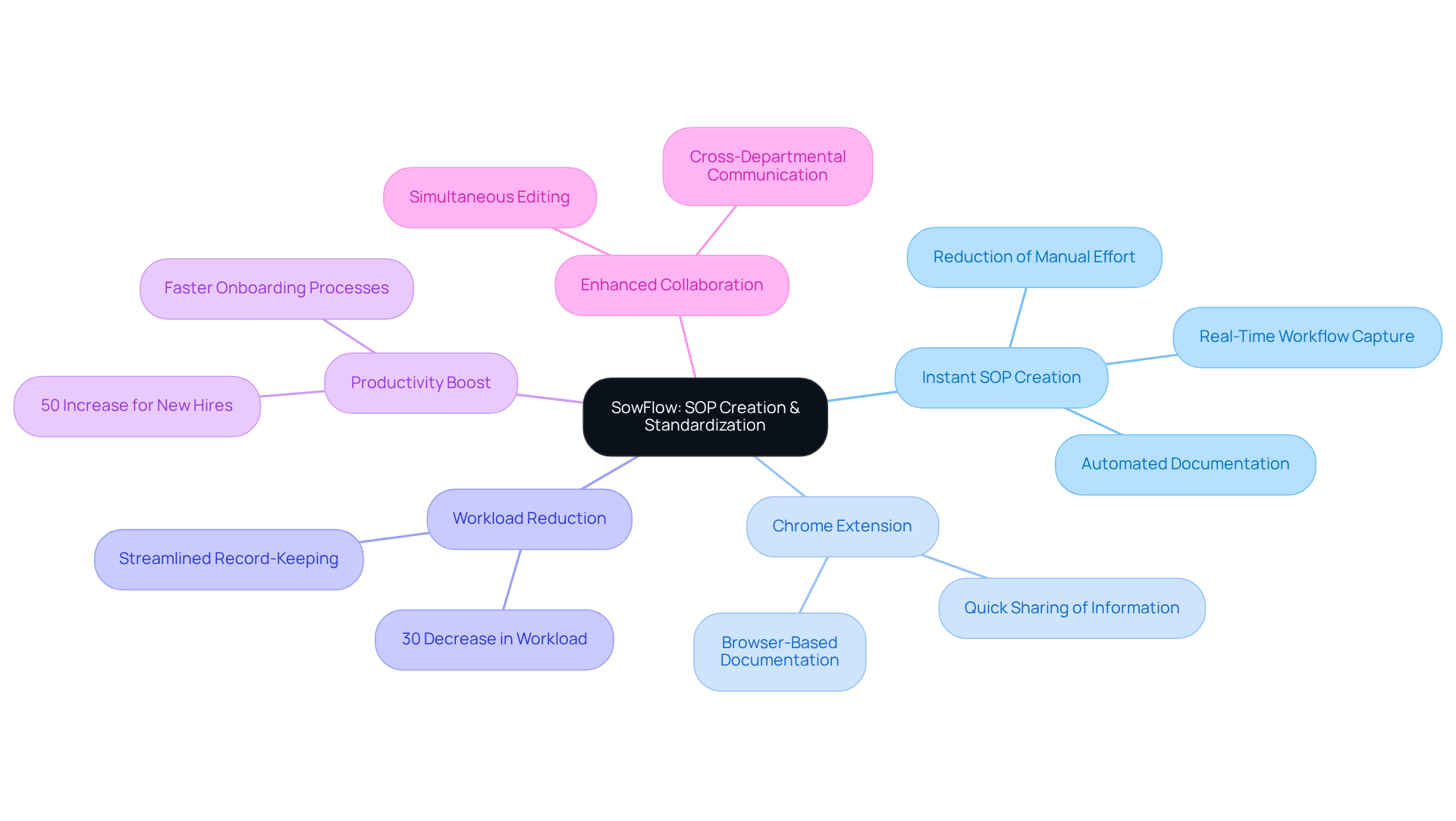
- The SowFlow Chrome extension allows for quick documentation of workflows directly from the browser, reducing workload by 30%.
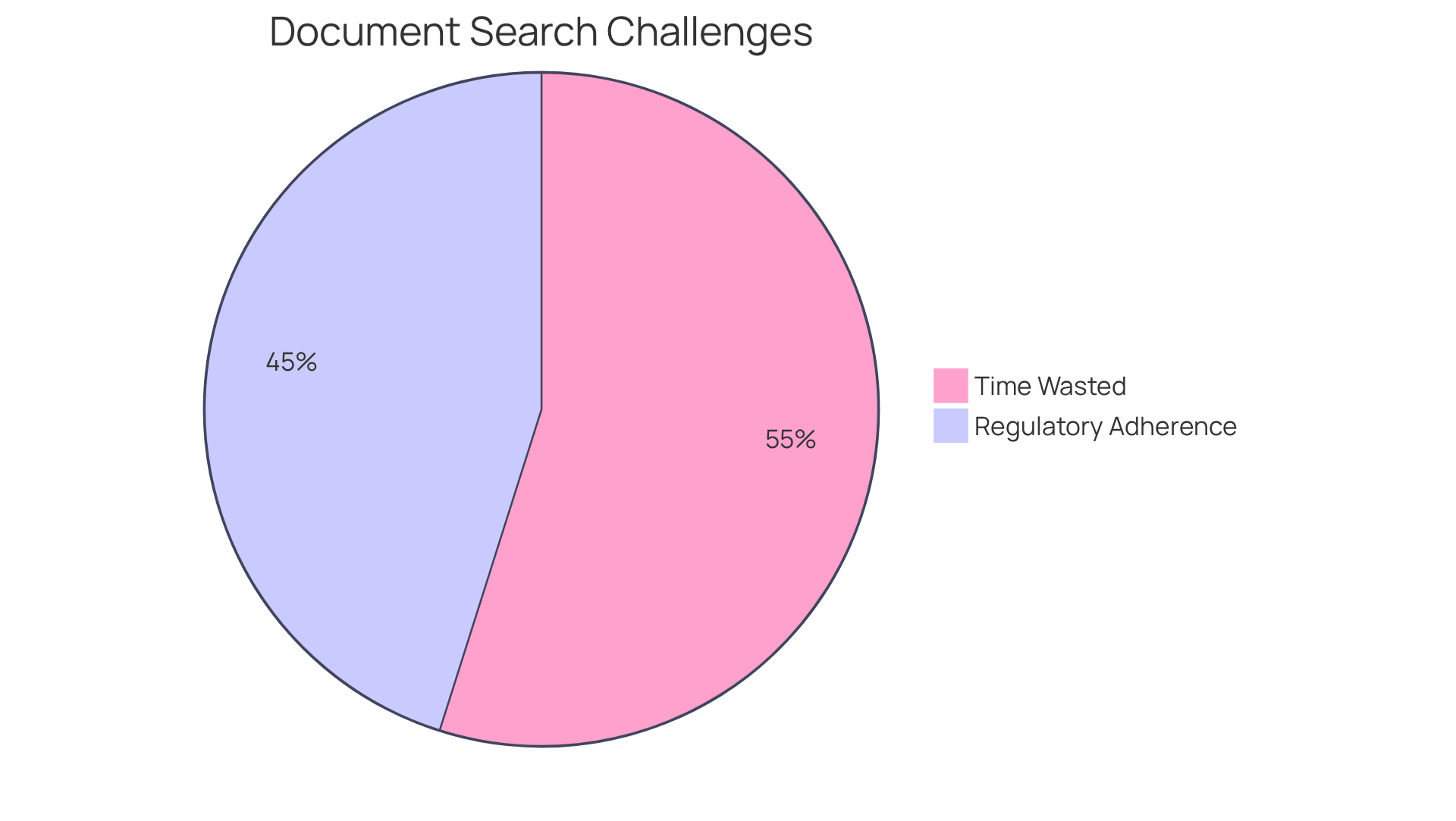
- DocuWare offers smart indexing and full-text search for efficient file retrieval, addressing the 73% of employees who waste time searching for documents.
- 60% of organisations value automation for regulatory compliance, with DocuWare helping to streamline processes and save an average of $46,000 annually.
- Quickbase provides customizable workflows and automation features, yielding an impressive 198% annual ROI for companies that automate paperwork.
- 39% of organisations experience faster customer response times due to digital paperwork processes with Quickbase.
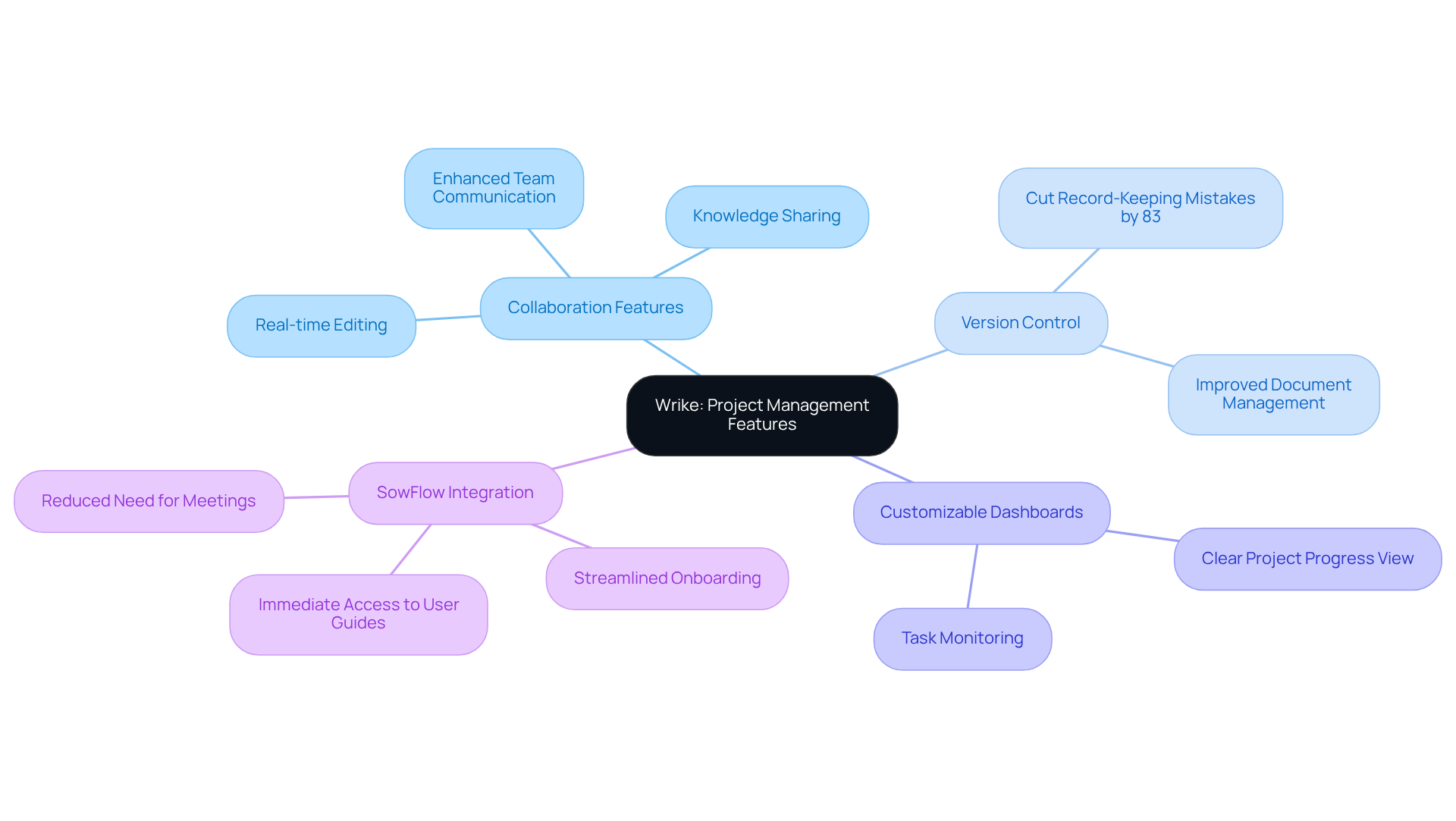
- Wrike enhances project management through real-time collaboration and version control, reducing record-keeping errors by up to 83%.
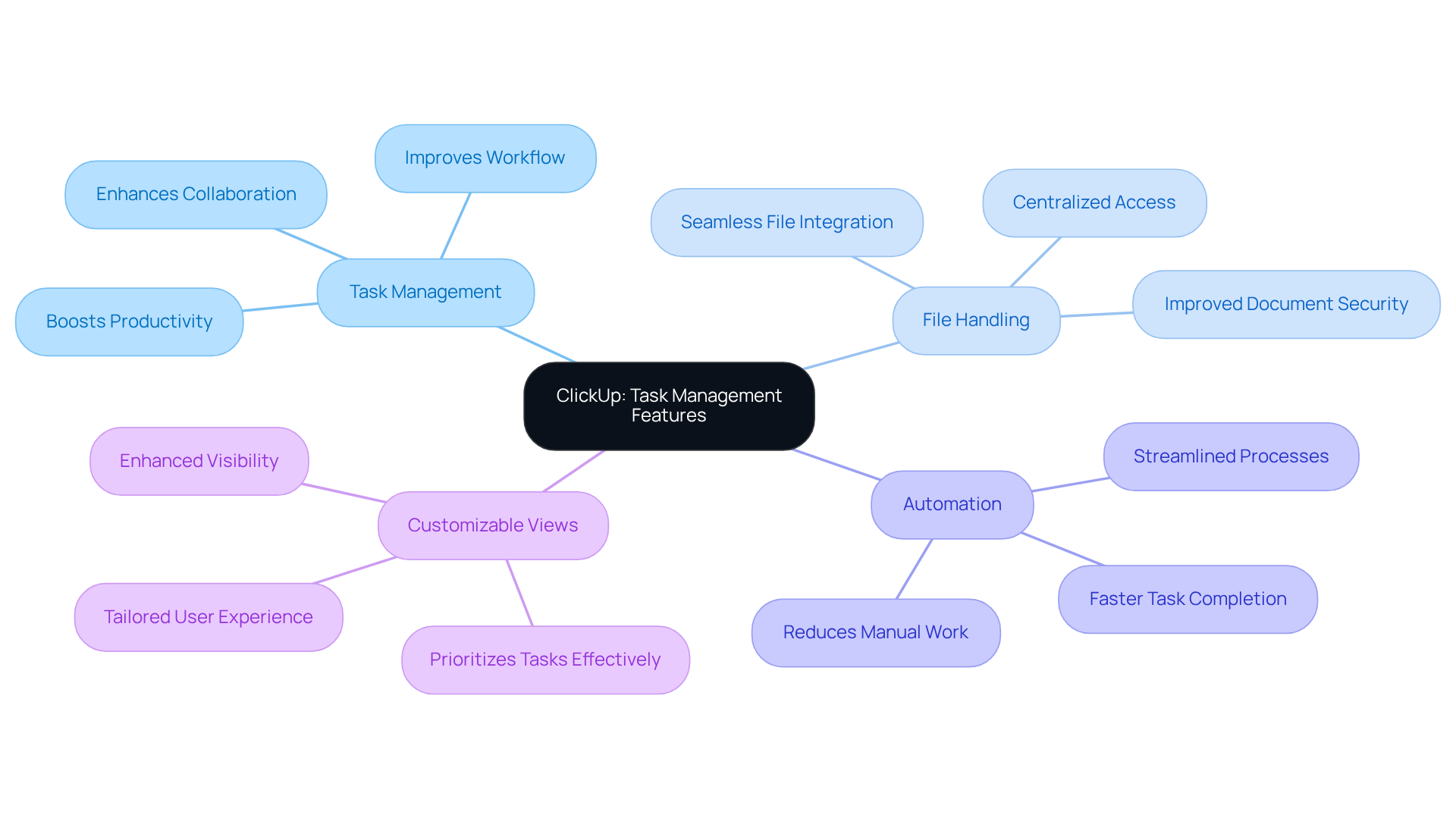
- ClickUp integrates task management with document management, allowing seamless file handling connected to tasks, boosting organisation and productivity.
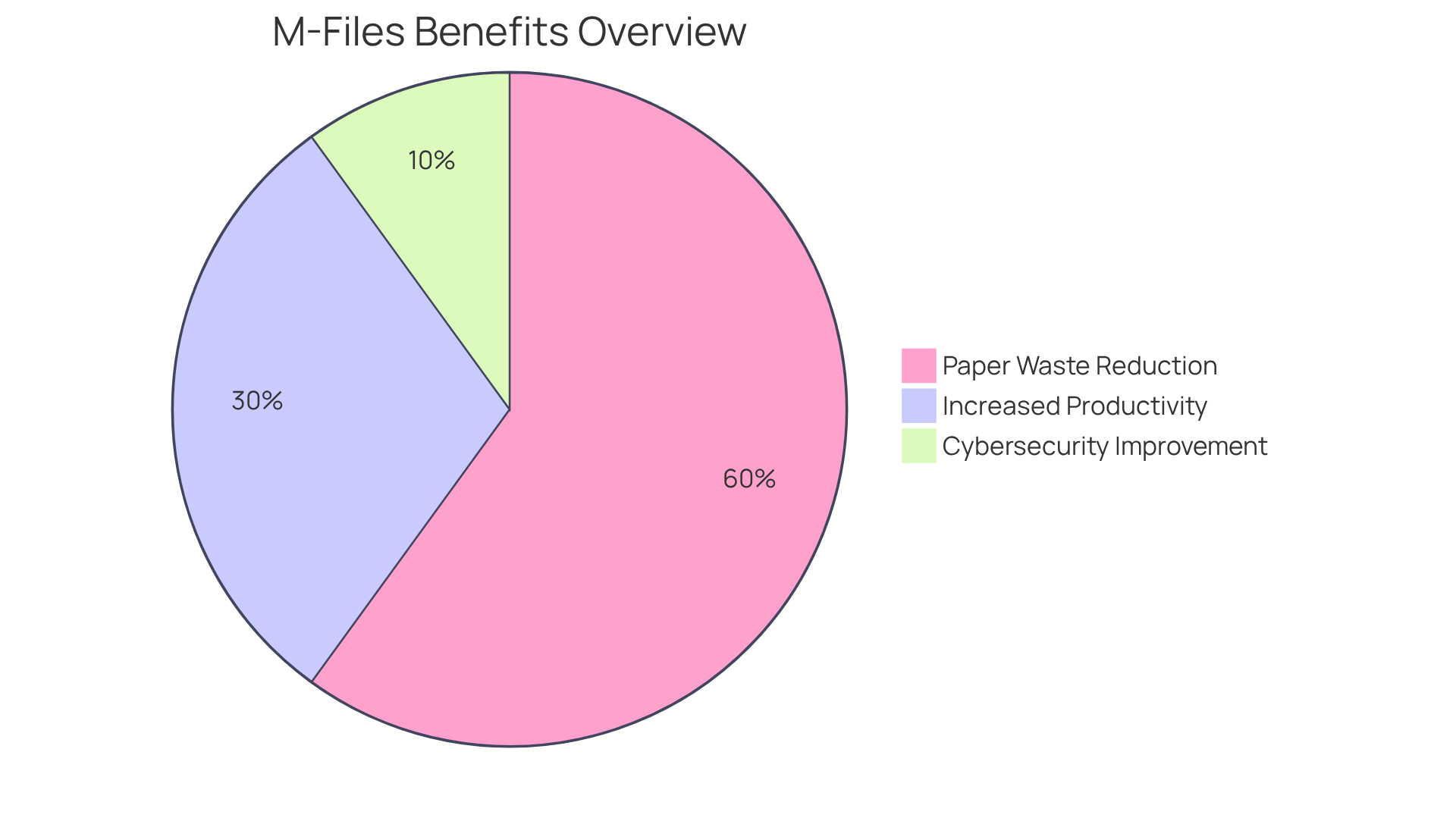
- M-Files uses a metadata-driven system for file organisation, resulting in a 60% reduction in paper waste and a 30% increase in productivity.
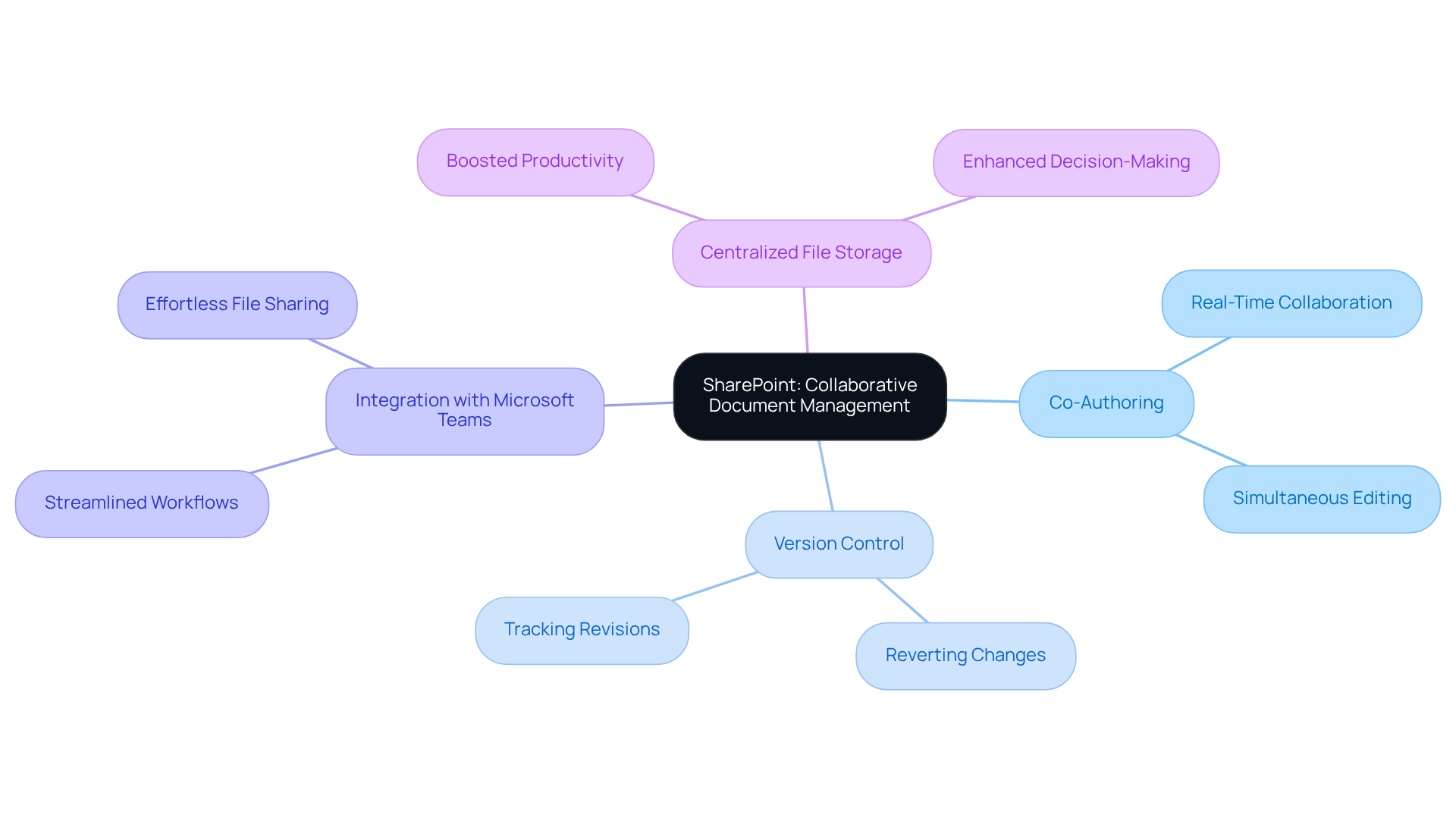
- SharePoint facilitates collaborative document management with co-authoring and version control features, enhancing team communication and decision-making.
- Google Workspace's integrated tools improve collaboration and productivity, with 71% of companies reporting better operational efficiency.
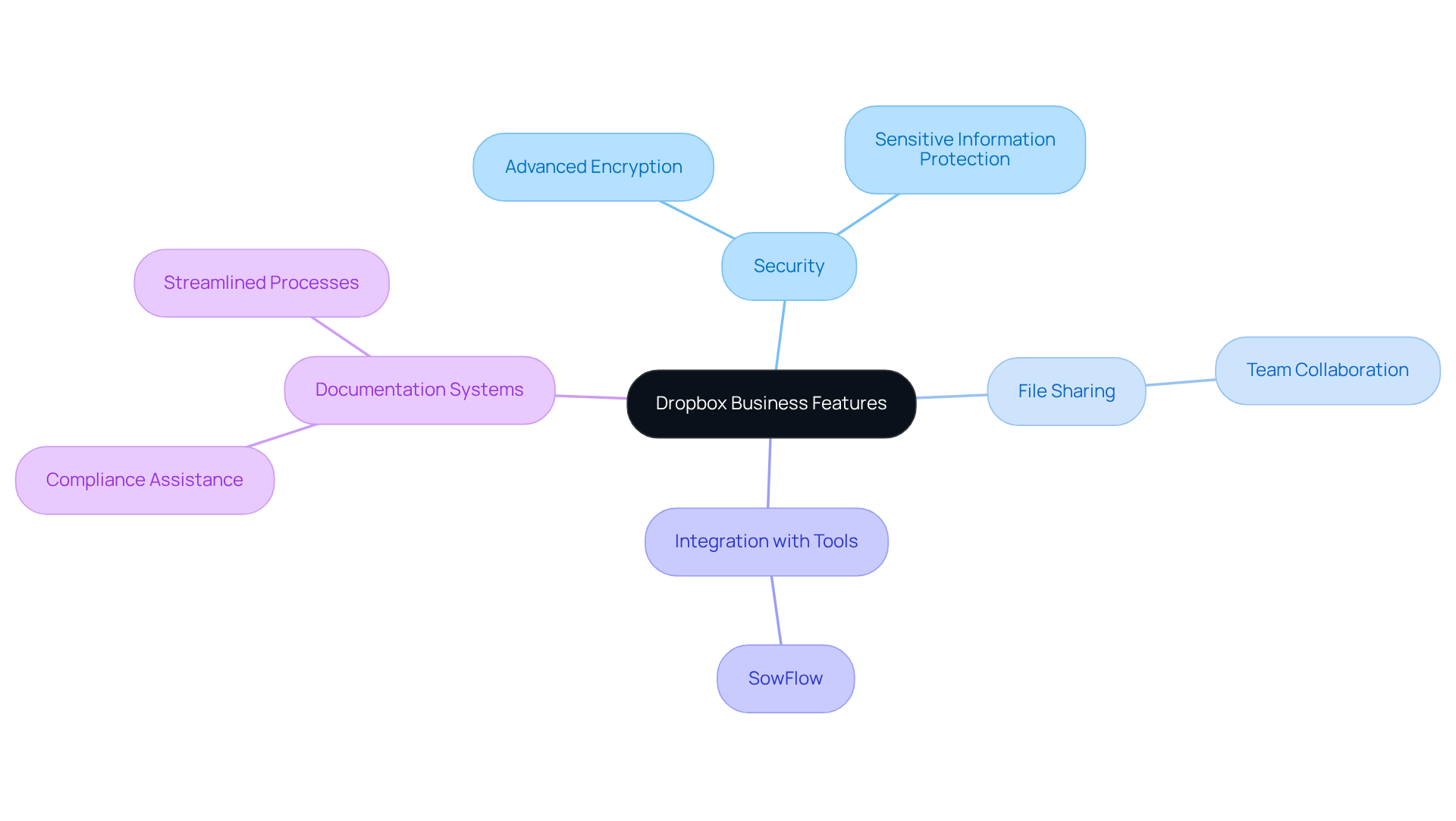
- Dropbox Business ensures secure file storage and sharing, with 85% of businesses recognising its role in regulatory compliance.
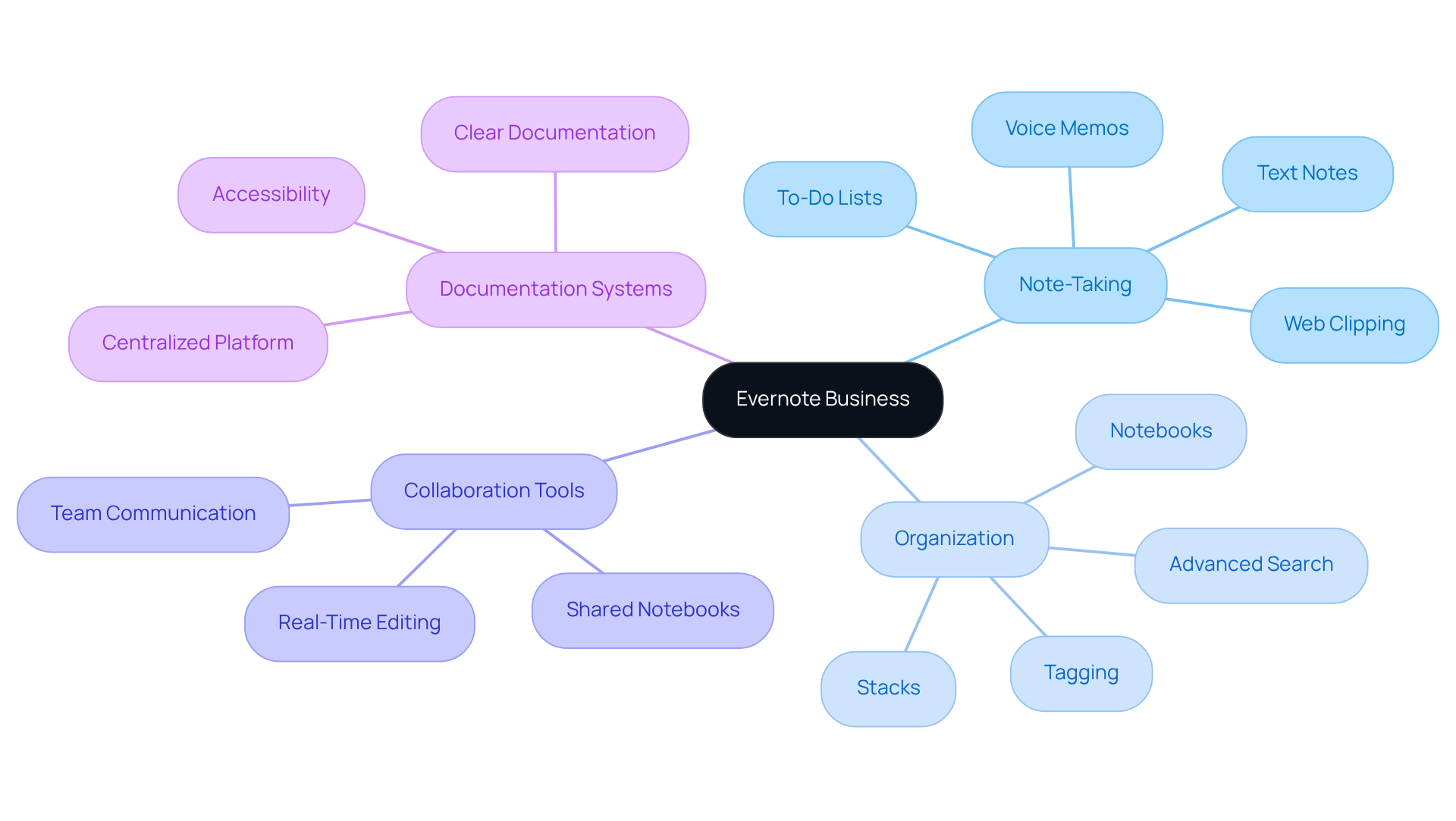
- Evernote Business offers effective note-taking and organisation features, enhancing team communication and productivity through easy sharing and accessibility.
Introduction
In the fast-paced world of operations management, you might be wondering just how crucial effective documentation systems can be. They’re not just about keeping things tidy; they’re key to streamlining processes and boosting productivity. So, let’s dive into ten essential tools that can help you, as an operations manager, create, manage, and optimize your documentation workflows. From automating standard operating procedures to enabling real-time collaboration, these systems pack a punch when it comes to transforming organizational efficiency.
But here’s the kicker: with so many options out there, how do you find the right solutions that truly fit your needs and drive success? It’s a bit of a maze, isn’t it? Don’t worry, though; we’re here to guide you through it!
SowFlow: Instant SOP Creation and Process Standardization
You might be wondering how to make your organization's a breeze to create and manage. Well, that’s where SowFlow comes in! This handy tool lets you whip up in no time, making sure your processes are standardized and easy to find.
Speaking of ease, have you tried the ? It’s a game changer! You can right from your browser, which means capturing and sharing is quicker than ever. Organizations have reported a since they started using tools like this. Imagine what you could do with all that extra time!
And it gets better! SowFlow makes updating and revising records super simple, which helps keep everyone on the same page and operations running smoothly. This streamlined approach can . It really highlights how crucial are for achieving operational excellence. So, why not explore how SowFlow can help your team thrive?
DocuWare: Comprehensive Document Management and Workflow Automation
You might be wondering how to make and a breeze. Well, DocuWare has got your back with a solid set of tools designed just for that! With its smart indexing and full-text search features, you can quickly find the files you need. This is a game changer, especially since .
Now, let’s talk about security. DocuWare ensures your files are handled securely, which is super important for compliance. Did you know that ? By with its , DocuWare cuts down on those pesky manual tasks, .
And here’s a fun fact: ! That’s some serious cash. Plus, DocuWare integrates smoothly with your current systems, serving as one of the that allow you to keep control over your documentation while enhancing collaboration among teams. In today’s fast-paced business world, that’s a must!
Quickbase: Flexible Document Management for Enhanced Workflow
You might be wondering how Quickbase stands out in the crowded world of workflow platforms. Well, it’s pretty versatile! This platform lets organizations tailor their workflows to meet , making it a handy tool for teams. With its , creating, managing, and sharing files becomes a breeze.
Now, let’s talk about automation. Quickbase really shines here, helping to that can bog you down. Imagine being able to focus on the strategic initiatives that actually drive your ! According to industry data, companies that automate their paperwork can see an impressive annual ROI of 198 percent. That’s some serious financial incentive to consider!
And it gets better - 39% of organizations have noticed quicker customer response times thanks to digital paperwork processes. That’s a big win for , right? Plus, Quickbase offers that can really enhance your decision-making process, ultimately boosting productivity.
Speaking of productivity, did you know that the file handling systems market is expected to grow to a whopping $24.91 billion by 2032? That’s a clear signal for operations managers to think about how Quickbase can help them stay competitive. For instance, by leveraging Quickbase’s automation features, you can simplify workflows and cut down on manual data entry. This way, your team can focus on what really matters - those that drive success!

Wrike: Project Management with Integrated Document Collaboration
You might be wondering how Wrike stands out in the crowded field of . Well, it’s all about those that really amp up group effectiveness! With real-time editing and version control, Wrike helps keep everyone on the same page, reducing the risk of errors. Did you know that can cut record-keeping mistakes by up to 83%? That’s a game changer for a smoother workflow!
Now, let’s talk about those . They give operations managers a clear view of project progress, allowing them to keep an eye on records and tasks all at once. Speaking of efficiency, have you heard about ? It’s a fantastic tool that gives teams immediate access to user guides and . This makes and encourages among team members.
Plus, with ’s seamless , you can eliminate unnecessary meetings! This really enhances Wrike’s features, creating a collaborative atmosphere where teams can share insights and boost productivity. And who doesn’t want better project outcomes, right? As we gear up for 2025, staying in the loop about the latest innovations in collaboration tools will be key for operations managers looking to enhance their processes.
ClickUp: Task Management with Document Management Features
You might be wondering how to keep your team organized and productive. Well, ClickUp is here to help! It’s a fantastic that not only helps you manage tasks but also lets you handle files seamlessly. Imagine being able to create and connect files directly to your tasks - everything you need is right at your fingertips!
Did you know that a recent survey found that 89% of companies rely on cloud-based methods for file management? That really shows how important platforms like ClickUp are for . Plus, with its automation features, you can cut down on manual work, giving you more time to focus on what really matters. And let’s not forget about the that help teams prioritize tasks effectively.
Operations supervisors have noticed a big difference in . One even said, "Having all our files connected to tasks has revolutionized our workflow, simplifying the tracking of progress and collaboration." Pretty cool, right? By and using , ClickUp not only enhances collaboration but also boosts productivity across teams.
Organizations like [Example Company] have jumped on board with ClickUp, and they’re seeing amazing results. A more organized and efficient work environment means better outcomes for everyone involved. So, why not explore how ClickUp can transform your team's workflow?
M-Files: Metadata-Driven Document Management
You might be wondering how M-Files stands out in the crowded world of file organization. Well, it’s all about its clever ! Instead of sorting files by where they’re physically located, M-Files organizes them based on their content. This fresh approach makes it super easy to quickly. Imagine being able to find what you need in a snap - sounds great, right?
By harnessing the power of metadata, M-Files takes the hassle out of workflows, guiding files through necessary processes with hardly any manual effort. This means you get the right info at just the right moment, which can really in your organization. And here’s a fun fact: businesses using M-Files have reported a whopping 60% drop in paper waste! That’s a clear win for going digital.
But wait, there’s more! by as much as 30% compared to traditional methods. That’s some serious motivation to make the switch! As more companies jump on the metadata bandwagon, they’re finding that it really enhances how they handle records. In fact, 70% of organizations say they’ve seen better threat detection and response in cybersecurity thanks to AI integration. Speaking of trends, the move towards is only going to grow, with industry leaders emphasizing its role in boosting searchability and overall performance.
SharePoint: Collaborative Document Management for Teams
You might be wondering how SharePoint stands out as a fantastic platform for managing files collaboratively. Well, it really shines when it comes to helping teams work together efficiently. With its co-authoring feature, multiple users can jump in and edit files at the same time, making sure everyone’s on the same page with the latest info. This cuts down on errors and miscommunication, creating a more agile work environment.
Speaking of collaboration, SharePoint’s is a game changer. It keeps track of changes and saves revisions, so if something goes awry, teams can easily revert to earlier versions. Now, let’s dive into how with to take communication and project management to the next level. Teams can share files and updates effortlessly, which really streamlines workflows and helps avoid those pesky delays.
Centralizing file storage in SharePoint not only boosts productivity but also fosters a that enhances decision-making. As more organizations lean on these tools, the exciting new features in SharePoint for 2025 are set to make collaboration even better. If you’re an operations manager looking to optimize your , SharePoint is definitely an asset you won’t want to overlook!
Google Workspace: Integrated Tools for Document Creation and Management
You might be wondering how Google Workspace can really help with your content creation and management. Well, it’s got a whole suite of integrated tools that make collaboration a breeze! With apps like Google Docs, Sheets, and Drive, your team can work together in real-time, keeping everyone on the same page with project goals.
Now, let’s talk about the . It means you can access your documents from just about anywhere, which is a game changer for flexibility and productivity. Plus, those handy ? They take care of the repetitive tasks, so your team can focus on the big picture instead of getting bogged down in the nitty-gritty.
Recent studies show that organizations using , such as , see real improvements in and . For example, a survey found that 71% of companies using reported better . By embracing these tools, you can really enhance your and boost your overall efficiency, setting yourself up for success in a competitive world.
And hey, industry leaders are saying that keeping up with the latest features in is key to maximizing these benefits. So, why not dive in and explore what’s new? You might just find the perfect solution to your documentation challenges!

Dropbox Business: Secure File Storage and Sharing for Documentation
You might be wondering how Dropbox Business can help you manage your files securely. Well, it’s not just a storage solution; it’s packed with that keep your sensitive information safe. Plus, it makes sharing files a breeze and encourages teamwork, so your crew can collaborate effortlessly.
Now, let’s dive into what makes Dropbox even more appealing. It integrates smoothly with various productivity tools, which means it can adapt to your needs as an operations manager. Imagine having a , giving you control over your management processes while keeping everything accessible and secure.
Did you know that 85% of businesses think that , like , ? That really highlights how crucial security is in document management. As operations managers like you focus on secure and efficient record-keeping, it’s important to consider like Dropbox Business as .
And here’s something interesting: clients using have shared how can really change the game. Tools like can complement Dropbox Business by making it easier to develop SOPs and training materials, which ultimately boosts productivity. So, if you’re looking to , why not explore these options further?
Evernote Business: Note-Taking and Organization for Effective Documentation
You might be wondering how to keep your notes organized and accessible, right? Well, Evernote Business is here to help! It’s a fantastic designed to make managing concepts, projects, and records a breeze for teams. With features like tagging, notebooks, and advanced search capabilities, you can quickly find the information you need without the hassle.
Speaking of teamwork, Evernote’s make sharing notes and documents super easy. This really boosts communication and productivity among team members. Imagine having a where you can jot down ideas and keep everything organized - sounds great, doesn’t it?
For operations managers, this means , which are essential for driving efficiency. No more chaos from disorganized information! So, if you’re looking to with , Evernote Business might just be the solution you need.
Conclusion
Effective documentation systems are crucial for operations managers who want to streamline processes and boost productivity. You might be wondering how tools like SowFlow, DocuWare, Quickbase, and others can help. Well, by adopting these systems, organizations can really enhance their operational efficiency, collaboration, and compliance. Each of these tools has unique features that cater to different documentation needs, ensuring teams can work seamlessly together and maintain high standards in their workflows.
Throughout this article, we’ve shared some key insights on how these documentation systems can transform operations. For example, SowFlow makes creating SOPs a breeze, while DocuWare takes document management up a notch with automation. Quickbase and Wrike shine in flexibility and collaboration, respectively, and M-Files and SharePoint focus on organization and teamwork. And let’s not forget Google Workspace, Dropbox Business, and Evernote Business, which offer integrated solutions for various documentation challenges. Each tool not only boosts productivity but also fosters a culture of collaboration, helping teams thrive in their environments.
As businesses keep evolving, embracing these documentation systems isn’t just a choice; it’s a must for success. Operations managers should definitely explore these tools to see how they can optimize workflows, enhance collaboration, and ultimately drive better outcomes. Staying informed about the latest advancements in documentation technology can really position organizations for success in an increasingly competitive landscape. So, why not invest in the right documentation system today? It could pave the way for a more efficient and productive tomorrow!
Frequently Asked Questions
What is SowFlow and how does it help with SOP creation?
SowFlow is a tool designed for creating and managing Standard Operating Procedures (SOPs) quickly and easily. It allows users to produce detailed how-to guides, ensuring processes are standardized and easily accessible.
How does the SowFlow Chrome extension enhance productivity?
The SowFlow Chrome extension enables users to document workflows directly from their browser, making it faster to capture and share important information. Organizations have reported a 30% reduction in workload after implementing tools like SowFlow.
What benefits does SowFlow offer for updating and revising records?
SowFlow simplifies the process of updating and revising records, helping keep everyone informed and operations running smoothly. This streamlined approach can boost productivity by 50% for new hires.
What is DocuWare and what features does it provide for document management?
DocuWare is a document management and workflow automation tool that offers smart indexing and full-text search features, allowing users to quickly find the files they need, which is crucial for improving efficiency.
How does DocuWare address security and compliance?
DocuWare ensures secure handling of files, which is important for regulatory compliance. Many organizations adopt automation technologies for this reason, with 60% citing regulatory adherence as a key factor.
What financial benefits can organizations expect from using DocuWare?
Organizations that leverage automation with DocuWare report saving an average of $46,000 annually, highlighting the financial advantages of streamlining processes.
What makes Quickbase a unique workflow platform?
Quickbase is versatile and allows organizations to customize their workflows to meet specific operational needs. Its user-friendly interface simplifies the creation, management, and sharing of files.
How does Quickbase improve automation and productivity?
Quickbase helps reduce repetitive tasks, allowing teams to focus on strategic initiatives. Companies that automate paperwork can see an impressive annual ROI of 198%.
What impact does Quickbase have on customer response times?
39% of organizations using Quickbase have noticed quicker customer response times due to the efficiency of digital paperwork processes.
What is the projected growth of the file handling systems market?
The file handling systems market is expected to grow to $24.91 billion by 2032, indicating a strong opportunity for operations managers to consider tools like Quickbase for maintaining competitiveness.
List of Sources
- SowFlow: Instant SOP Creation and Process Standardization
- GRS Roadstone Case Study - r2c Online (https://r2conline.com/case_studies/grsroadstone)
- Digital standard operating procedures: Your essential guide to streamlined workflows and compliance (https://workerbase.com/blog/digital-standard-operating-procedures-sops-your-essential-guide-to-streamlined-workflows-and-compliance)
- Case Studies Archive - Gurobi Optimization (https://gurobi.com/case_studies)
- 10 Essential SOP Systems for Streamlined Operations Management (https://sowflow.io/blog-post/10-essential-sop-systems-for-streamlined-operations-management)
- thewritersforhire.com (https://thewritersforhire.com/the-smart-future-of-sops-how-ai-is-revolutionizing-standard-operating-procedures)
- DocuWare: Comprehensive Document Management and Workflow Automation
- 50+ Workflow Automation Statistics For 2025 - DocuClipper (https://docuclipper.com/blog/workflow-automation-statistics)
- 100 Document Management Statistics to Make You Rethink Your Processes in 2025 (https://filecenter.com/blog/document-management-statistics)
- 75 Document Processing Statistics for 2025: Market Size, Trends & Automation ROI (https://sensetask.com/blog/document-processing-statistics-2025)
- Document Management Stats & Trends in Digital Era | Insights丨PDF Reader Pro (https://pdfreaderpro.com/blog/document-management-statistics)
- 50+ Workflow Automation Stats & Trends You Can’t Ignore in 2026 (https://kissflow.com/workflow/workflow-automation-statistics-trends)
- Quickbase: Flexible Document Management for Enhanced Workflow
- 50+ Workflow Automation Statistics For 2025 - DocuClipper (https://docuclipper.com/blog/workflow-automation-statistics)
- 100 Document Management Statistics to Make You Rethink Your Processes in 2025 (https://filecenter.com/blog/document-management-statistics)
- Just the Numbers: 10 Document Management Stats You Need to Know (https://foxit.com/blog/just-the-numbers-10-document-management-stats-you-need-to-know)
- Rethinking Your Document Management (https://business.com/articles/7-statistics-that-will-make-you-rethink-your-document-management-strategy)
- Document Management and Workflows: 25 Key Statistics You Need to Know (https://sensetask.com/blog/document-management-and-workflows-key-statistics)
- Wrike: Project Management with Integrated Document Collaboration
- Project Management Statistics By Team Size, Remote Work, Software And Features (2026) (https://electroiq.com/stats/project-management-statistics)
- 13 Shocking Document Management Statistics Revealed! (https://theecmconsultant.com/document-management-statistics)
- zight.com (https://zight.com/blog/collaboration-statistics)
- thedigitalprojectmanager.com (https://thedigitalprojectmanager.com/project-management/project-management-statistics)
- 110+ project management statistics and trends for 2026 (https://monday.com/blog/project-management/project-management-statistics)
- ClickUp: Task Management with Document Management Features
- 100 Document Management Statistics to Make You Rethink Your Processes in 2025 (https://filecenter.com/blog/document-management-statistics)
- Rethinking Your Document Management (https://business.com/articles/7-statistics-that-will-make-you-rethink-your-document-management-strategy)
- Document Management and Workflows: 25 Key Statistics You Need to Know (https://sensetask.com/blog/document-management-and-workflows-key-statistics)
- Document Management Stats & Trends in Digital Era | Insights丨PDF Reader Pro (https://pdfreaderpro.com/blog/document-management-statistics)
- 13 Shocking Document Management Statistics Revealed! (https://theecmconsultant.com/document-management-statistics)
- M-Files: Metadata-Driven Document Management
- Rethinking Your Document Management (https://business.com/articles/7-statistics-that-will-make-you-rethink-your-document-management-strategy)
- Document Management Stats & Trends in Digital Era | Insights丨PDF Reader Pro (https://pdfreaderpro.com/blog/document-management-statistics)
- Business Process Automation Statistics 2025 (https://vegam.ai/blog/business-process-automation-statistics-2025)
- 70 Business Automation Statistics Driving Growth in 2025 - Vena (https://venasolutions.com/blog/automation-statistics)
- How to Build a Metadata-Driven Document Lifecycle with M-Files in Australian Firms - Range Information Systems (https://rangeis.com.au/how-to-build-a-metadata-driven-document-lifecycle-with-m-files-in-australian-firms)
- SharePoint: Collaborative Document Management for Teams
- desk365.io (https://desk365.io/blog/microsoft-teams-statistics)
- Microsoft Teams Statistics 2026: Growth & Insights • SQ Magazine (https://sqmagazine.co.uk/microsoft-teams-statistics)
- asana.com (https://asana.com/resources/team-motivational-quotes)
- Microsoft Teams Daily Active Users 2026: Stats & Growth (https://notta.ai/en/blog/microsoft-teams-statistics)
- Microsoft Teams: Building a Foundation for the Future (https://clearpeople.com/blog/microsoft-365-usage-stats-signals-a-wake-up-call)
- Google Workspace: Integrated Tools for Document Creation and Management
- The impact of electronic medical records on clinical documentation: A case study - PMC (https://pmc.ncbi.nlm.nih.gov/articles/PMC12327706)
- Assessing the Impact of Artificial Intelligence Tools on Employee Productivity: Insights from a Comprehensive Survey Analysis | MDPI (https://mdpi.com/2079-9292/13/18/3758)
- intuitionlabs.ai (https://intuitionlabs.ai/articles/ai-adoption-us-hospitals-2025)
- 20 Expert Quotes on AI in Content Writing and Marketing (https://medium.com/@dmidigitalmarketingagency/20-expert-quotes-on-ai-in-content-writing-and-marketing-14de6b6d30e0)
- Dropbox Business: Secure File Storage and Sharing for Documentation
- Document Management Stats & Trends in Digital Era | Insights丨PDF Reader Pro (https://pdfreaderpro.com/blog/document-management-statistics)
- 100 Document Management Statistics to Make You Rethink Your Processes in 2025 (https://filecenter.com/blog/document-management-statistics)
- jumpcloud.com (https://jumpcloud.com/blog/boss-it-security-quotes)
- comparitech.com (https://comparitech.com/blog/information-security/encryption-statistics)
- 62 World Backup Day Quotes from 51 Experts for 2024 (https://solutionsreview.com/backup-disaster-recovery/world-backup-day-quotes-from-experts-for-2024)
- Evernote Business: Note-Taking and Organization for Effective Documentation
- A Different Take On Using Evernote to Become Massively Productive (https://harmonenterprises.com/blog/use-evernote-become-massively-productive)
- deliberatedirections.com (https://deliberatedirections.com/quotes-optimizing-productivity)
- Evernote Review: Pros, Cons, Features & Pricing (https://thedigitalprojectmanager.com/tools/evernote-review)
- Ditch the Sticky Notes, Embrace the Future | Evernote: The Modern Note-Taking Revolution (https://medium.com/@ashwinpalo/ditch-the-sticky-notes-embrace-the-future-evernote-the-modern-note-taking-revolution-4b5f5ea2f26e)
- Evernote - Analyst Reviews, Pricing & Features 2025 (https://technologyevaluation.com/solutions/53498/evernote?srsltid=AfmBOopdpMK-_hE68pbwWlF6XPd0UubZyJ26OpA9AcUqdhAfkS3QRAVm)
👍
What others are liking


5 Steps to outline your ideal documentation structure
5 MINS READ
Where to start the your journey of mapping out your ideal documentation structure, aligning it with the very heartbeat of your organization?
Defining a winning level of detail in your process
3 MINS READ
What is too much detail, and what is too little? This article described in that winning level detail about what detail is enough.


